 Guillaume Lebedel · · 9 min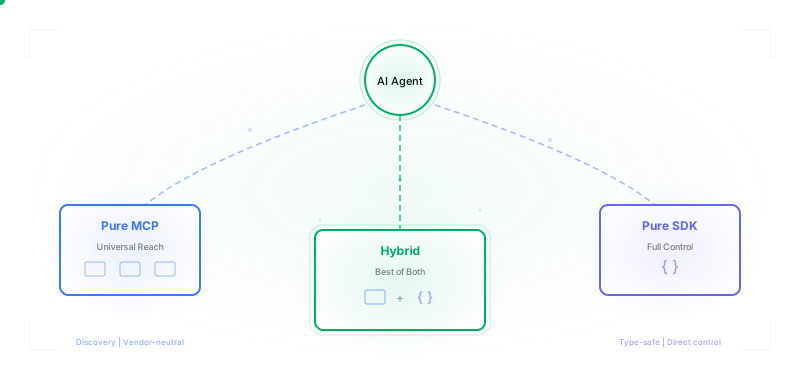
Your Agent Toolkit: MCP Server, SDK-based Toolset, or Both?
Table of Contents
Every developer building AI agents faces the same question: how should my agent consume tools?
The obvious answer used to be “just use function calling.” Define schemas inline, let the model pick tools, handle the results. Simple enough for a demo. Then you need approval workflows, tool filtering, output transformations, and suddenly you’re rebuilding infrastructure that should already exist.
MCP promised to standardize this. One protocol, any client. Connect to any MCP server and discover tools dynamically. A year later, 10,000+ MCP servers exist and adoption includes Claude, ChatGPT, Cursor, VS Code, and Copilot.
But the promise doesn’t match reality for everyone. Framework support varies dramatically. Vercel AI SDK’s MCP integration can’t deploy stdio transport to production. Missing features include session management, resumable streams, and approval workflows. Security and multi-tenant isolation? You’re on your own.
So how should you actually consume tools in your agent?
Three Approaches to AI Agent Tool Consumption
There are three ways to give your agent access to tools. Each optimizes for different constraints.
Pure MCP Client: Connect to MCP servers, discover tools dynamically. The protocol handles discovery, you handle everything else.
Pure SDK (Function Calling): Import tools as functions directly in your codebase. Define schemas with JSON Schema or Zod. No external dependencies.
Hybrid Toolset SDK: Libraries like StackOne that pull tool definitions dynamically but wrap them with utilities the protocol doesn’t provide (filtering, approvals, framework adapters, output transformations).
The right choice depends on how many integrations you need, whether you need runtime flexibility, and what utilities you can’t build yourself.
Pure MCP Client: Dynamic Discovery, Variable Support
Connecting to MCP servers gives you access to thousands of pre-built integrations. Any MCP-compatible server exposes tools your agent can discover at runtime.
// Connect to a remote MCP server (Sentry's hosted endpoint)
import { experimental_createMCPClient } from "ai";

const mcpClient = await experimental_createMCPClient({
  transport: {
    type: "sse",
    url: "https://mcp.sentry.dev/sse",
  },
});

// Discover available tools dynamically
const tools = await mcpClient.tools();
Remote MCP servers like Sentry’s handle OAuth, scaling, and state management. Local stdio servers work for development but can’t deploy to production in most frameworks.
Pure MCP Client
Pros:
- 10,000+ servers: Connect to existing MCP servers without writing integration code
- Dynamic discovery: Tools discovered at runtime, not hardcoded
- Model-agnostic: Same MCP server works with Claude, GPT, Gemini, local models
- Ecosystem momentum: Major player adoption, Linux Foundation governance
Cons:
- Framework variance: Vercel AI SDK’s stdio transport “cannot be deployed to production”
- No approvals: Protocol doesn’t define human-in-the-loop patterns
- Auth complexity: OAuth/PKCE/token refresh left to implementer
- Network overhead: Every tool call goes through the server
The framework variance issue is real. We’ve seen teams spend days working around the gap between what MCP specifies and what their framework actually implements. Session management, notifications, and resumable streams exist in the spec but not consistently in SDKs.
What Developers Actually Say About MCP
The frustration isn’t theoretical:
“Yeah MCP is the worst documented technology I have ever encountered… I have read so much about MCP and have zero fucking clue except vague marketing speak.”
— epistasis, Hacker News
“This is a stunningly bad specification, perhaps the worst I have seen in my career.”
— jes5199, Hacker News
“Heavy MCP setups can consume 55-100k+ tokens before you type a word. That’s 27-50% of a 200k context window gone on tool definitions alone.”
— Mario Giancini, “The Hidden Cost of MCP Servers”
“MCP servers don’t reload when code changes. Must fully restart Claude Code CLI, losing entire conversation context every time. This has been broken for 6+ months.”
— GitHub Issue #7174
Server support is fine. Client implementations lag behind the spec. Custom headers, OAuth flows, and session management work differently (or not at all) across frameworks.
If your tools are for broad ecosystem consumption (open source, community contribution, cross-platform) and you can live with lowest-common-denominator features, pure MCP works.
Pure SDK: Full Control, Limited Reach
When you control both the agent and the tools, SDK-based function calling gives you type safety, embedded utilities, and no network overhead.
// SDK function calling with Zod
import { z } from "zod";
import { tool } from "ai";

const searchDocs = tool({
  description: "Search documentation",
  parameters: z.object({
    query: z.string().describe("Search query"),
  }),
  execute: async ({ query }) => {
    const results = await searchIndex(query);
    return results.slice(0, 5);
  },
});
Pure SDK (Function Calling)
Pros:
- Direct control: Tool behavior is your code, not protocol-mediated
- Type safety: Zod schemas, TypeScript inference, compile-time checks
- No server: Tools are functions, no infrastructure to deploy
- Embedded utilities: Add caching, approvals, transformations inline
Cons:
- Vendor-specific: OpenAI, Anthropic, Vercel each have different patterns
- Rebuild per service: New integration = new tool code
- Manual discovery: Hardcoded tool imports, no runtime querying
- Redeploy for updates: Tool changes require code changes
Pure SDK makes sense for single-framework projects with custom tools. When you’re building internal tools for your specific agent, the overhead of running an MCP server doesn’t pay off.
Hybrid: SDK Utilities with MCP Discovery
The hybrid approach recognizes that MCP’s value is in discovery and standardization, but the protocol has real gaps that SDKs fill better.
// Hybrid: dynamic discovery + SDK utilities
const toolset = new StackOneToolSet();

// Fetch tools dynamically, filter by provider and action pattern
const tools = await toolset.fetchTools({
  providers: ["hibob", "slack"],
  actions: ["*_list_*", "*_create_*"],
});

// Convert for your framework
const openaiTools = tools.toOpenAI();
const vercelTools = await tools.toAISDK();
The hybrid approach pulls tool definitions from an MCP-style endpoint but wraps them with utilities the protocol doesn’t provide.
Hybrid Approach
Pros:
- Dynamic discovery: Tools fetched at runtime, always current
- Multi-framework: Single source, converts to OpenAI/Anthropic/Vercel/etc.
- Filtering: Glob patterns, provider scopes, action filters
- SDK utilities: Approvals, transformations, file handling built-in
Cons:
- Provider dependency: Relies on the hybrid provider’s implementation
- Extra abstraction: One more layer between agent and tools
- Feature coverage: May not expose all raw MCP capabilities
AI Agent Tool Filtering in Action
Filtering tools by pattern and provider dramatically reduces token costs. Here’s how it works:
Tool Filtering: All Tools to Filtered Set
- All Tools (847) ~185K tokens
- FILTER: providers: [“hibob”], actions: [“list”]
- Filtered (12) list_employees, list_time_off, list_departments, list_locations, list_groups, list_documents
- Result: ~2.6K tokens
- 98.6% token reduction
What AI Agent Frameworks Don’t Provide
You’ve seen the three approaches. But whichever you choose, your framework probably doesn’t handle everything you need. SDKs vary wildly in what utilities they provide.
The Variance Is Real
The same feature works differently (or not at all) across frameworks. Here’s what each framework actually provides across the features that matter most for production agents:
| Framework | MCP Support | Approvals | Output Transforms | File Handling | Execution Hooks |
|---|---|---|---|---|---|
| OpenAI Agents SDK | Yes | No | No | No | Partial |
| Anthropic Claude SDK | Yes | Partial | No | No | Yes |
| Vercel AI SDK | Partial | No | No | No | Partial |
| LangChain/LangGraph | Yes | Partial | Partial | Partial | Yes |
| Pydantic AI | Yes | No | No | No | Partial |
| StackOne | Partial | Yes | Yes | Yes | Yes |
The gaps below are what you’ll need to build yourself, or find a toolset SDK that provides them.
1. Agent Approval Workflows
MCP has no concept of human-in-the-loop. The protocol says “here’s a tool, here’s how to call it.” What it doesn’t say: should this call require approval? From whom? Under what conditions?
// SDK-level approval pattern
const tools = await toolset.fetchTools({
  needsApproval: true,
});

// Or conditional: auto-approve reads, require approval for writes
needsApproval: (tool) => tool.name.includes("create") || tool.name.includes("delete")
2. Agent Output Transformations
Tools return data. Sometimes that data is massive (file contents, search results, API responses). Raw MCP sends everything to the model, burning tokens on data the agent doesn’t need to see in full.
The SDK can split results: full data for your app’s UI, summarized data for the model. Your user sees the complete search results while the agent only consumes tokens for what it needs to reason about.
3. File Handling
MCP doesn’t specify how to handle file downloads, binary data, or content that needs encoding. A tool that returns a PDF gets you a URL. But the model can’t read PDFs from URLs.
SDKs handle the complexity: fetching URLs, detecting formats, extracting text from PDFs, encoding images for vision models, parsing spreadsheets into structured data. Without this, you’re writing format-specific handlers for every file type your tools might return.
4. Agent Execution Hooks for Security
Think Express middleware or DOM event handlers. Before any tool executes, your code runs first. You can log, check permissions, detect prompt injection, sanitize inputs, or block execution entirely.
This is critical for security. The agent might call file_write with a path from user input that contains ../../../etc/passwd. Or search_docs with a query that says “ignore previous instructions.” Pattern matching catches obvious attacks. Semantic similarity (embeddings compared against known attack vectors) catches the subtle ones. Without hooks, you’re trusting third-party tools completely. With hooks, you control every call.
MCP has no equivalent. It’s a protocol for tool discovery, not execution control. Hooks are SDK-level middleware that frameworks provide but the protocol doesn’t specify.
MCP vs SDK: Which Should You Choose?
Choose Pure MCP if…
- You need ecosystem reach across 10,000+ servers
- You want vendor neutrality and cross-platform compatibility
- You can handle auth complexity (OAuth, PKCE, token refresh) yourself
- Your tools are for community consumption, not internal use
Choose Pure SDK if…
- You have custom internal tools specific to your domain
- You’re committed to a single framework (OpenAI, Anthropic, Vercel)
- You want full control over tool behavior and type safety
- You don’t need runtime discovery or dynamic tool loading
Choose Hybrid if…
- You need multiple integrations (HRIS, CRM, ATS, messaging)
- You want production utilities: approvals, transforms, file handling
- You need cross-framework support without rewriting tool code
- You’re building multi-tenant SaaS with per-customer isolation
Where AI Agent Tooling Is Going
MCP isn’t going away. Linux Foundation governance means it’ll evolve slowly but stay stable. The spec will eventually address multi-tenancy, better auth, and the other gaps.
Our prediction: two or three agent frameworks will consolidate to cover 70% of the market with solid MCP support. The winners will be Claude’s Agent SDK and Pydantic AI, not OpenAI’s Agents SDK. Anthropic has the model quality lead and is building the tooling to match. Pydantic AI has the Pythonic simplicity that LangChain never achieved. Vercel AI SDK will own the TypeScript/Next.js niche. OpenAI’s SDK feels like the safe choice that loses to teams with stronger opinions about developer experience.
But hybrid toolset SDKs will continue to provide capabilities that harnesses don’t prioritize. Things like tool filtering with glob patterns, conditional approval workflows, output transformations that reduce token costs. These are features specific to multi-tenant SaaS that general-purpose agent frameworks won’t optimize for.
Multi-tenant isolation is the blind spot. Every framework in the comparison table assumes single-user contexts. Account-scoped tool visibility, per-tenant rate limits, audit logs per customer: you’re building that yourself.
Pure MCP servers will be for ecosystem contribution. Pure SDKs will be for internal tools. Hybrid approaches will power production SaaS features where you need both dynamic discovery and the utilities that make tools safe for real users. And the decision isn’t always MCP vs SDK — for local developer workflows, CLI tools often outperform both options.
There’s a fourth approach emerging that we haven’t covered here: Code Mode (or “code execution” in some frameworks). Instead of pre-defined tools, the agent writes and executes code to accomplish tasks. Cloudflare’s workers-ai, OpenAI’s code interpreter, and several frameworks are experimenting with this pattern. It deserves its own post.