
Adobe Commerce MCP Server
for AI Agents
Connect your AI agent to StackOne's Adobe Commerce MCP server and give it 61 MCP tools out of the box. Auth, tool execution, and security all managed.
 StackOne






Coverage
61 Agent Actions
Create, read, update, and delete across Adobe Commerce — and extend your agent's capabilities with custom actions.

Authentication
Agent Tool Authentication
Per-user OAuth in one call. Your Adobe Commerce MCP server gets session-scoped tokens with zero credentials stored on your infra.
Agent Auth →
Security
Agent Protection
Every Adobe Commerce tool response scanned for prompt injection in milliseconds — 88.7% accuracy, all running on CPU.
Prompt Injection Defense →
Performance
Max Agent Context. Min Cost.
Free up to 96% of your agent's context window to enhance reasoning and reduce cost, on every Adobe Commerce call.
Tools Discovery →What is the Adobe Commerce MCP Server?
A Adobe Commerce MCP server lets AI agents read and write Adobe Commerce data through the Model Context Protocol — Anthropic's open standard for connecting LLMs to external tools. StackOne's Adobe Commerce MCP server ships with 61 pre-built actions, fully extensible via the Connector Builder — plus managed authentication, prompt injection defense, observability, and agent execution runtime. Connect it from MCP clients like Claude Desktop, Claude Code, Cursor, Goose, and VS Code, or from agent frameworks like OpenAI Agents SDK, LangChain, and Vercel AI SDK.
All Adobe Commerce MCP Tools
Every action from Adobe Commerce's API, ready for your agent. Create, read, update, and delete — scoped to exactly what you need.
Products
- Create Product
Create a new product (ACL Magento_Catalogproducts)
- List Products
Retrieve a list of products with filtering and pagination (ACL Magento_Catalogproducts)
- Update Product
Update an existing product (ACL Magento_Catalogproducts)
- Delete Product
Delete a product by SKU (ACL Magento_Catalogproducts)
Categorys
- Create Category
Create a new category
- Get Category
Get category details
- Update Category
Update category information
- Delete Category
Delete a category
Customers
- Create Customer
Create a new customer account
- List Customers
Retrieve a list of customers with filtering
- Get Customer
Retrieve a specific customer by ID
- Update Customer
Update customer information
- Delete Customer
Delete a customer account
Customer Groups
- Create Customer Group
Create new customer group (ACL Magento_Customergroup)
- List Customer Groups
Get all customer groups (ACL Magento_Customergroup)
- Get Customer Group
Get specific customer group by ID (ACL Magento_Customergroup)
- Update Customer Group
Update an existing customer group by ID
- Delete Customer Group
Delete a customer group by ID
Orders
- List Orders
Retrieve a list of orders with filtering
- Get Order
Retrieve a specific order by ID
Invoices
- Create Invoice
Create an invoice for an order. Requires orderId (integer) as a path parameter. Optionally pass items (array of {order_item_id, qty}) to invoice specific items, capture (boolean) for online payment capture, and notify (boolean) to email the customer. Use list_orders to find the orderId — order must have uninvoiced items.
- List Invoices
List invoices with filters (ACL Magento_Sales sales_invoice)
- Get Invoice
Get specific invoice by ID (ACL Magento_Salessales_invoice)
Shipments
- Create Shipment
Create a shipment for an order. Requires an entity object containing order_id (integer), items (array of {order_item_id, qty}), and optionally tracks (array of {track_number, title, carrier_code}) and comments. Use list_orders to find the order_id first — order must be in 'processing' status.
- List Shipments
List shipments with filters (ACL Magento_Salesshipment)
- Get Shipment
Get specific shipment by ID (ACL Magento_Salesshipment)
Credit Memos
- List Credit Memos
List credit memos with filters (ACL Magento_Salescreditmemo)
- Get Credit Memo
Retrieve a credit memo by its numeric id. Obtain ids by first calling list_credit_memos, or capture them from the response of create_credit_memo. Requires ACL Magento_Sales::creditmemo.
Carts
- Create Cart
Create a new shopping cart for the authenticated customer
- Get Cart
Retrieve cart details by ID
Cart Items
- Update Cart Item
Update the quantity or product options of an existing cart item.
- Remove Cart Item
Remove an item from the cart
Source Items
- List Source Items
List multi-source inventory (MSI) source items — shows product quantities per warehouse/source. Filter by sku or source_code to find inventory across multiple locations. For simple single-source stock checks, use get_stock_status instead.
- Update Source Items
Update inventory quantities at sources. Requires a sourceItems array where each item has sku (string — use list_products to find SKUs), source_code (string — use list_source_items to find source codes), quantity (number), and status (number: 1=in stock, 0=out of stock).
CMS Pages
- List CMS Pages
Get all CMS pages (full standalone web pages like 'About Us', 'Home', 'Contact'). Pages have their own URL and are navigable in the storefront. Use list_cms_blocks for reusable content snippets embedded within pages instead.
- Get CMS Page
Get a specific CMS page
CMS Blocks
- List CMS Blocks
Get all CMS blocks (reusable content snippets like banners, sidebars, footer widgets that are embedded within pages or layouts). Blocks do not have their own URL. Use list_cms_pages for full standalone web pages instead.
- Get CMS Block
Get a specific CMS block
Coupons
- List Coupons
Get all coupon codes
- Delete Coupon
Delete a coupon by ID
Cart Price Rules
- Create Cart Price Rule
Create a new cart price rule (promotion). Requires a rule object with: name (string), is_active (boolean), simple_action (one of by_percent, by_fixed, cart_fixed, buy_x_get_y_free), discount_amount (number), customer_group_ids (array of integers — use list_customer_groups to find IDs), and website_ids (array of integers — use list_websites to find IDs). Use coupon_type SPECIFIC with use_auto_generation=true to enable coupon code generation via generate_coupons.
- List Cart Price Rules
Get all cart price rules
- Get Cart Price Rule
Get a specific cart price rule
- Update Cart Price Rule
Update an existing cart price rule by ID. Requires ruleId (integer) as path parameter and a rule object with the fields to update. Use list_cart_rules or get_cart_rule to find the ruleId first. The rule object has the same structure as create_cart_rule — at minimum include name, is_active, customer_group_ids, and website_ids.
- Delete Cart Price Rule
Delete a cart price rule by ID
Other (16)
- Add Order Comment
Add a comment to an existing order. Requires orderId (integer — use list_orders to find it) and a statusHistory object with comment (string). Optionally set is_customer_notified (0 or 1) and is_visible_on_front (0 or 1).
- Send Invoice Email
Send invoice email to customer (ACL Magento_Salessales_invoice)
- Create Credit Memo (Refund)
Create a credit memo (refund) for an order. Requires a creditmemo object with order_id (integer) and optionally items (array of {order_item_id, qty}), shipping_amount, adjustment_positive, adjustment_negative. The order must already have an invoice — use create_invoice first if needed. Use list_orders to find the order_id.
- Add Item To Cart
Add a product to the cart
- Get Product By SKU
Retrieve a specific product by SKU (ACL Magento_Catalogproducts)
- List Categories
Get category tree
- Get Stock Status
Get the legacy single-source stock status for a product by SKU (is it in stock? what quantity?). This uses the CatalogInventory module — for multi-source inventory (MSI) with multiple warehouses, use list_source_items instead.
- List Store Configurations
Get store configuration settings (locale, currency, timezone, base URLs, secure URLs). This returns the technical configuration of each store view — not the list of stores themselves. Use list_store_views to get the list of store views instead.
- List Websites
Get all websites in the Magento multi-site hierarchy. A website is the top level — each website contains one or more store groups. Use this to find website_ids needed by create_cart_rule and other actions that require website scoping.
- List Store Groups
Get all store groups (the middle level of Magento's hierarchy: Website > Store Group > Store View). Each store group belongs to a website and contains one or more store views. Also called 'stores' in the Magento admin.
- List Store Views
Get all store views (the lowest level of Magento's hierarchy: Website > Store Group > Store View). Each store view represents a specific language/locale frontend. The store view code is used in API base URLs (e.g., /rest/default/V1).
- List Tax Rates
Get all tax rates — the actual percentage rates applied to products (e.g., 8.25% for California). Each rate is tied to a country and optionally a region/zip code. Use list_tax_rules to see how rates are combined into rules, or list_tax_classes to see product/customer tax class categories.
- List Tax Rules
Get all tax rules — rules that combine tax rates with tax classes to determine which rate applies to which products/customers. A rule links one or more tax rates to customer tax classes and product tax classes. Use list_tax_rates for the actual percentage rates, or list_tax_classes for the category definitions.
- List Tax Classes
Get all tax classes — categories that classify products (e.g., 'Taxable Goods', 'Shipping') or customers (e.g., 'Retail Customer', 'Wholesale') for tax calculation purposes. Filter by class_type=PRODUCT or class_type=CUSTOMER. Use list_tax_rules to see how classes are linked to rates.
- Cancel Order
Cancel an existing order
- Generate Coupons
Generate coupon codes for a cart price rule. Requires a couponSpec object with rule_id (integer — use list_cart_rules to find it; the rule must have coupon_type=SPECIFIC and use_auto_generation=true), quantity (integer), length (integer), and format (one of alphanum, alpha, num). Optionally add prefix, suffix, and delimiter.
Set Up Your Adobe Commerce MCP Server in Minutes
One endpoint. Any framework. Your agent is talking to Adobe Commerce in under 10 lines of code.
Agent Frameworks


 JSON
JSON{
"mcpServers": {
"stackone": {
"command": "npx",
"args": [
"-y",
"mcp-remote@latest",
"https://api.stackone.com/mcp?x-account-id=<account_id>",
"--header",
"Authorization: Basic <YOUR_BASE64_TOKEN>"
]
}
}
}Platform Resources
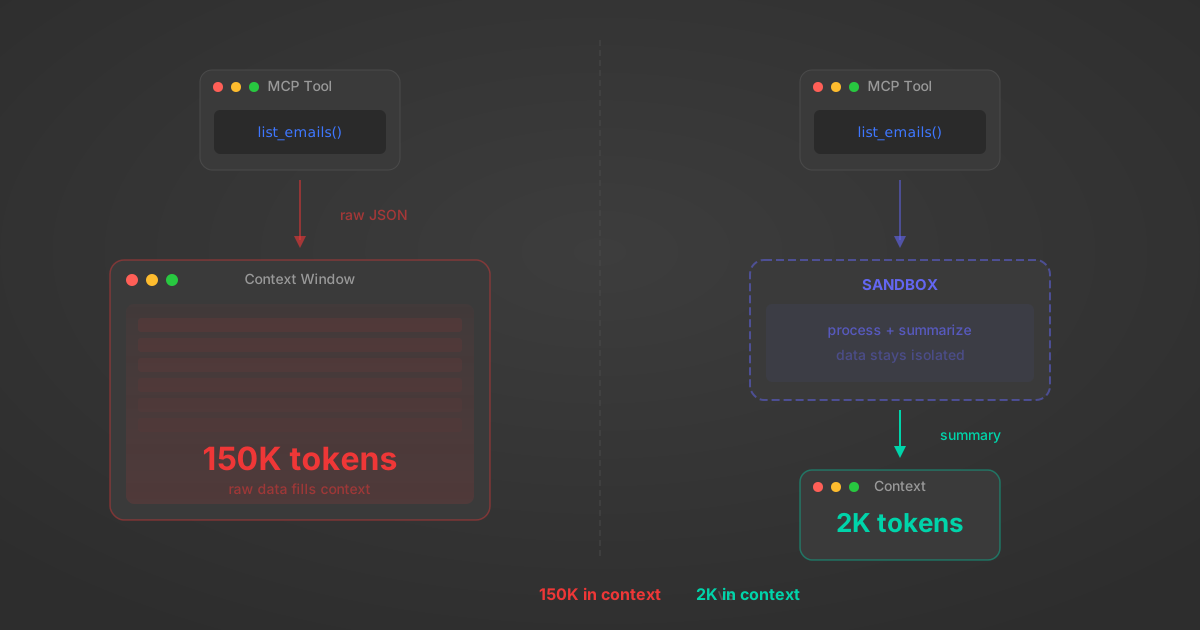
MCP Code Mode: Keeping Tool Responses Out of Agent Context
Anthropic's code_execution processes data already in context. Custom MCP code mode keeps raw tool responses in a sandbox. 14K tokens vs 500.
11 min
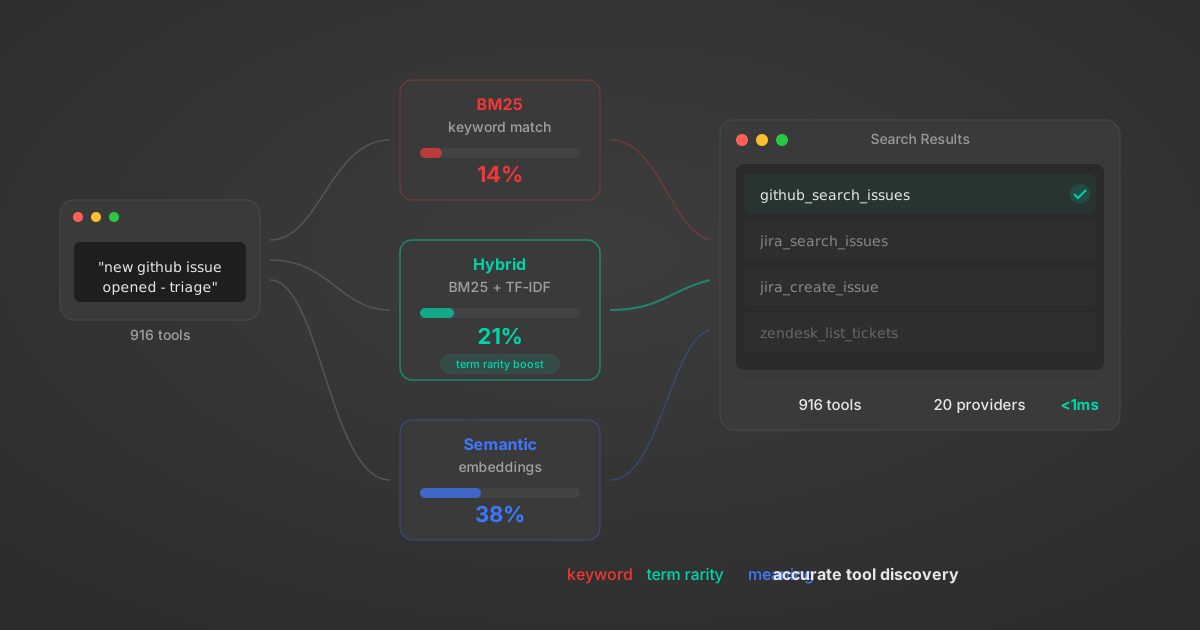
Comparing BM25, TF-IDF, and Hybrid Search for MCP Tool Discovery
Benchmarking BM25, TF-IDF, and hybrid search for MCP tool discovery across 916 tools. The 80/20 TF-IDF/BM25 hybrid hits 21% Top-1 accuracy in under 1ms.
10 min
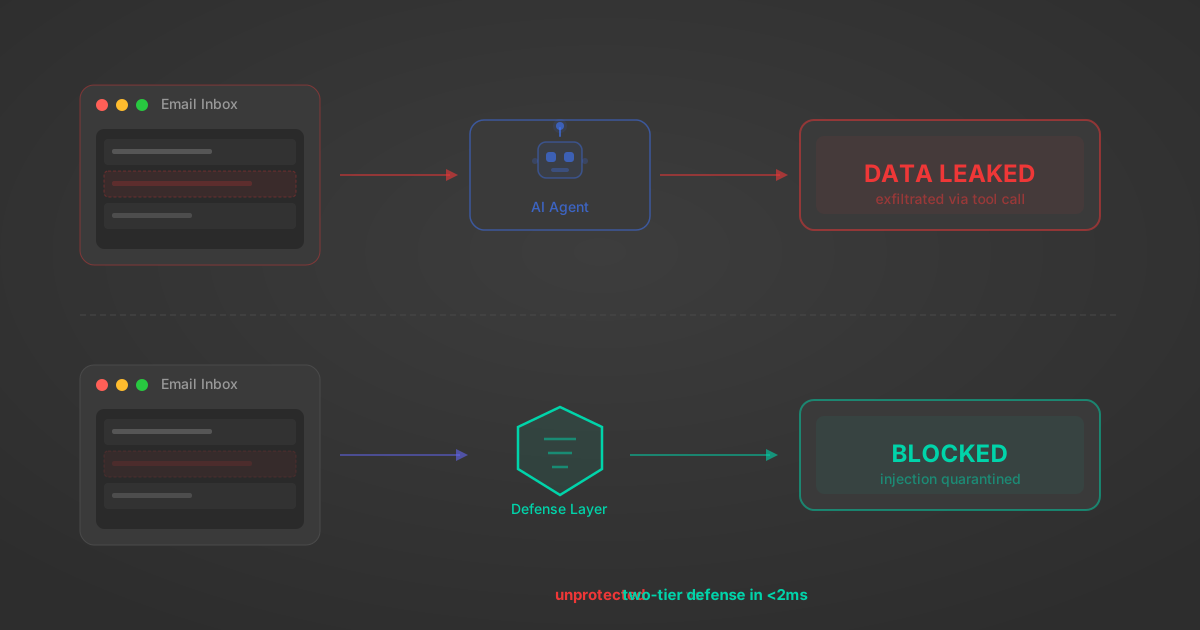
Indirect Prompt Injection Defense for MCP Tools: A Technical Guide
MCP tools that read emails, CRM records, and tickets are indirect prompt injection vectors. Here's how we built a two-tier defense that scans tool results in ~11ms.
12 min
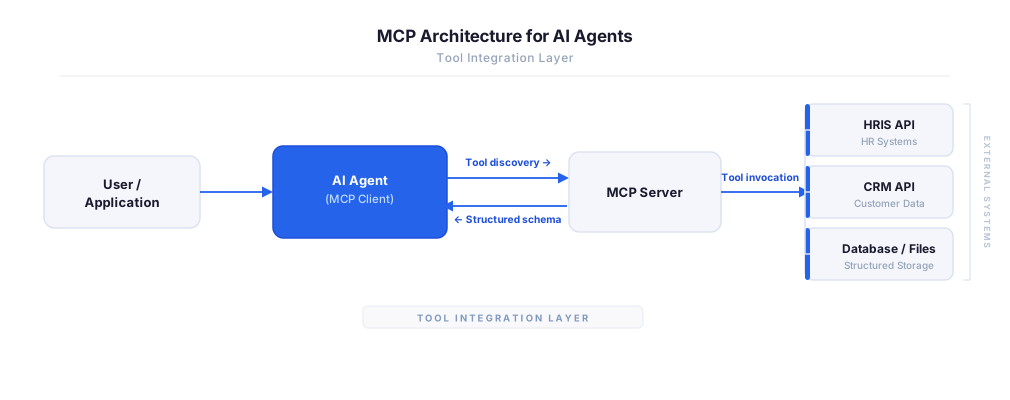
MCP vs A2A: Architecture, Security, and When to Use Each
MCP vs A2A: what each protocol standardizes, how they differ, their shared security risks including indirect prompt injection, and when to use one, both, or a hybrid architecture.
12 min
MCP vs API: What Hundreds of Connector Builds Taught Us
MCP wraps APIs, it doesn't replace them. After building hundreds of connectors that serve both, here's when each approach wins.
14 min read
Adobe Commerce MCP Server FAQ
Does StackOne have a Adobe Commerce MCP server?
Adobe Commerce MCP server vs direct API integration — what's the difference?
How does Adobe Commerce authentication work for AI agents?
origin_owner_id.Are Adobe Commerce MCP tools vulnerable to prompt injection?
What is the context bloat of a Adobe Commerce agent and how do I avoid it?
Can I limit which actions my Adobe Commerce agent can access?
Can I create custom agent actions for my Adobe Commerce MCP server?
When should I NOT use a Adobe Commerce MCP server?
What AI frameworks and AI clients does the StackOne Adobe Commerce MCP server support?
Put your AI agents to work
All the tools you need to build and scale AI agent integrations, with best-in-class connectivity, execution, and security.