
Asana MCP Server
for AI Agents
Connect your AI agent to StackOne's Asana MCP server and give it 126 MCP tools out of the box. Auth, tool execution, and security all managed.
 StackOne






Coverage
126 Agent Actions
Create, read, update, and delete across Asana — and extend your agent's capabilities with custom actions.

Authentication
Agent Tool Authentication
Per-user OAuth in one call. Your Asana MCP server gets session-scoped tokens with zero credentials stored on your infra.
Agent Auth →
Security
Agent Protection
Every Asana tool response scanned for prompt injection in milliseconds — 88.7% accuracy, all running on CPU.
Prompt Injection Defense →
Performance
Max Agent Context. Min Cost.
Free up to 96% of your agent's context window to enhance reasoning and reduce cost, on every Asana call.
Tools Discovery →What is the Asana MCP Server?
A Asana MCP server lets AI agents read and write Asana data through the Model Context Protocol — Anthropic's open standard for connecting LLMs to external tools. StackOne's Asana MCP server ships with 126 pre-built actions, fully extensible via the Connector Builder — plus managed authentication, prompt injection defense, observability, and agent execution runtime. Connect it from MCP clients like Claude Desktop, Claude Code, Cursor, Goose, and VS Code, or from agent frameworks like OpenAI Agents SDK, LangChain, and Vercel AI SDK.
All Asana MCP Tools
Every action from Asana's API, ready for your agent. Create, read, update, and delete — scoped to exactly what you need.
Attachments
- List Attachments
Get all attachments for a specific parent object (task or project)
- Get Attachment
Get details of a specific attachment
- Delete Attachment
Delete an attachment from a task or project
Custom Fields
- Create Custom Field
Creates a new custom field in a workspace. Every custom field is required to be created in a specific workspace, and this workspace cannot be changed once set. A custom field's name must be unique within a workspace and not conflict with names of existing task properties such as Due Date or Assignee. A custom field's type must be one of text, enum, multi_enum, number, date, or people. Returns the full record of the newly created custom field
- List Custom Fields
Returns a list of the compact representation of all of the custom fields in a workspace
- Get Custom Field
Get details of a specific custom field
- Update Custom Field
A specific, existing custom field can be updated by making a PUT request on the URL for that custom field. Only the fields provided in the data block will be updated; any unspecified fields will remain unchanged. When using this method, it is best to specify only those fields you wish to change, or else you may overwrite changes made by another user since you last retrieved the custom field. A custom field's type cannot be updated. An enum custom field's enum_options cannot be updated with this endpoint. Instead see Work With Enum Options for information on how to update enum_options. Locked custom fields can only be updated by the user who locked the field. Returns the complete updated custom field record
Enum Options
- Create Enum Option
Creates an enum option and adds it to this custom field's list of enum options. A custom field can have at most 50 enum options (including disabled options). By default, new enum options are inserted at the end of a custom field's list. Locked custom fields can only have enum options added by the user who locked the field. Returns the full record of the newly created enum option
- Update Enum Option
Updates an existing enum option. Enum options are ordered by creation time with the most recently created at the top. Locked custom fields can only have enum options updated by the user who locked the field. Returns the complete updated enum option record
Dependencies
- Add Dependencies
Add one or more dependencies to a task (tasks that must be completed before this task)
- Remove Dependencies
Remove one or more dependencies from a task
Dependents
- Add Dependents
Add one or more dependents to a task (tasks that depend on this task being completed)
- Remove Dependents
Remove one or more dependents from a task
Goals
- Create Goal
Create a new goal in a workspace or team.
- List Goals
Get goals in a workspace or portfolio
- Get Goal
Get details of a specific goal
- Update Goal
Update properties of an existing goal
- Delete Goal
Delete a goal
Subgoals
- Add Subgoal
Add a subgoal to a parent goal
- Remove Subgoal
Remove a subgoal from a parent goal
Memberships
- Create Membership
Add a user or team as a member of a goal, project, portfolio, or custom_field
- List Memberships
Get all memberships for a parent object (goal, project, portfolio, or custom_field)
- Get Membership
Get details of a specific membership
- Update Membership
Update an existing membership. Only the fields provided in the data block will be updated; any unspecified fields will remain unchanged. Memberships on goals, projects, portfolios, and custom_fields can be updated
- Delete Membership
Remove a member from a project or goal
Organization Exports
- Create Organization Export
Request a complete export of an organization's data in JSON format (Enterprise+ only)
- Get Organization Export
Get the status and download URL of an organization export request
Portfolios
- Create Portfolio
Create a new portfolio in a workspace
- List Portfolios
Get all portfolios in a workspace
- Get Portfolio
Get details of a specific portfolio
- Update Portfolio
Update properties of an existing portfolio
- Delete Portfolio
Delete a portfolio
Projects
- Create Project
Create a new project in a workspace or team. If the workspace for your project is an organization, you must also supply a team to share the project with.
- List Projects
Get all projects in a workspace
- Get Project
Get details of a specific project
- Update Project
Update an existing project
- Delete Project
Delete a project permanently
Project Templates
- List Project Templates
Get all project templates in a workspace or team
- Get Project Template
Get details of a specific project template
Tasks
- Create Task
Create a new task in Asana
- Search Tasks
Advanced search for tasks in a workspace with multiple filters
- List Tasks
Returns the compact task records for some filtered set of tasks. Use one or more of the parameters provided to filter the tasks returned. You must specify a project or tag if you do not specify assignee and workspace.
- Get Task
Get a single task by ID
- Update Task
Update an existing task in Asana
- Delete Task
Delete a task from Asana
Sections
- Create Section
Create a new section in a project
- List Sections
Get all sections in a project (board columns or list headers)
- Get Section
Get details of a specific section
- Update Section
Update properties of an existing section
- Delete Section
Delete a section from a project
Status Updates
- Create Status Update
Creates a new status update on an object. Returns the full record of the newly created status update. Requires either text or html_text to be provided.
- List Status Updates
Returns the compact status update records for all updates on the object
- Get Status Update
Get details of a specific status update
- Delete Status Update
Delete a status update
Storys
- Create Story
Adds a story to a task. This endpoint currently only allows for comment stories to be created. The comment will be authored by the currently authenticated user, and timestamped when the server receives the request. Returns the full record for the new story added to the task. Requires either text or html_text to be provided
- Get Story
Get details of a specific story
- Update Story
Updates the story and returns the full record for the updated story. Only comment stories can have their text updated, and only comment stories and attachment stories can be pinned. Only one of text and html_text can be specified
- Delete Story
Delete a story/comment from a task
Subtasks
- Create Subtask
Creates a new subtask and adds it to the parent task. Returns the full record for the newly created subtask
- List Subtasks
Get all subtasks for a specific task
Tags
- Create Tag
Create a new tag in a workspace
- List Tags
Get all tags in a workspace
- Get Tag
Get details of a specific tag
- Update Tag
Update properties of an existing tag
Task Templates
- List Task Templates
Get task templates from a project (Premium feature)
- Get Task Template
Get a single task template by ID (Premium feature)
Teams
- List Teams
Get all teams in a workspace
- Get Team
Get details of a specific team
- Update Team
Update a team's properties and access controls
Time Periods
- List Time Periods
Get all time periods in a workspace, optionally filtered by date range
- Get Time Period
Get details of a specific time period
Time Tracking Entrys
- Create Time Tracking Entry
Creates a time tracking entry on a given task. Returns the record of the newly created time tracking entry
- Get Time Tracking Entry
Returns the complete time tracking entry record for a single time tracking entry
- Update Time Tracking Entry
A specific, existing time tracking entry can be updated by making a PUT request on the URL for that time tracking entry. Only the fields provided in the data block will be updated; any unspecified fields will remain unchanged. When using this method, it is best to specify only those fields you wish to change, or else you may overwrite changes made by another user since you last retrieved the task. Returns the complete updated time tracking entry record
- Delete Time Tracking Entry
Delete a time tracking entry
Users
- List Users
Get all users in a workspace
- Get User
Get details of a specific user
Webhooks
- Create Webhook
Create a new webhook to receive notifications about changes to a resource
- List Webhooks
Get the compact representation of all webhooks your app has registered for the authenticated user in the given workspace
- Get Webhook
Returns the full record for the given webhook
- Update Webhook
An existing webhook's filters can be updated by making a PUT request on the URL for that webhook. Note that the webhook's previous filters array will be completely overwritten by the filters sent in the PUT request
- Delete Webhook
This method permanently removes a webhook. Note that it may be possible to receive a request that was already in flight after deleting the webhook, but no further requests will be issued
Workspaces
- List Workspaces
Get all workspaces accessible to the authenticated user
- Get Workspace
Get details of a specific workspace
- Update Workspace
Update properties of a workspace
Other (41)
- Add Custom Field To Project
Custom fields are associated with projects by way of custom field settings. This method creates a setting for the project
- Add Custom Field To Portfolio
Custom fields are associated with portfolios by way of custom field settings. This method creates a setting for the portfolio
- Add Item To Portfolio
Add a project to a portfolio
- Add Members To Project
Add users as members to a project
- Add Followers To Project
Add users as followers to a project
- Add Task To Section
Add a task to a specific section
- Add Tag To Task
Add a tag to a task
- Add Followers To Task
Add one or more followers to a task
- Add Project To Task
Add a task to an additional project
- Add User To Team
Add a user to a team
- Add User To Workspace
Add a user to a workspace or organization. The user can be referenced by their globally unique user ID or their email address. Returns the full user record for the invited user
- Get Audit Log Events
Get audit log events for enterprise security and compliance monitoring
- Get Events
Get events on a resource for real-time change tracking
- Get Portfolio Items
Get all projects in a portfolio
- Get Project Tasks
Get all tasks in a project
- List Stories
Get all stories (activity feed and comments) for a task
- Get Team Users
Get all users in a team
- List Time Tracking Entries
Returns time tracking entries for a given task
- Get Current User
Get details of the authenticated user
- Get User Favorites
Get a user's favorites
- Get User Teams
Get all teams a user belongs to
- Get User Workspace Memberships
Get workspace memberships for a user
- Get User Team Memberships
Get team memberships for a user
- Get User Task List
Returns the full record for a user's task list
- Get Tasks From User Task List
Returns the compact list of tasks in a user's My Tasks list. Note - Access control is enforced for this endpoint as with all Asana API endpoints, meaning a user's private tasks will be filtered out if the API-authenticated user does not have access to them. Note - Both complete and incomplete tasks are returned by default unless they are filtered out (for example, setting completed_since=now will return only incomplete tasks, which is the default view for My Tasks in Asana)
- Set Parent Task
Set or change the parent task for a task to make it a subtask
- Remove Custom Field From Project
Removes a custom field setting from a project
- Remove Custom Field From Portfolio
Removes a custom field setting from a portfolio
- Remove Item From Portfolio
Remove a project from a portfolio
- Remove Members From Project
Remove users from project members
- Remove Followers From Project
Remove users from project followers
- Remove Tag From Task
Remove a tag from a task
- Remove Followers From Task
Remove one or more followers from a task
- Remove Project From Task
Remove a task from a project
- Remove User From Team
Remove a user from a team
- Remove User From Workspace
Remove a user from a workspace or organization. The user making this call must be an admin in the workspace. The user can be referenced by their globally unique user ID or their email address. When invoked using a Service Account Token (SAT), this endpoint follows the same behavior as the SCIM API Delete endpoint. When invoked using a Personal Access Token (PAT), the endpoint behaves similarly, except that ownership of the user's resources is transferred to the PAT owner instead of the admin specified in the Admin Console. Note - If you wish to retain access to a user's private resources (i.e., those visible only to that user), you have to make them public manually (or ask the user to do so) before removal. Returns an empty data record
- Duplicate Project
Create a duplicate of a project
- Instantiate Project Template
Create a new project from a template
- Typeahead Search
Search for objects in a workspace by name for autocomplete
- Duplicate Task
Create a copy of an existing task with optional field inclusions
- Instantiate Task From Template
Creates and returns a job that will asynchronously handle the task instantiation
Set Up Your Asana MCP Server in Minutes
One endpoint. Any framework. Your agent is talking to Asana in under 10 lines of code.
Agent Frameworks


 JSON
JSON{
"mcpServers": {
"stackone": {
"command": "npx",
"args": [
"-y",
"mcp-remote@latest",
"https://api.stackone.com/mcp?x-account-id=<account_id>",
"--header",
"Authorization: Basic <YOUR_BASE64_TOKEN>"
]
}
}
}Check More Project Management MCP Servers
203+ actions
185+ actions
147+ actions
145+ actions
142+ actions
138+ actions
136+ actions
Platform Resources
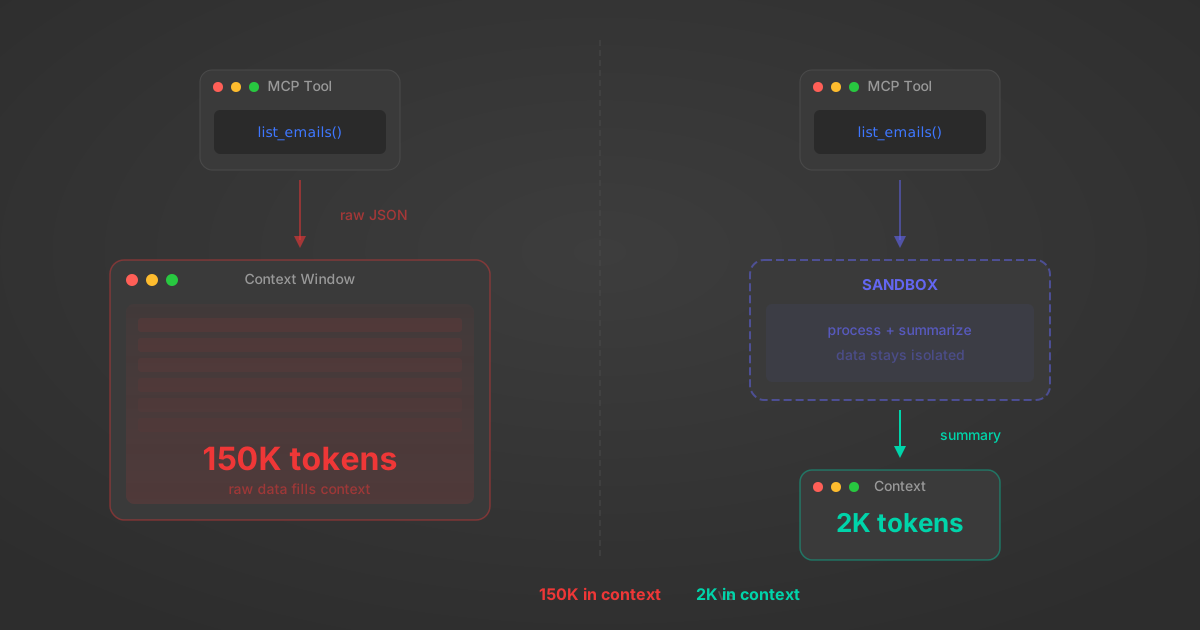
MCP Code Mode: Keeping Tool Responses Out of Agent Context
Anthropic's code_execution processes data already in context. Custom MCP code mode keeps raw tool responses in a sandbox. 14K tokens vs 500.
11 min
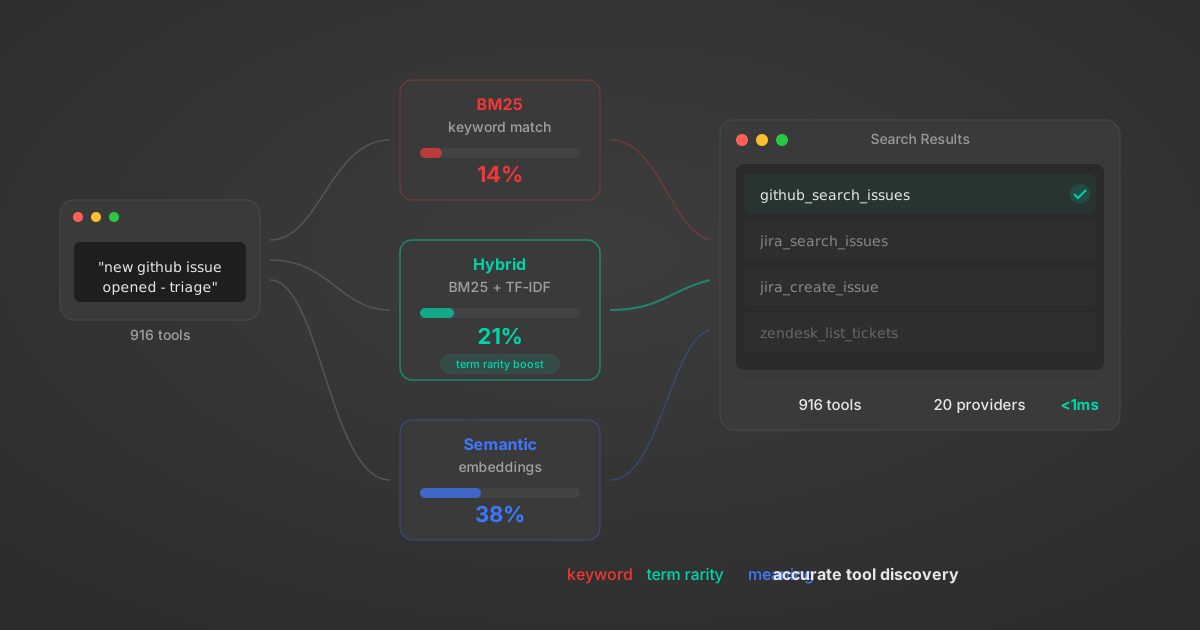
Comparing BM25, TF-IDF, and Hybrid Search for MCP Tool Discovery
Benchmarking BM25, TF-IDF, and hybrid search for MCP tool discovery across 916 tools. The 80/20 TF-IDF/BM25 hybrid hits 21% Top-1 accuracy in under 1ms.
10 min
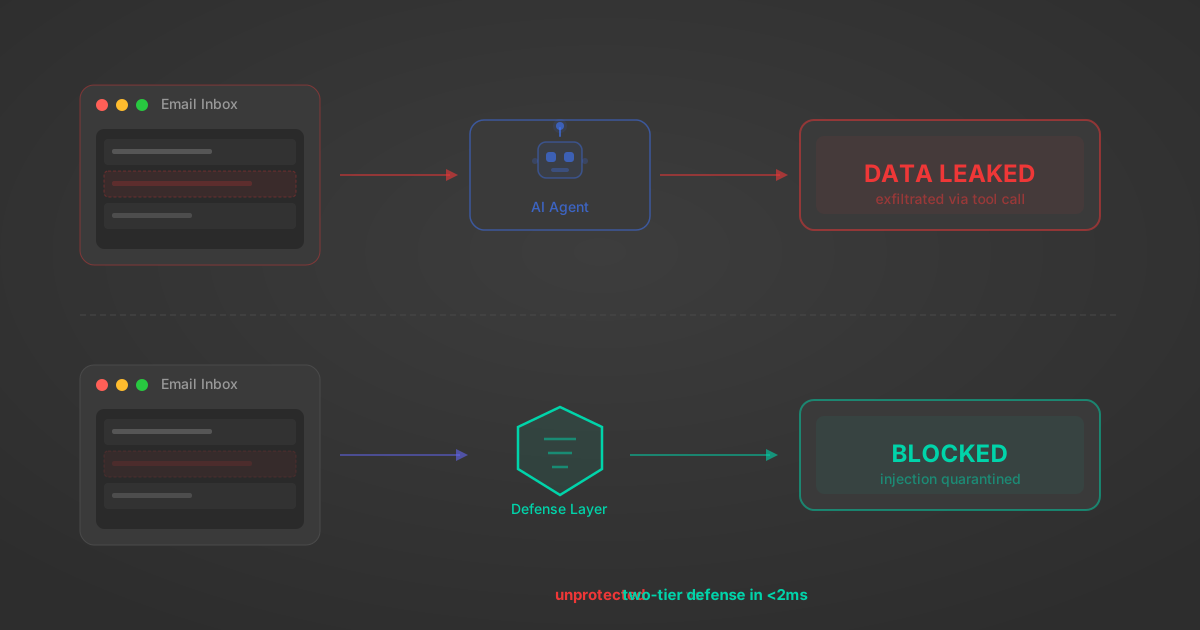
Indirect Prompt Injection Defense for MCP Tools: A Technical Guide
MCP tools that read emails, CRM records, and tickets are indirect prompt injection vectors. Here's how we built a two-tier defense that scans tool results in ~11ms.
12 min
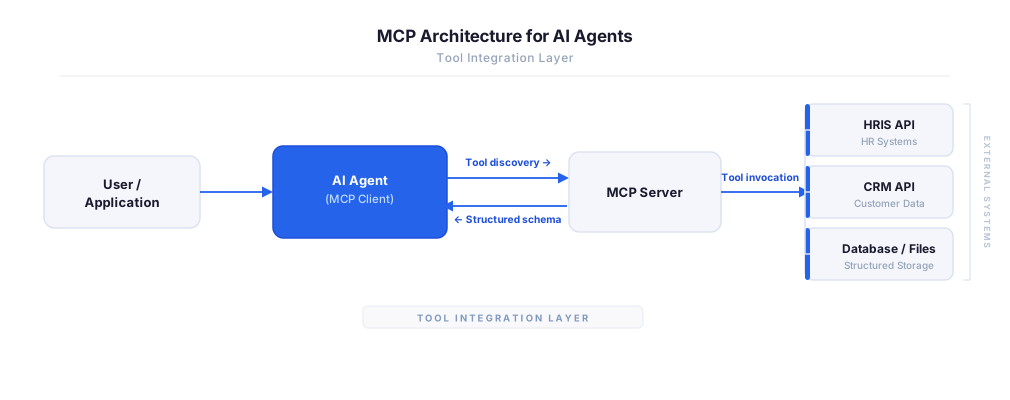
MCP vs A2A: Architecture, Security, and When to Use Each
MCP vs A2A: what each protocol standardizes, how they differ, their shared security risks including indirect prompt injection, and when to use one, both, or a hybrid architecture.
12 min
MCP vs API: What Hundreds of Connector Builds Taught Us
MCP wraps APIs, it doesn't replace them. After building hundreds of connectors that serve both, here's when each approach wins.
14 min read
Asana MCP Server FAQ
Does StackOne have a Asana MCP server?
Asana MCP server vs direct API integration — what's the difference?
How does Asana authentication work for AI agents?
origin_owner_id.Are Asana MCP tools vulnerable to prompt injection?
What is the context bloat of a Asana agent and how do I avoid it?
Can I limit which actions my Asana agent can access?
Can I create custom agent actions for my Asana MCP server?
When should I NOT use a Asana MCP server?
What AI frameworks and AI clients does the StackOne Asana MCP server support?
Put your AI agents to work
All the tools you need to build and scale AI agent integrations, with best-in-class connectivity, execution, and security.