
Bloomerang MCP Server
for AI Agents
Connect your AI agent to StackOne's Bloomerang MCP server and give it 104 MCP tools out of the box. Auth, tool execution, and security all managed.
 StackOne






Coverage
104 Agent Actions
Create, read, update, and delete across Bloomerang — and extend your agent's capabilities with custom actions.

Authentication
Agent Tool Authentication
Per-user OAuth in one call. Your Bloomerang MCP server gets session-scoped tokens with zero credentials stored on your infra.
Agent Auth →
Security
Agent Protection
Every Bloomerang tool response scanned for prompt injection in milliseconds — 88.7% accuracy, all running on CPU.
Prompt Injection Defense →
Performance
Max Agent Context. Min Cost.
Free up to 96% of your agent's context window to enhance reasoning and reduce cost, on every Bloomerang call.
Tools Discovery →What is the Bloomerang MCP Server?
A Bloomerang MCP server lets AI agents read and write Bloomerang data through the Model Context Protocol — Anthropic's open standard for connecting LLMs to external tools. StackOne's Bloomerang MCP server ships with 104 pre-built actions, fully extensible via the Connector Builder — plus managed authentication, prompt injection defense, observability, and agent execution runtime. Connect it from MCP clients like Claude Desktop, Claude Code, Cursor, Goose, and VS Code, or from agent frameworks like OpenAI Agents SDK, LangChain, and Vercel AI SDK.
All Bloomerang MCP Tools
Every action from Bloomerang's API, ready for your agent. Create, read, update, and delete — scoped to exactly what you need.
Constituents
- List Constituents
Retrieves a paginated list of all constituents (donors, contacts, and organizations) from the Bloomerang CRM database via GET /constituents.
- Get Constituent
Retrieves a single constituent record by its unique numeric ID via GET /constituent/{id}, returning the complete donor or organization profile.
- Search Constituents
Performs a text search across constituents and households via GET /constituents/search, matching against names and returning paginated results.
- Update Constituent
Updates an existing constituent record by ID via PUT /constituent/{id}, applying partial updates where only provided fields are modified.
- Delete Constituent
Permanently deletes a constituent record by ID via DELETE /constituent/{id}, removing the donor or organization and all associated data from the CRM.
Transactions
- Create Transaction
Creates a new donation transaction for a constituent via POST /transaction, recording the gift in the CRM database without initiating a payment charge unless a WalletItem is provided.
- List Transactions
Retrieves a paginated list of all donation transactions from the Bloomerang CRM via GET /transactions, with filters for amount range, donor, type, and transaction number.
- Get Transaction
Retrieves a single transaction record by its unique numeric ID via GET /transaction/{id}, returning the complete donation details including designations and payment information.
- Update Transaction
Updates an existing transaction record by ID via PUT /transaction/{id}, applying partial updates to donation details such as amount, date, method, and designations.
- Delete Transaction
Permanently deletes a transaction record by ID via DELETE /transaction/{id}, removing the donation and all associated designations from the CRM.
Designations
- List Designations
Retrieves a paginated list of transaction designations via GET /transactions/designations, showing how donations are allocated across funds, campaigns, and appeals.
- Get Designation
Retrieves a single designation record by its unique numeric ID via GET /transactions/designation/{id}, returning the complete fund/campaign/appeal allocation details.
Interactions
- Create Interaction
Creates a new interaction (communication touchpoint) for a constituent via POST /interaction, logging a donor engagement activity such as an email, call, or meeting.
- List Interactions
Retrieves a paginated list of donor interactions (touchpoints) from the Bloomerang CRM via GET /interactions, tracking all communications and engagement activities with constituents.
- Get Interaction
Retrieves a single interaction record by its unique numeric ID via GET /interaction/{id}, returning the complete communication touchpoint details.
- Update Interaction
Updates an existing interaction record by ID via PUT /interaction/{id}, applying partial updates to communication details such as channel, purpose, and notes.
- Delete Interaction
Permanently deletes an interaction record by ID via DELETE /interaction/{id}, removing the communication touchpoint from the constituent's timeline.
Tasks
- Create Task
Creates a new task (scheduled follow-up action) via POST /task, assigning a stewardship activity to a user with a due date, channel, and purpose.
- List Tasks
Retrieves a paginated list of tasks (scheduled follow-up actions) from the Bloomerang CRM via GET /tasks, with filters for status, due date range, assignee, and associated constituent.
- Get Task
Retrieves a single task record by its unique numeric ID via GET /task/{id}, returning the complete scheduled action details including assignee, due date, and status.
- Update Task
Updates an existing task record by ID via PUT /task/{id}, applying partial updates to scheduled action details such as due date, subject, assignee, and notes.
- Delete Task
Permanently deletes a task record by ID via DELETE /task/{id}, removing the scheduled follow-up action from the CRM.
Campaigns
- Create Campaign
Creates a new fundraising campaign via POST /campaign, setting up an organizational unit for tracking donations and measuring progress toward a fundraising goal.
- List Campaigns
Retrieves a paginated list of fundraising campaigns from the Bloomerang CRM via GET /campaigns, used to organize and track donation drives and fundraising initiatives.
- Get Campaign
Retrieves a single campaign record by its unique numeric ID via GET /campaign/{id}, returning the complete fundraising initiative details including goal progress.
- Update Campaign
Updates an existing campaign record by ID via PUT /campaign/{id}, applying partial updates to campaign details such as name, dates, goal, and active status.
Appeals
- Create Appeal
Creates a new fundraising appeal via POST /appeal, defining a solicitation method that can be referenced in transaction designations.
- List Appeals
Retrieves a paginated list of fundraising appeals from the Bloomerang CRM via GET /appeals, representing specific solicitation efforts or outreach methods used to generate donations.
- Get Appeal
Retrieves a single appeal record by its unique numeric ID via GET /appeal/{id}, returning the complete solicitation method details.
- Update Appeal
Updates an existing appeal record by ID via PUT /appeal/{id}, applying partial updates to the appeal name or active status.
Funds
- Create Fund
Creates a new fund (financial account category) via POST /fund, defining a donation allocation target for use in transaction designations.
- List Funds
Retrieves a paginated list of funds from the Bloomerang CRM via GET /funds, representing financial accounts or categories that donations are allocated to (e.g., General Fund, Building Fund).
- Get Fund
Retrieves a single fund record by its unique numeric ID via GET /fund/{id}, returning the complete financial account details.
- Update Fund
Updates an existing fund record by ID via PUT /fund/{id}, applying partial updates to fund properties such as name, active status, default designation, and QuickBooks ledger class.
Households
- Create Household
Creates a new household grouping via POST /household, linking individual constituents into a family unit with a designated head for combined giving and communication.
- List Households
Retrieves a paginated list of households from the Bloomerang CRM via GET /households, representing family or organizational groupings of individual constituents for combined giving and communication.
- Get Household
Retrieves a single household record by its unique numeric ID via GET /household/{id}, returning the complete household grouping details including head, members, and name fields.
- Update Household
Updates an existing household record by ID via PUT /household/{id}, applying partial updates to membership, head designation, and name fields.
- Delete Household
Permanently deletes a household grouping by ID via DELETE /household/{id}, removing the family unit but preserving all individual member constituent records.
Notes
- Create Note
Creates a new note (free-text annotation) for a constituent via POST /note, adding internal documentation to a donor's record.
- List Notes
Retrieves a paginated list of notes from the Bloomerang CRM via GET /notes, representing free-text annotations attached to constituent records for internal documentation.
- Get Note
Retrieves a single note record by its unique numeric ID via GET /note/{id}, returning the complete annotation including content, constituent association, and custom fields.
- Update Note
Updates an existing note record by ID via PUT /note/{id}, applying partial updates to the content, date, or custom field values.
- Delete Note
Permanently deletes a note record by ID via DELETE /note/{id}, removing the annotation from the constituent's timeline.
Address
- Create Address
Creates a new mailing address for a constituent via POST /address, adding a secondary address or the initial address record for a donor.
- Get Address
Retrieves a single address record by its unique numeric ID via GET /addresses/{id}, returning the complete mailing address details.
- Update Address
Updates an existing address record by ID via PUT /address/{id}, applying partial updates to mailing address fields such as street, city, state, and primary designation.
- Delete Address
Permanently deletes an address record by ID via DELETE /address/{id}, removing the mailing address from the constituent's record.
Email Address
- Create Email Address
Creates a new email address for a constituent via POST /email, adding a secondary email or the initial email record for a donor.
- Get Email Address
Retrieves a single email address record by its unique numeric ID via GET /email/{id}, returning the complete email details including type, value, and primary designation.
- Update Email Address
Updates an existing email address record by ID via PUT /email/{id}, applying partial updates to the email type, value, or primary designation.
- Delete Email Address
Permanently deletes an email address record by ID via DELETE /email/{id}, removing the email from the constituent's contact information.
Phone Numbers
- Create Phone Number
Creates a new phone number for a constituent via POST /phone, adding a secondary phone or the initial phone record for a donor.
- List Phone Numbers
Retrieves a paginated list of phone numbers from the Bloomerang CRM via GET /phones, including primary and secondary phone records for all constituents.
- Get Phone Number
Retrieves a single phone number record by its unique numeric ID via GET /phone/{id}, returning the complete phone details including type, number, extension, and primary designation.
- Update Phone Number
Updates an existing phone number record by ID via PUT /phone/{id}, applying partial updates to the phone type, number, extension, or primary designation.
- Delete Phone Number
Permanently deletes a phone number record by ID via DELETE /phone/{id}, removing the phone from the constituent's contact information.
Refunds
- Create Refund
Creates a new refund record against an existing transaction via POST /refund, recording a partial or full return of a donation amount while preserving the audit trail.
- List Refunds
Retrieves a paginated list of refund records from the Bloomerang CRM via GET /refunds, tracking returned or reversed donation amounts.
- Get Refund
Retrieves a single refund record by its unique numeric ID via GET /refund/{id}, returning the complete refund details including amount, date, associated transaction, and reason.
- Update Refund
Updates an existing refund record by ID via PUT /refund/{id}, applying partial updates to the refund date, amount, or reason note.
- Delete Refund
Permanently deletes a refund record by ID via DELETE /refund/{id}, removing the refund entry and restoring the original transaction to its full amount.
Relationships
- Create Relationship
Creates a new relationship between two non-household constituents via POST /relationship, defining a bidirectional connection such as Spouse, Parent/Child, or Employer/Employee.
- Get Relationship
Retrieves a single relationship record by its unique numeric ID via GET /relationship/{id}, returning the complete connection details between two constituents.
- Update Relationship
Updates an existing relationship record by ID via PUT /relationship/{id}, applying partial updates to the role type, head-of-household designation, or note.
- Delete Relationship
Permanently deletes a relationship record by ID via DELETE /relationship/{id}, removing the bidirectional connection between two constituents.
Relationship Roles
- List Relationship Roles
Retrieves a paginated list of relationship role definitions from the Bloomerang CRM via GET /relationshiproles, providing the available connection types (e.g., Spouse, Parent, Employer) for use when creating relationships.
- Get Relationship Role
Retrieves a single relationship role definition by its unique numeric ID via GET /relationshiprole/{id}, returning the role name, reciprocal role, and configuration details.
Soft Credits
- Create Soft Credit
Creates a new soft credit via POST /softcredit, attributing donation recognition to a constituent who influenced a gift without being the actual donor.
- List Soft Credits
Retrieves a paginated list of soft credits from the Bloomerang CRM via GET /softcredits, representing donation recognition given to constituents who influenced a gift but are not the actual donor.
- Get Soft Credit
Retrieves a single soft credit record by its unique numeric ID via GET /softcredit/{id}, returning the complete recognition attribution details.
- Update Soft Credit
Updates an existing soft credit record by ID via PUT /softcredit/{id}, allowing modification of the recognized amount.
- Delete Soft Credit
Permanently deletes a soft credit record by ID via DELETE /softcredit/{id}, removing the donation recognition attribution from the constituent.
Tributes
- Create Tribute
Creates a new tribute (honorary or memorial dedication) via POST /tribute, defining a person to be honored or memorialized in donation designations.
- List Tributes
Retrieves a paginated list of tributes from the Bloomerang CRM via GET /tributes, representing honorary or memorial dedications that can be attached to donations.
- Get Tribute
Retrieves a single tribute record by its unique numeric ID via GET /tribute/{id}, returning the complete honorary or memorial dedication details.
- Search Tributes
Performs a text search across active tributes via GET /tributes/search, matching against tribute names with a minimum 3-character query for autocomplete or lookup functionality.
- Update Tribute
Updates an existing tribute record by ID via PUT /tribute/{id}, applying partial updates to the tribute name, type, description, and other properties.
Email Interests
- List Email Interests
Retrieves a paginated list of email interest categories from the Bloomerang CRM via GET /emailInterests, representing the email subscription topics that constituents can opt into or out of.
- Get Email Interest
Retrieves a single email interest category by its unique numeric ID via GET /emailInterest/{id}, returning the subscription topic details.
Wallet Items
- Create Wallet Item
Creates a new wallet item (stored payment method) for a constituent via POST /walletitem, securely tokenizing a credit card or bank account for recurring donations.
- List Wallet Items
Retrieves a list of wallet items (stored payment methods) from the Bloomerang CRM via GET /walletitems, showing saved credit cards and bank accounts used for recurring donations.
- Get Wallet Item
Retrieves a single wallet item (stored payment method) by its unique numeric ID via GET /walletitem/{id}, returning masked payment details including method type, last four digits, and expiration.
- Delete Wallet Item
Permanently deletes a wallet item (stored payment method) by ID via DELETE /walletitem/{id}, removing the saved credit card or bank account from the constituent's record.
Processors
- List Processors
Retrieves a list of payment processors configured in the Bloomerang account via GET /processors, showing the gateways that handle credit card and bank account charges for donations.
- Get Processor
Retrieves a single payment processor by its unique numeric ID via GET /processor/{id}, returning the complete gateway configuration including type, status, and supported payment methods.
Other (18)
- Create Constituent (Merge)
Creates a new constituent or merges data into an existing duplicate record via POST /constituent/merge, using intelligent duplicate detection based on name plus contact info.
- Get Constituent Relationships
Retrieves all relationships for a specific constituent via GET /constituent/{id}/relationships, showing family, professional, and organizational connections.
- Get Constituent Timeline
Retrieves a chronological timeline of all activity for a constituent (or all household members if a Household ID is provided) via GET /constituent/{id}/timeline.
- Get Pledge Installments
Retrieves a paginated list of installment schedule entries for a specific pledge via GET /pledge/{id}/installments, showing scheduled payment dates and amounts.
- Get Pledge Payments
Retrieves a paginated list of successful payments made against a specific pledge via GET /pledge/{id}/payments, showing fulfilled installment transactions.
- Get Pledge Payment Failures
Retrieves a paginated list of failed payment attempts for a specific pledge via GET /pledge/{id}/paymentFailures, showing declined or errored transactions.
- List Addresses
Retrieves a paginated list of physical mailing addresses from the Bloomerang CRM via GET /addresses, including primary and secondary addresses for all constituents.
- List Email Addresses
Retrieves a paginated list of email addresses from the Bloomerang CRM via GET /emails, including primary and secondary email records for all constituents.
- List Custom Field Categories
Retrieves a list of custom field categories for a specific entity type via GET /customFieldCategories/{type}, showing how custom fields are organized into groups in the Bloomerang CRM.
- List Custom Fields
Retrieves a list of custom field definitions for a specific entity type via GET /customFields/{type}, showing the available custom data fields and their configurations.
- List Custom Values
Retrieves all selectable option values for PickOne and PickMultiple custom fields of a given entity type via GET /customValues/{type}, providing the dropdown options available when setting custom field values.
- List Custom Values By Field
Retrieves selectable option values for a specific custom field via GET /customValues/{type}/{fieldId}, narrowing results to a single PickOne or PickMultiple field.
- Update Constituent Communication Settings
Updates communication preferences and restrictions for a constituent via PUT /constituent/{id}/updateCommunicationSettings, managing opt-outs and email interest subscriptions.
- Find Duplicate Constituents
Searches for possible duplicate constituent records via POST /constituent/duplicates, requiring a name match plus at least one matching contact detail.
- Complete Task
Marks a task as completed via PUT /task/{id}/complete, with an option to automatically create a corresponding interaction record from the task details.
- Refresh Campaign Summaries
Triggers a recalculation of all campaign goal summaries via GET /campaigns/refreshsummaries, updating progress metrics to reflect the latest transaction data.
- Generate Pledge Installments
Generates a preview installment schedule for a pledge via GET /pledge/generateInstallments without saving to the database, useful for calculating payment plans before creating or modifying a pledge.
- Write Off Pledge
Writes off the remaining unpaid balance of a pledge via POST /pledge/{id}/writeOff, marking the outstanding amount as uncollectible.
Bloomerang AI Agent Use Cases
Connect your AI agent to Bloomerang and help your team scale the sales operations they run by hand today.
Use StackOne to connect your AI agent to your CRM, email, and calendar tools to automate post-demo follow-up.
ViewUse StackOne to connect your AI agent to your CRM, email, and calendar tools to automate deal risk scoring and pipeline alerts.
ViewUse StackOne to connect your AI agent to your CRM, sales engagement, and messaging tools to automate outbound prospecting.
ViewSet Up Your Bloomerang MCP Server in Minutes
One endpoint. Any framework. Your agent is talking to Bloomerang in under 10 lines of code.
Agent Frameworks


 JSON
JSON{
"mcpServers": {
"stackone": {
"command": "npx",
"args": [
"-y",
"mcp-remote@latest",
"https://api.stackone.com/mcp?x-account-id=<account_id>",
"--header",
"Authorization: Basic <YOUR_BASE64_TOKEN>"
]
}
}
}Check More crm-sales MCP Servers
134+ actions
82+ actions
61+ actions
59+ actions
54+ actions
53+ actions
26+ actions
Platform Resources

MCP Code Mode: Keeping Tool Responses Out of Agent Context
Anthropic's code_execution processes data already in context. Custom MCP code mode keeps raw tool responses in a sandbox. 14K tokens vs 500.
11 min

Comparing BM25, TF-IDF, and Hybrid Search for MCP Tool Discovery
Benchmarking BM25, TF-IDF, and hybrid search for MCP tool discovery across 916 tools. The 80/20 TF-IDF/BM25 hybrid hits 21% Top-1 accuracy in under 1ms.
10 min

Indirect Prompt Injection Defense for MCP Tools: A Technical Guide
MCP tools that read emails, CRM records, and tickets are indirect prompt injection vectors. Here's how we built a two-tier defense that scans tool results in ~11ms.
12 min
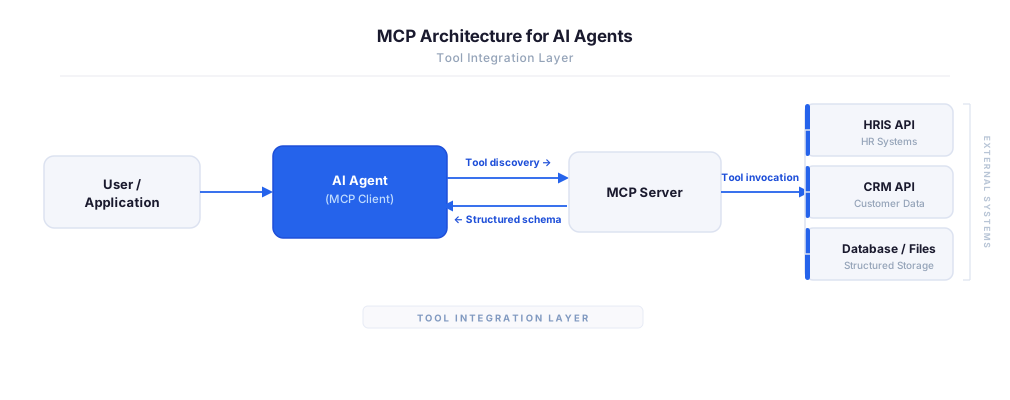
MCP vs A2A: Architecture, Security, and When to Use Each
MCP vs A2A: what each protocol standardizes, how they differ, their shared security risks including indirect prompt injection, and when to use one, both, or a hybrid architecture.
12 min
MCP vs API: What Hundreds of Connector Builds Taught Us
MCP wraps APIs, it doesn't replace them. After building hundreds of connectors that serve both, here's when each approach wins.
14 min read
Bloomerang MCP Server FAQ
Does StackOne have a Bloomerang MCP server?
Bloomerang MCP server vs direct API integration — what's the difference?
How does Bloomerang authentication work for AI agents?
origin_owner_id.Are Bloomerang MCP tools vulnerable to prompt injection?
What is the context bloat of a Bloomerang agent and how do I avoid it?
Can I limit which actions my Bloomerang agent can access?
Can I create custom agent actions for my Bloomerang MCP server?
When should I NOT use a Bloomerang MCP server?
What AI frameworks and AI clients does the StackOne Bloomerang MCP server support?
Put your AI agents to work
All the tools you need to build and scale AI agent integrations, with best-in-class connectivity, execution, and security.