
ClickUp MCP Server
for AI Agents
Connect your AI agent to StackOne's ClickUp MCP server and give it 95 MCP tools out of the box. Auth, tool execution, and security all managed.
 StackOne






Coverage
95 Agent Actions
Create, read, update, and delete across ClickUp — and extend your agent's capabilities with custom actions.

Authentication
Agent Tool Authentication
Per-user OAuth in one call. Your ClickUp MCP server gets session-scoped tokens with zero credentials stored on your infra.
Agent Auth →
Security
Agent Protection
Every ClickUp tool response scanned for prompt injection in milliseconds — 88.7% accuracy, all running on CPU.
Prompt Injection Defense →
Performance
Max Agent Context. Min Cost.
Free up to 96% of your agent's context window to enhance reasoning and reduce cost, on every ClickUp call.
Tools Discovery →What is the ClickUp MCP Server?
A ClickUp MCP server lets AI agents read and write ClickUp data through the Model Context Protocol — Anthropic's open standard for connecting LLMs to external tools. StackOne's ClickUp MCP server ships with 95 pre-built actions, fully extensible via the Connector Builder — plus managed authentication, prompt injection defense, observability, and agent execution runtime. Connect it from MCP clients like Claude Desktop, Claude Code, Cursor, Goose, and VS Code, or from agent frameworks like OpenAI Agents SDK, LangChain, and Vercel AI SDK.
All ClickUp MCP Tools
Every action from ClickUp's API, ready for your agent. Create, read, update, and delete — scoped to exactly what you need.
Tasks
- Create Task
Create a new task in a list with customizable properties including name, description, assignees, priority, due dates, status, and custom fields.
- List Tasks
Retrieve all tasks from a specific list with pagination support and comprehensive task details including status, assignees, and custom fields.
- Get Task
Retrieve complete details of a specific task by ID including all metadata, custom fields, checklists, subtasks, and relationships.
- Update Task
Modify task properties including name, description, status, assignees, dates, priority, and custom fields for an existing task.
- Delete Task
Permanently remove a task from the workspace.
Task Dependencys
- Add Task Dependency
Set a task as waiting on or blocking another task to define workflow order and task relationships.
- Delete Task Dependency
Remove dependency relationship between tasks to update task relationships and remove workflow constraints.
Task Links
- Add Task Link
Link two tasks together to create relationships between related tasks for cross-referencing.
- Delete Task Link
Remove link between tasks to update task relationships and remove connections between tasks.
Spaces
- Create Space
Create a new space in workspace for high-level organization of projects and teams with custom configuration.
- Get Spaces
Retrieve all spaces in workspace with configuration including features, statuses, and enabled ClickApps.
- Get Space
Get details of a specific space including features, statuses, and enabled ClickApps configuration.
- Update Space
Modify space properties including name, color, settings, and enabled features.
- Delete Space
Remove a space and all contained folders, lists, and tasks from workspace permanently.
Folders
- Create Folder
Create a new folder in a space to organize lists into logical project groups.
- Get Folders
Retrieve all folders in a space with metadata including lists and task counts for workspace organization.
- Get Folder
Get details of a specific folder including contained lists and folder-level metadata.
- Update Folder
Modify folder name and organizational properties for better workspace structure.
- Delete Folder
Remove a folder and all contained lists and tasks from workspace permanently.
Task Comments
- Create Task Comment
Add a comment to a task with rich text formatting for collaboration and feedback.
- Get Task Comments
Retrieve all comments on a task with author information and timestamps for viewing conversation history.
Comments
- Create List Comment
Add comment to a list for list-level discussions and project notes documentation.
- Get List Comments
Retrieve comments on a list for viewing list discussions and project notes.
- Update Comment
Edit an existing comment's content to correct or update information.
- Delete Comment
Remove a comment from task or list to clean up discussions and remove outdated information.
Time Entrys
- Create Time Entry
Create a time entry with specified start and end times to manually log time worked on tasks.
- Update Time Entry
Edit an existing time entry's duration or details to correct time tracking data and adjust logged hours.
- Delete Time Entry
Remove a time entry from records to clean up incorrect time entries and adjust time logs.
Webhooks
- Create Webhook
Set up a webhook to monitor events in workspace with event filtering for real-time integrations.
- Get Webhooks
List all webhooks configured for workspace to manage webhook integrations and monitor subscriptions.
- Update Webhook
Modify webhook configuration including events and status for changing webhook subscriptions and endpoint configuration.
- Delete Webhook
Remove a webhook subscription from workspace to disconnect integrations and stop event notifications.
Goals
- Create Goal
Create a new goal in workspace with targets and owners for tracking organizational objectives and OKRs.
- Get Goals
Retrieve all goals in workspace with progress tracking for displaying goal lists and overall progress.
- Get Goal
Get details of a specific goal including targets, progress, and completion status for tracking.
- Update Goal
Modify goal properties including name, due date, owners, color, and tracking settings.
- Delete Goal
Remove a goal from workspace to archive completed goals and clean up objectives.
Key Results
- Create Key Result
Add a target (key result) to a goal with measurable outcomes for tracking goal progress with specific metrics.
- Delete Key Result
Remove a target from a goal to clean up goal targets and remove obsolete metrics.
Checklists
- Create Checklist
Add a checklist to a task for breaking down work into sub-items with assignee and progress tracking.
- Update Checklist
Modify checklist name and position within task for better organization and workflow.
- Delete Checklist
Remove a checklist from task to clean up completed checklists and simplify task structure.
Checklist Items
- Create Checklist Item
Add an item to a checklist with assignee and resolution tracking for sub-task management.
- Update Checklist Item
Edit checklist item including name, assignee, and resolution status for progress tracking.
- Delete Checklist Item
Remove an item from checklist to clean up completed items and remove obsolete entries.
Custom Field Values
- Set Custom Field Value
Sets or updates a custom field value on a task with optional type-specific options for extended data tracking.
- Remove Custom Field Value
Clears a custom field value from a task to reset the field to its default state.
Space Tags
- Create Space Tag
Create a new tag in a space with custom name and color for adding categorization options.
- Get Space Tags
Retrieve all tags in a space with colors and names for displaying available categorization options.
- Update Space Tag
Edit tag name and colors for better organization and visual distinction in workspace.
- Delete Space Tag
Remove a tag from space to clean up unused tags and simplify categorization options.
Space Views
- Create Space View
Create a custom view at space level with filters, grouping, and sorting for space-wide task visualization.
- Get Space Views
Retrieve all views configured for a space for listing available visualizations and view options.
Views
- Get View
Get details of a specific view including filters, grouping, sorting and display settings.
- Update View
Modify view properties including name, filters, grouping, and sorting for customized data display.
- Delete View
Remove a view from workspace to clean up unused views and simplify interface organization.
Docs
- Create Doc
Create a new document in workspace for knowledge management, documentation, and project notes.
- Get Doc
Retrieve a document's content and metadata for accessing documentation programmatically.
- Search Docs
Search and filter documents in workspace with various criteria for finding specific documentation.
Pages
- Create Page
Add a new page to a document with content to extend documentation with additional pages.
- Get Page
Retrieve a specific page from document with content for accessing individual page content and metadata.
User Groups
- Create User Group
Create a new user group in workspace with members for organizing users for permissions and notifications management.
- Get User Groups
Retrieve user groups in workspace with optional filtering by specific group IDs.
- Update User Group
Modify user group members and properties for managing team organization and group membership.
- Delete User Group
Remove a user group from workspace to clean up team structure and remove obsolete groups.
Other (30)
- Create Task Attachment
Upload a file to a task as an attachment. Files stored in the cloud cannot be used in this API request.
- Create List
Create a new list in a folder with custom name, content, and due date configuration for organizing tasks into project stages.
- Add Tag To Task
Add a tag label to a task for categorization, filtering, and organization across workspace.
- Create Workspace View
Create a custom view at workspace level for custom data visualizations and workflow displays.
- Create Task From Template
Generates a new task in a list using a predefined task template with standardized properties for recurring workflows.
- Get Filtered Team Tasks
Query tasks across workspace with advanced filtering by spaces, folders, lists, statuses, assignees, tags, dates, and custom fields for powerful task discovery.
- Get Lists
Retrieve all lists in a folder with metadata including statuses, task counts, and configuration details.
- Get Folderless Lists
Retrieve lists in a space that aren't contained in folders for flat organizational structures.
- Get List
Get detailed information about a specific list including available statuses, task count, and configuration settings.
- Get Authorized User
Get details of authenticated user including permissions, workspace access, and profile information for verification.
- Get Authorized Workspaces
Retrieve all workspaces that the authenticated user has access to.
- Get Workspace Seats
View the used, total, and available member and guest seats for a Workspace.
- Get Workspace Plan
View the current plan for the specified Workspace.
- Get Time Entries
Retrieve time entries with filtering by date range, assignee, and location for generating time reports and timesheets.
- Get Space Custom Fields
Get custom fields configured for a specific space with field definitions and options.
- Get List Custom Fields
Get custom fields available for tasks in a specific list with field metadata and validation.
- Get View Tasks
Retrieve tasks displayed in a task view (list, board, calendar, gantt, etc.) with the view's filters applied.
- Get Doc Pages
Retrieve all pages of a document including their body content (markdown or plain text).
- Get List Members
Retrieve members with access to a specific list for viewing list collaborators and permission levels.
- Get Task Members
Retrieve members with access to a specific task for viewing task collaborators and permission levels.
- Get Task Templates
View task templates available in workspace with pagination for listing reusable task templates for standardized task creation.
- Get Custom Task Types
Retrieve custom task types configured for workspace for getting available task type options (tasks, milestones, etc.).
- Get Shared Hierarchy
Retrieve shared workspace structure including spaces, folders, and lists accessible to user for viewing shared resources.
- Update List
Modify list properties including name, content, color, priority, assignee, and due dates.
- Delete List
Remove a list and all contained tasks from the workspace permanently.
- Remove Tag From Task
Remove a tag from a task to update categorization and remove outdated labels.
- Start Time Entry
Start a timer for the authenticated user on a task to track real-time work duration.
- Stop Time Entry
Stop currently running timer for authenticated user to complete time tracking session and record duration.
- Edit Key Result
Update a target's properties and progress values for tracking progress toward goal targets and updating metrics.
- Edit Page
Update page content and properties for maintaining documentation and updating page content.
Set Up Your ClickUp MCP Server in Minutes
One endpoint. Any framework. Your agent is talking to ClickUp in under 10 lines of code.
Agent Frameworks


 JSON
JSON{
"mcpServers": {
"stackone": {
"command": "npx",
"args": [
"-y",
"mcp-remote@latest",
"https://api.stackone.com/mcp?x-account-id=<account_id>",
"--header",
"Authorization: Basic <YOUR_BASE64_TOKEN>"
]
}
}
}Check More Project Management MCP Servers
203+ actions
185+ actions
147+ actions
145+ actions
142+ actions
138+ actions
136+ actions
Platform Resources
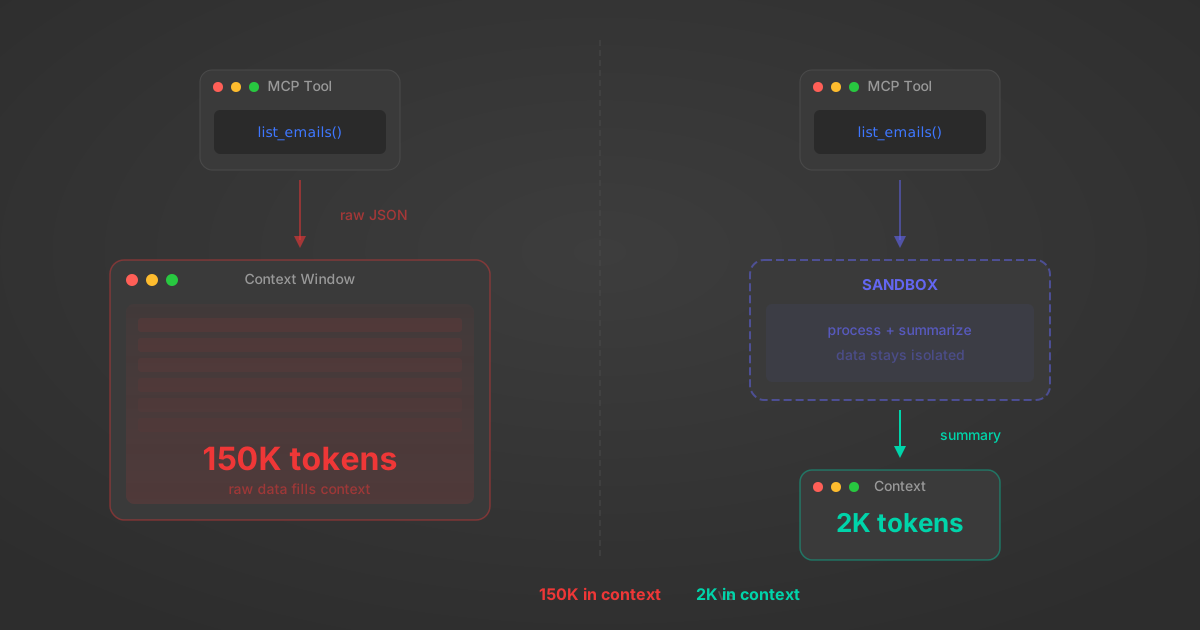
MCP Code Mode: Keeping Tool Responses Out of Agent Context
Anthropic's code_execution processes data already in context. Custom MCP code mode keeps raw tool responses in a sandbox. 14K tokens vs 500.
11 min
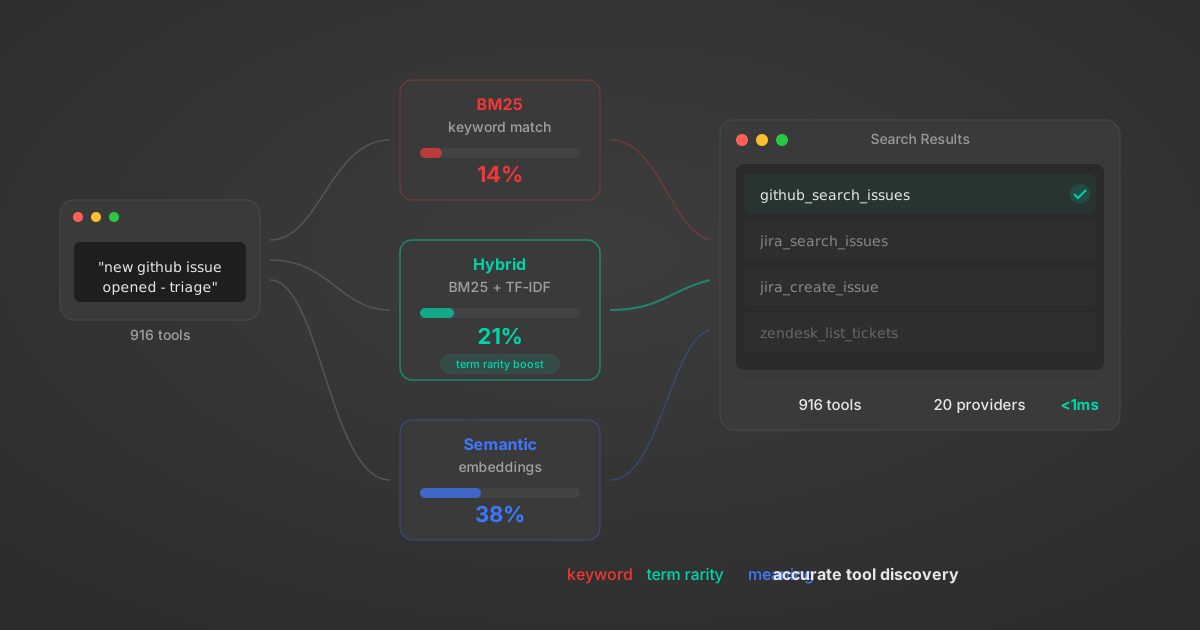
Comparing BM25, TF-IDF, and Hybrid Search for MCP Tool Discovery
Benchmarking BM25, TF-IDF, and hybrid search for MCP tool discovery across 916 tools. The 80/20 TF-IDF/BM25 hybrid hits 21% Top-1 accuracy in under 1ms.
10 min
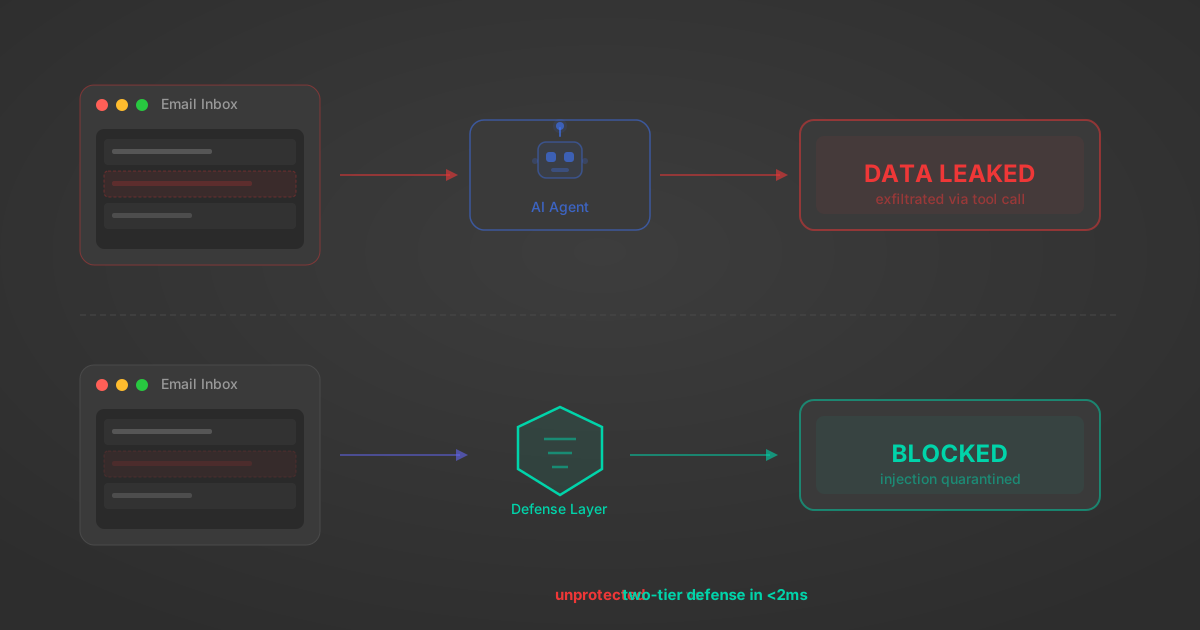
Indirect Prompt Injection Defense for MCP Tools: A Technical Guide
MCP tools that read emails, CRM records, and tickets are indirect prompt injection vectors. Here's how we built a two-tier defense that scans tool results in ~11ms.
12 min
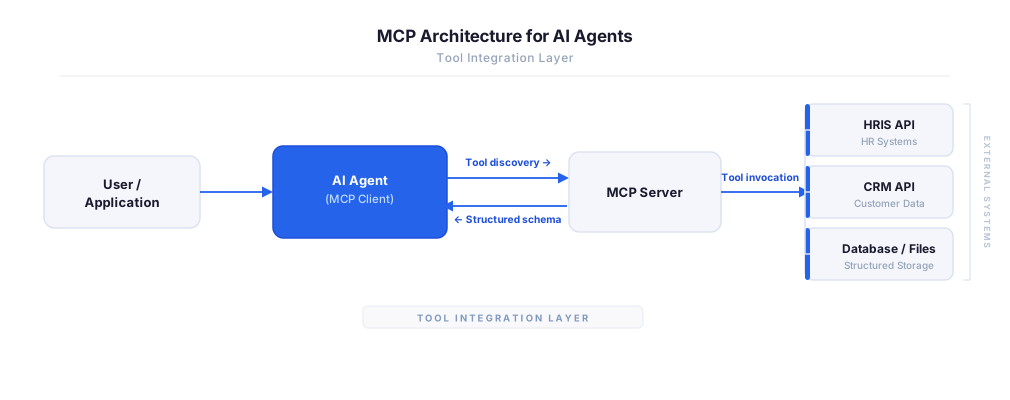
MCP vs A2A: Architecture, Security, and When to Use Each
MCP vs A2A: what each protocol standardizes, how they differ, their shared security risks including indirect prompt injection, and when to use one, both, or a hybrid architecture.
12 min
MCP vs API: What Hundreds of Connector Builds Taught Us
MCP wraps APIs, it doesn't replace them. After building hundreds of connectors that serve both, here's when each approach wins.
14 min read
ClickUp MCP Server FAQ
Does StackOne have a ClickUp MCP server?
ClickUp MCP server vs direct API integration — what's the difference?
How does ClickUp authentication work for AI agents?
origin_owner_id.Are ClickUp MCP tools vulnerable to prompt injection?
What is the context bloat of a ClickUp agent and how do I avoid it?
Can I limit which actions my ClickUp agent can access?
Can I create custom agent actions for my ClickUp MCP server?
When should I NOT use a ClickUp MCP server?
What AI frameworks and AI clients does the StackOne ClickUp MCP server support?
Put your AI agents to work
All the tools you need to build and scale AI agent integrations, with best-in-class connectivity, execution, and security.