
Cloudways MCP Server
for AI Agents
Connect your AI agent to StackOne's Cloudways MCP server and give it 82 MCP tools out of the box. Auth, tool execution, and security all managed.
 StackOne






Coverage
82 Agent Actions
Create, read, update, and delete across Cloudways — and extend your agent's capabilities with custom actions.

Authentication
Agent Tool Authentication
Per-user OAuth in one call. Your Cloudways MCP server gets session-scoped tokens with zero credentials stored on your infra.
Agent Auth →
Security
Agent Protection
Every Cloudways tool response scanned for prompt injection in milliseconds — 88.7% accuracy, all running on CPU.
Prompt Injection Defense →
Performance
Max Agent Context. Min Cost.
Free up to 96% of your agent's context window to enhance reasoning and reduce cost, on every Cloudways call.
Tools Discovery →What is the Cloudways MCP Server?
A Cloudways MCP server lets AI agents read and write Cloudways data through the Model Context Protocol — Anthropic's open standard for connecting LLMs to external tools. StackOne's Cloudways MCP server ships with 82 pre-built actions, fully extensible via the Connector Builder — plus managed authentication, prompt injection defense, observability, and agent execution runtime. Connect it from MCP clients like Claude Desktop, Claude Code, Cursor, Goose, and VS Code, or from agent frameworks like OpenAI Agents SDK, LangChain, and Vercel AI SDK.
All Cloudways MCP Tools
Every action from Cloudways's API, ready for your agent. Create, read, update, and delete — scoped to exactly what you need.
Alert Channels
- Create Alert Channel
Create a new CloudwaysBot notification channel to receive alerts via email, Slack, or webhook integration
- List Alert Channels
Retrieve all configured CloudwaysBot notification channels (email, Slack, webhook) for your account
- Update Alert Channel
Update an existing CloudwaysBot notification channel's configuration including its name, delivery type, subscribed events, active status, and destination targets.
- Delete Alert Channel
Permanently delete a CloudwaysBot notification channel, stopping all future alert deliveries through it
Applications
- Add Application
Deploy a new application (WordPress, Laravel, PHP, Magento, etc.) to an existing Cloudways server via POST /app
- Clone Application
Clone an application to the same Cloudways server with a new label via POST /app/clone
- List Applications
Retrieve a list of all applications deployed across all servers in the Cloudways account via GET /apps
- Delete Application
Permanently delete an application and all its data from a Cloudways server via DELETE /app/{app_id}
Application Credentials
- Create Application Credentials
Create a new set of access credentials (username and password) for a Cloudways application via POST /app/creds.
- Get Application Credentials
Retrieve access credentials (admin URL, username, password) for a Cloudways application via GET /app/creds
- Update Application Credential
Update an existing set of access credentials (username and password) for a Cloudways application via PUT /app/creds/{app_cred_id}.
- Delete Application Credential
Permanently delete a specific set of access credentials from a Cloudways application via DELETE /app/creds/{app_cred_id}.
Cron Jobs
- Get Cron Jobs
Retrieve all configured cron jobs for a Cloudways application via GET /app/manage/cronList
- Update Cron Jobs
Replace the entire cron job configuration for a Cloudways application via POST /app/manage/cronList
FPM Settings
- Get FPM Settings
Retrieve the PHP-FPM (FastCGI Process Manager) configuration settings for a specific application via GET /app/manage/fpm_setting.
- Update FPM Settings
Update the PHP-FPM (FastCGI Process Manager) configuration for a specific application via POST /app/manage/fpm_setting.
Supervisord Queues
- Create Supervisord Queue
Create a new Supervisor daemon-managed background queue worker for a Cloudways application, commonly used for Laravel queue processing, job dispatching, and long-running background tasks.
- Get Supervisord Queues
Retrieve all Supervisord-managed background queue worker configurations for a Cloudways application, showing active queue processes, their connection drivers, worker counts, and runtime settings.
Projects
- Create Project
Create a new project to logically group and organize applications and servers on your Cloudways account
- List Projects
Retrieve all projects in your Cloudways account, including their associated applications and server assignments
- Update Project
Update a project's name or reassign its applications to reorganize your Cloudways infrastructure
- Delete Project
Delete a project from your Cloudways account without affecting the applications or servers it contained
Servers
- Create Server
Launch a new managed cloud server on a specified provider (DigitalOcean, Vultr, AWS, GCE, or Linode) via POST /server.
- Clone Server
Clone an existing server and its application to a different cloud provider or region via POST /server/cloneServer.
- List Servers
Retrieve a list of all servers in your Cloudways account with their full configuration details via GET /server.
- Delete Server
Permanently delete a server and all its applications from your Cloudways account via DELETE /server/{server_id}.
Server Settings
- Get Server Settings
Retrieve all configurable settings for a specific server including PHP, MySQL, and web server tuning via GET /server/manage/settings.
- Update Server Settings
Update PHP, MySQL, and web server configuration settings for a specific server via POST /server/manage/settings.
Varnish Settings
- Get Varnish Settings
Retrieve the Varnish cache configuration and VCL settings for a specific application on a server via GET /app/manage/varnish_setting.
- Update Varnish Settings
Update the Varnish cache VCL (Varnish Configuration Language) rules for an application on a server via POST /app/manage/varnish_setting.
SSH Keys
- Create SSH Key
Upload an SSH public key to a Cloudways server, associating it with a specific application credential for secure shell access
- Update SSH Key
Rename an existing SSH key on a Cloudways server to update its human-readable label
- Delete SSH Key
Remove an SSH key from a Cloudways server, immediately revoking the associated shell access
Other (49)
- Clone Application To Another Server
Clone an application to a different Cloudways server in the same account via POST /app/cloneToOtherServer
- Clone Staging Application
Clone an application to create a staging copy on the same server via POST /staging/app/cloneApp, enabling safe testing of changes before deploying to production.
- List Alerts
Retrieve all CloudwaysBot alert notifications for your account including server events, security warnings, and operational advisories
- Get Git SSH Key
Retrieve the SSH public key that Cloudways generated for Git-based deployments on a specific application, so it can be added as a deploy key in the remote repository
- Get Git Branches
List all branch names from a remote Git repository accessible by the application's SSH key
- Get Git Deployment History
Retrieve the chronological history of all Git deployments (clones and pulls) for an application, including timestamps and commit details
- List Cloud Providers
Retrieve all supported cloud infrastructure providers available on Cloudways for server provisioning, including DigitalOcean, Vultr, AWS, Google Cloud, and Linode.
- List Regions
Retrieve all available geographic regions across cloud providers where Cloudways servers can be deployed, used for selecting deployment location during server creation.
- List Server Sizes
Retrieve all available server sizes and instance types across cloud providers, including CPU, RAM, storage, and bandwidth specifications for capacity planning.
- List Application Types
Retrieve all deployable application types on Cloudways, including WordPress, Laravel, Magento, PHP, and other supported web application frameworks and CMS platforms.
- List Packages
Retrieve all available server software packages and their supported versions, such as PHP, MySQL, Apache, Nginx, Redis, and other stack components configurable on Cloudways servers.
- List Settings
Retrieve all configurable server and application settings with their allowed values, used as a reference for understanding which parameters can be tuned on Cloudways infrastructure.
- List Backup Frequencies
Retrieve all available backup scheduling frequency options for Cloudways servers, used when configuring automated backup policies.
- Get Operation Status
Check the current status of an asynchronous Cloudways operation by its operation ID, used to poll long-running tasks like server creation, cloning, scaling, or application deployment.
- Search Knowledge Base
Search the Cloudways knowledge base articles by title keyword to find relevant help documentation, troubleshooting guides, and platform tutorials.
- Get Countries List
Retrieve the complete list of countries supported by Cloudways, typically used for billing address configuration, account registration, and regional compliance settings.
- Get Monitor Durations
Retrieve all available monitoring duration options that define the time range for server and application performance monitoring data on the Cloudways platform.
- Get Monitor Targets
Retrieve all available monitoring target metrics (CPU, RAM, disk, bandwidth, etc.) that can be tracked for servers and applications on the Cloudways platform.
- Get Monitoring Graph
Retrieve time-series monitoring metrics (CPU, RAM, disk, or bandwidth) for a Cloudways server over a specified duration
- Get Disk Usage
Retrieve current disk usage statistics for a Cloudways server including total, used, and available space
- Get Whitelisted IPs For SSH/SFTP
Retrieves the full list of IP addresses currently whitelisted for SSH and SFTP access on a Cloudways server, useful for auditing access controls.
- Get Whitelisted IPs For MySQL
Retrieves the full list of IP addresses currently whitelisted for remote MySQL database connections on a Cloudways server.
- Get Service Status
Retrieve the running status of all managed services on a Cloudways server including Apache, Nginx, MySQL, PHP-FPM, Memcached, Varnish, and Redis
- Update Application Label
Update the display label of an application on a Cloudways server via PUT /app/{app_id}
- Update Application Domain Aliases
Update the domain aliases (additional custom domains) for a Cloudways application via POST /app/manage/aliases
- Update Application CNAME
Set or update the CNAME (canonical domain name) for a Cloudways application via POST /app/manage/cname.
- Update Application Webroot
Change the webroot directory path for a Cloudways application via POST /app/manage/webroot.
- Update Whitelisted IPs
Adds or removes a single IP address from the SSH/SFTP or MySQL whitelist on a Cloudways server, controlling remote access to the server.
- Update SSL Certificate
Uploads and installs a custom (non-Let's Encrypt) SSL certificate and its CA bundle on a Cloudways application for HTTPS.
- Update Server Label
Update the display label of a server for organizational purposes via PUT /server/{server_id}.
- Update Backup Settings
Configure automated backup settings for a server including local backup storage, backup frequency, and retention period via POST /server/manage/backupSettings.
- Update Server Package
Update a specific software package on a server to a target version via POST /server/manage/package.
- Mark Alert As Read
Mark a CloudwaysBot alert as read to acknowledge it and remove it from the unread notifications list
- Mark All Alerts As Read
Mark all CloudwaysBot alert notifications as read in a single bulk operation, acknowledging all pending alerts and clearing the unread notifications list.
- Restore Application
Restore an application from a previously created backup to a specific point in time via POST /app/manage/restore.
- Change Application Access State
Enable or disable public access to a Cloudways application by toggling its access state via POST /app/state.
- Generate Git SSH Key
Generate a new SSH key pair for Git deployments on an application, replacing any existing key
- Git Clone
Clone a remote Git repository branch into the application's deploy path for the initial code deployment
- Git Pull
Pull the latest commits from a remote Git branch into the application's deploy path to update the deployed code
- Install Let's Encrypt SSL
Provisions and installs a free Let's Encrypt SSL certificate for one or more domains on a Cloudways-hosted application, supporting both single-domain and wildcard certificates.
- Revoke Let's Encrypt SSL
Revokes and removes a previously installed Let's Encrypt SSL certificate from a Cloudways application, disabling HTTPS for the specified domain.
- Start Server
Start a stopped server to resume hosting and make all its applications accessible again via POST /server/start.
- Stop Server
Stop a running server to halt all hosted applications and services via POST /server/stop.
- Restart Server
Restart a running server to apply configuration changes or recover from issues via POST /server/restart.
- Upgrade Server
Vertically scale a server to a larger instance type for more CPU, RAM, and disk via POST /server/scaleServer.
- Scale Server Resources
Scale a server's compute resources by changing its instance type via POST /server/scaleResources.
- Backup Server
Trigger an on-demand backup of a server and all its applications and databases via POST /server/manage/backup.
- Scale Server Volume Size
Scale the storage volume size and type for a server to increase or adjust disk capacity via POST /server/scaleVolume.
- Change Service State
Start, stop, or restart a specific managed service (Apache, Nginx, MySQL, PHP-FPM, Memcached, Varnish, or Redis) on a Cloudways server
Set Up Your Cloudways MCP Server in Minutes
One endpoint. Any framework. Your agent is talking to Cloudways in under 10 lines of code.
Agent Frameworks


 JSON
JSON{
"mcpServers": {
"stackone": {
"command": "npx",
"args": [
"-y",
"mcp-remote@latest",
"https://api.stackone.com/mcp?x-account-id=<account_id>",
"--header",
"Authorization: Basic <YOUR_BASE64_TOKEN>"
]
}
}
}Check More Developer Tools MCP Servers
185+ actions
150+ actions
142+ actions
138+ actions
138+ actions
136+ actions
130+ actions
Platform Resources
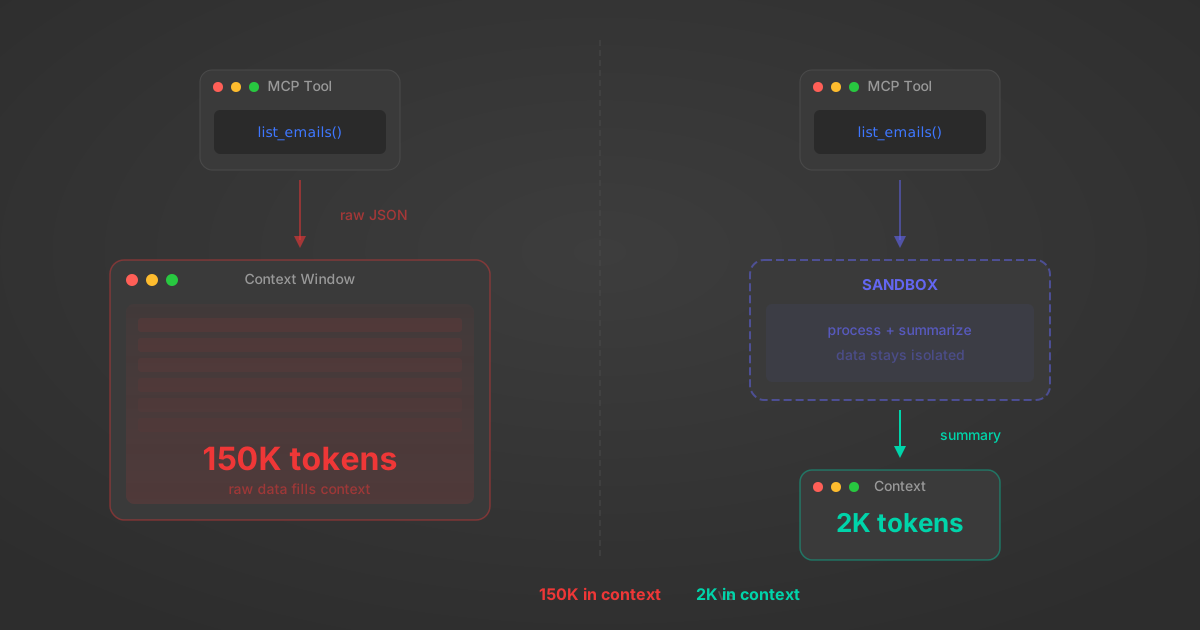
MCP Code Mode: Keeping Tool Responses Out of Agent Context
Anthropic's code_execution processes data already in context. Custom MCP code mode keeps raw tool responses in a sandbox. 14K tokens vs 500.
11 min
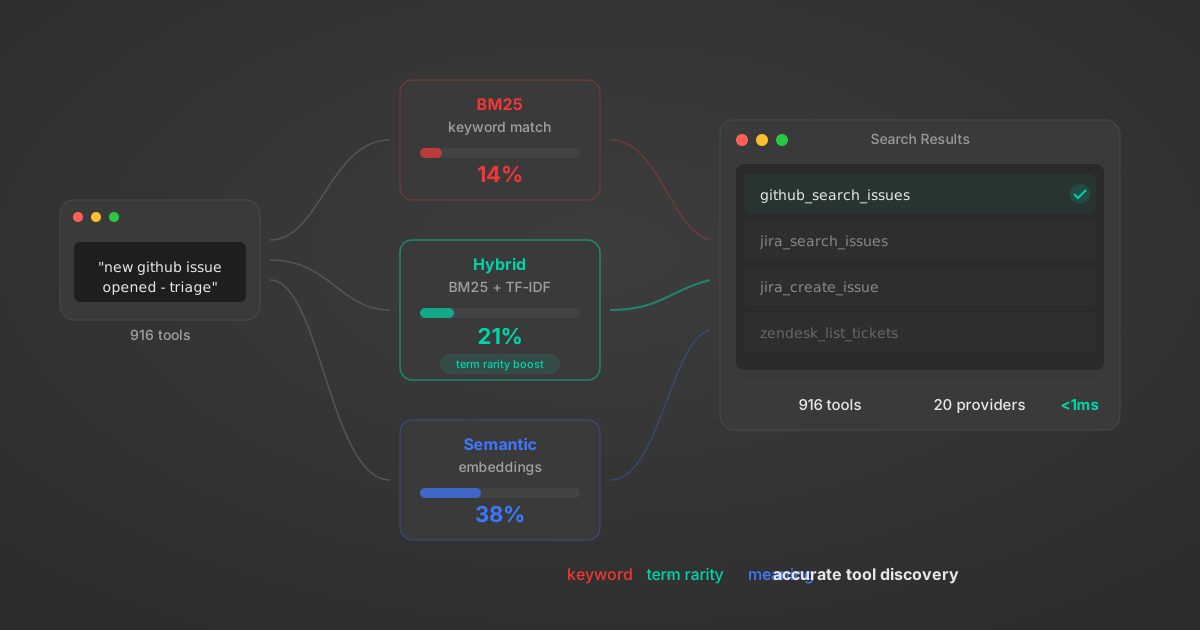
Comparing BM25, TF-IDF, and Hybrid Search for MCP Tool Discovery
Benchmarking BM25, TF-IDF, and hybrid search for MCP tool discovery across 916 tools. The 80/20 TF-IDF/BM25 hybrid hits 21% Top-1 accuracy in under 1ms.
10 min
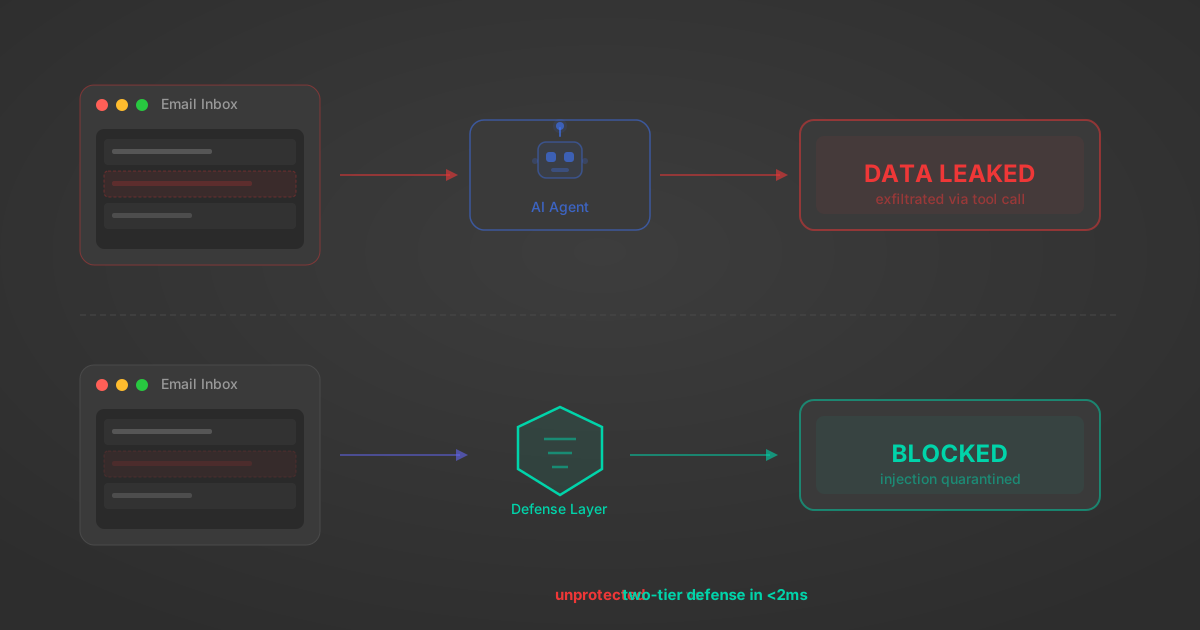
Indirect Prompt Injection Defense for MCP Tools: A Technical Guide
MCP tools that read emails, CRM records, and tickets are indirect prompt injection vectors. Here's how we built a two-tier defense that scans tool results in ~11ms.
12 min
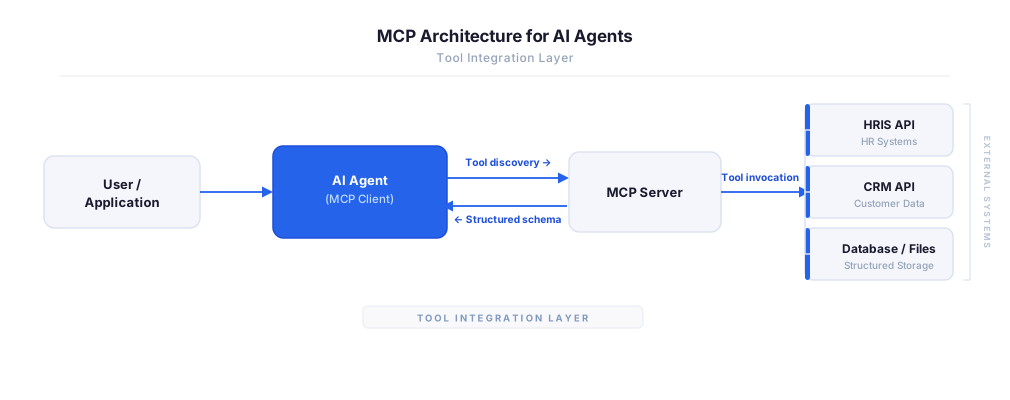
MCP vs A2A: Architecture, Security, and When to Use Each
MCP vs A2A: what each protocol standardizes, how they differ, their shared security risks including indirect prompt injection, and when to use one, both, or a hybrid architecture.
12 min
MCP vs API: What Hundreds of Connector Builds Taught Us
MCP wraps APIs, it doesn't replace them. After building hundreds of connectors that serve both, here's when each approach wins.
14 min read
Cloudways MCP Server FAQ
Does StackOne have a Cloudways MCP server?
Cloudways MCP server vs direct API integration — what's the difference?
How does Cloudways authentication work for AI agents?
origin_owner_id.Are Cloudways MCP tools vulnerable to prompt injection?
What is the context bloat of a Cloudways agent and how do I avoid it?
Can I limit which actions my Cloudways agent can access?
Can I create custom agent actions for my Cloudways MCP server?
When should I NOT use a Cloudways MCP server?
What AI frameworks and AI clients does the StackOne Cloudways MCP server support?
Put your AI agents to work
All the tools you need to build and scale AI agent integrations, with best-in-class connectivity, execution, and security.