
Docebo MCP Server
for AI Agents
Connect your AI agent to StackOne's Docebo MCP server and give it 56 MCP tools out of the box. Auth, tool execution, and security all managed.
 StackOne






Coverage
56 Agent Actions
Create, read, update, and delete across Docebo — and extend your agent's capabilities with custom actions.

Authentication
Agent Tool Authentication
Per-user OAuth in one call. Your Docebo MCP server gets session-scoped tokens with zero credentials stored on your infra.
Agent Auth →
Security
Agent Protection
Every Docebo tool response scanned for prompt injection in milliseconds — 88.7% accuracy, all running on CPU.
Prompt Injection Defense →
Performance
Max Agent Context. Min Cost.
Free up to 96% of your agent's context window to enhance reasoning and reduce cost, on every Docebo call.
Tools Discovery →What is the Docebo MCP Server?
A Docebo MCP server lets AI agents read and write Docebo data through the Model Context Protocol — Anthropic's open standard for connecting LLMs to external tools. StackOne's Docebo MCP server ships with 56 pre-built actions, fully extensible via the Connector Builder — plus managed authentication, prompt injection defense, observability, and agent execution runtime. Connect it from MCP clients like Claude Desktop, Claude Code, Cursor, Goose, and VS Code, or from agent frameworks like OpenAI Agents SDK, LangChain, and Vercel AI SDK.
All Docebo MCP Tools
Every action from Docebo's API, ready for your agent. Create, read, update, and delete — scoped to exactly what you need.
Users
- Create User
Create a new user in the Docebo platform with username, email, and password
- List Users
Retrieve a list of all users in the Docebo platform with optional filtering and pagination. The search_text parameter is a partial text match across multiple fields (username, firstname, lastname, email) - it is NOT a domain or field-specific filter, so a value like '@example.com' matches that substring anywhere in any searchable field, not only the email domain. To find users by email domain (e.g. addresses ending in @example.com), paginate through all users and filter client-side by email suffix rather than relying on search_text.
- Get User
Retrieve detailed information for a specific user by their Docebo user ID
- Update User
Update an existing user's information in the Docebo platform
- Batch Import Users
Import or update multiple users in the Docebo platform in a single batch operation
- Batch Delete Users
Delete multiple users by user IDs in a single batch operation
- Delete User
Delete a user from the Docebo platform
Courses
- Create Course
Create a new course in the Docebo platform
- List Courses
Retrieve a list of all courses in the Docebo platform with optional filtering and pagination
- Get Course
Retrieve detailed information for a specific course by ID
- Update Course
Update an existing course in the Docebo platform with comprehensive settings including enrollment options, time options, player settings, and more
- Batch Import Courses
Import multiple courses in a single batch operation
- Delete Course
Delete a course from the Docebo platform
Enrollments
- Create Enrollment
Enroll a user in a course with optional level, validity dates, session assignment, and custom enrollment fields
- Get Enrollment
Retrieve enrollment details for a specific user in a specific course. Returns a single enrollment record with dates, status, completion time, and score. Both course ID and user ID are required
- Update Enrollment
Update an existing enrollment with comprehensive options including dates, status, level, session assignment, and custom fields
- Batch Import Enrollments
Import multiple enrollments in a single batch operation. Each item requires enrollment_date (YYYY-MM-DD format). Supports comprehensive options including status, scores, and assignment types
- Delete Enrollment
Un-enroll one or more users from one or more courses or learning plans, with options to reset learning tracks and delete issued certificates
Learning Plans
- Create Learning Plan
Create a new learning plan in the Docebo platform
- List Learning Plans
Retrieve a list of all learning plans in the Docebo platform
- Get Learning Plan
Retrieve detailed information for a specific learning plan by ID
- Update Learning Plan
Update an existing learning plan in the Docebo platform
- Delete Learning Plan
Delete a learning plan from the Docebo platform
Learning Objects
- Create Learning Objects
Create multiple learning objects (training materials) in a single batch operation. Per item, lo_type selects which content field to send - use lo_url for video (YouTube ok), scorm (SCORM .zip URL), tincan and aicc; use lo_filename ONLY for file. lo_filename and lo_url are mutually exclusive - never set both on the same item. IMPORTANT - the options.s3_* block is BATCH-scoped, not per item; when present, EVERY item in the call is routed through the S3 file-import path, so any lo_url item in the same call fails with 'Input file does not exist'. Never mix lo_url items with lo_filename items in one call - send file (lo_filename) items in their own batch WITH real, working options.s3_* AWS credentials, and send lo_url items (video/scorm/tincan/aicc) in a separate batch WITHOUT any options block. IMPORTANT - this batch endpoint always returns HTTP 200 even when every item fails; you MUST inspect each entry in the response array (data[].success and data[].message) to detect per-item failures, since the outer status is not reliable. IMPORTANT - lo_thumbnail does NOT accept external/public image URLs; any reachable external URL is rejected item-level with 'Invalid thumbnail'. Omit lo_thumbnail on batch import and set the thumbnail afterwards via Docebo's own pre-uploaded-image mechanism (see the lo_thumbnail field description).
- Get Learning Object
Retrieve detailed information for a specific learning object (training material) by ID, including title, description, type, visibility, and associated course
Categorys
- Create Category
Create a new course category in the Docebo platform
- Get Category
Retrieve detailed information for a specific category by ID
- Update Category
Update an existing category in the Docebo platform
- Delete Category
Delete a category from the Docebo platform
Sessions
- List Sessions
Retrieve a list of ILT (Instructor-Led Training) sessions for a classroom course in the Docebo platform
- Get Session
Retrieve detailed information for a specific ILT session including instructors, dates, and enrollment settings
- Delete Session
Delete an ILT session from a course in the Docebo platform
Locations
- Create Location
Create a new ILT location in the Docebo platform for scheduling training sessions
- List Locations
Retrieve a list of all ILT locations in the Docebo platform with optional sorting and pagination
- Update Location
Update an existing ILT location in the Docebo platform
- Delete Location
Delete an ILT location from the Docebo platform
Branches
- List Branches
Retrieve a PAGINATED list of branches of given or root level in the Docebo platform. Returns up to page_size branches per page (default page 1); inspect has_more_data in the response and increment the page parameter to fetch subsequent pages until has_more_data is false to obtain the complete dataset. When the request asks for the complete, full, or entire hierarchy/list, keep paginating through every page automatically until has_more_data is false before responding - do not stop after the first page or pause to ask whether to continue. Set flattened=true to return the complete subtree (all descendant branches) of the selected node rather than only the direct level.
- Batch Create Branches
Create or update multiple organizational branches in a single batch operation
- Batch Delete Branches
Delete multiple organizational branches in a single batch operation
Branchs
- Create Branch
Create a new organizational branch in the Docebo platform
- Get Branch
Get details of a selected branch by its numeric branch ID (branch_id). It does NOT accept a branch name - passing a name returns 404. To resolve a branch by name, use list_branches with search_text to find the branch, then pass its numeric id here (or set use_secondary_identifier=true to look up by the branch's secondary code identifier).
- Update Branch
Update selected branch in the Docebo platform
- Delete Branch
Delete an organizational branch from the Docebo platform
Other (13)
- Send User Message
Send a message to a user
- Get User Settings
Get setting information about a specific user
- Get Course Learning Objects
Retrieve all learning objects (training materials) for a specific course
- Get Course Enrollments
Retrieve all enrollments associated with a specific course with filtering by status, level, branch, group, and more
- List Certifications
Retrieve a list of all certifications in the Docebo platform
- List Categories
Retrieve a list of all course categories in the Docebo platform
- Get Child Categories
Retrieve child categories for a specific parent category by numeric category ID. Returns a 400 error (not an empty list) when the parent category has no children, so check the parent's has_child flag from list_categories first and only call this when has_child is true; if has_child is false, treat it as an empty set rather than calling this action.
- Get Session Enrollments
Retrieve all enrollments for a specific ILT session with filtering and pagination options
- Get Branch Users
Retrieve information about a branch's users
- Batch Import User Certifications
Import certifications for multiple users in a single batch operation
- Enroll User In Learning Plan
Enroll a single user in a learning plan
- Unenroll User From Learning Plan
Unenroll a user from a learning plan
- Assign Users To Branch
Assign users to an organizational branch
Set Up Your Docebo MCP Server in Minutes
One endpoint. Any framework. Your agent is talking to Docebo in under 10 lines of code.
Agent Frameworks


 JSON
JSON{
"mcpServers": {
"stackone": {
"command": "npx",
"args": [
"-y",
"mcp-remote@latest",
"https://api.stackone.com/mcp?x-account-id=<account_id>",
"--header",
"Authorization: Basic <YOUR_BASE64_TOKEN>"
]
}
}
}Check More Learning / LMS MCP Servers
122+ actions
111+ actions
100+ actions
79+ actions
78+ actions
72+ actions
69+ actions
Platform Resources
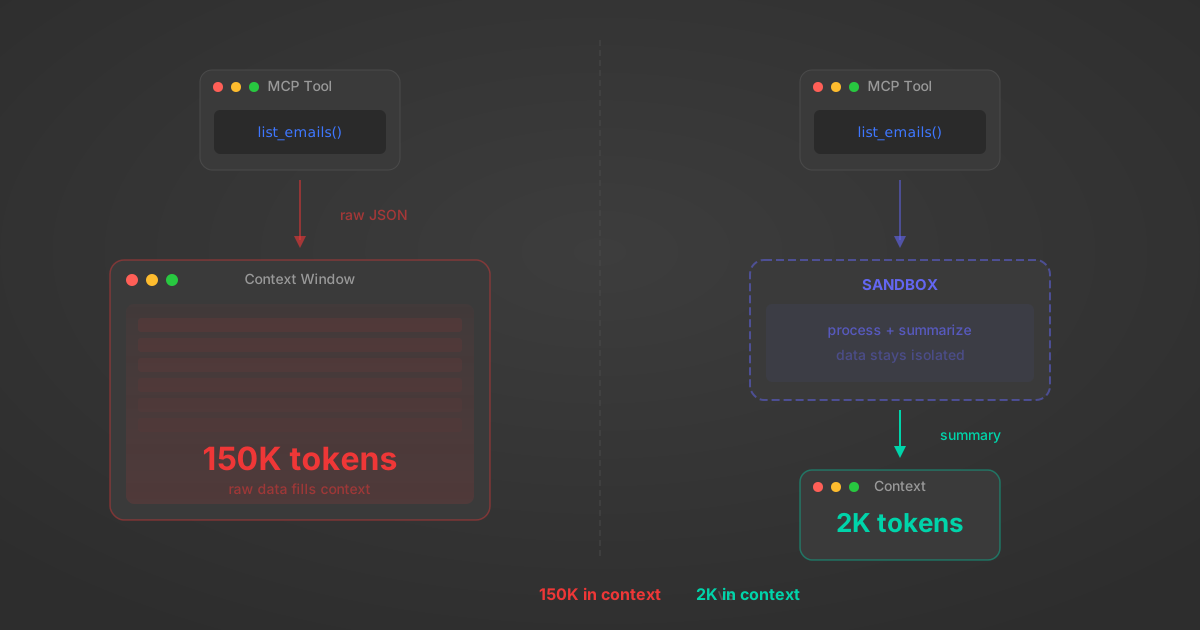
MCP Code Mode: Keeping Tool Responses Out of Agent Context
Anthropic's code_execution processes data already in context. Custom MCP code mode keeps raw tool responses in a sandbox. 14K tokens vs 500.
11 min
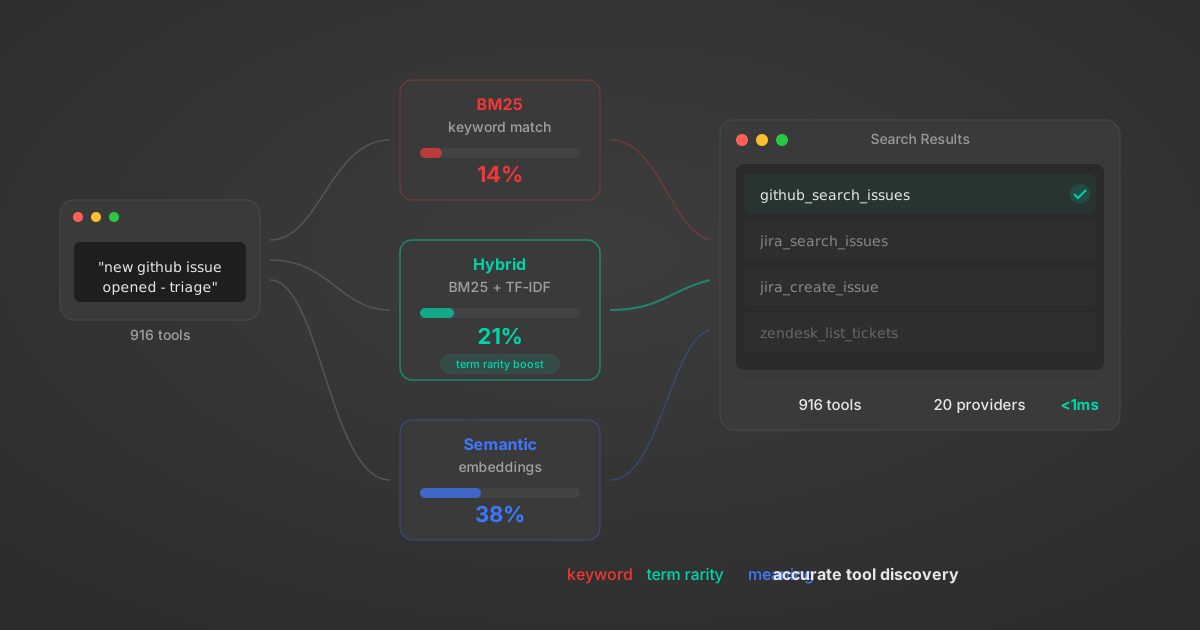
Comparing BM25, TF-IDF, and Hybrid Search for MCP Tool Discovery
Benchmarking BM25, TF-IDF, and hybrid search for MCP tool discovery across 916 tools. The 80/20 TF-IDF/BM25 hybrid hits 21% Top-1 accuracy in under 1ms.
10 min
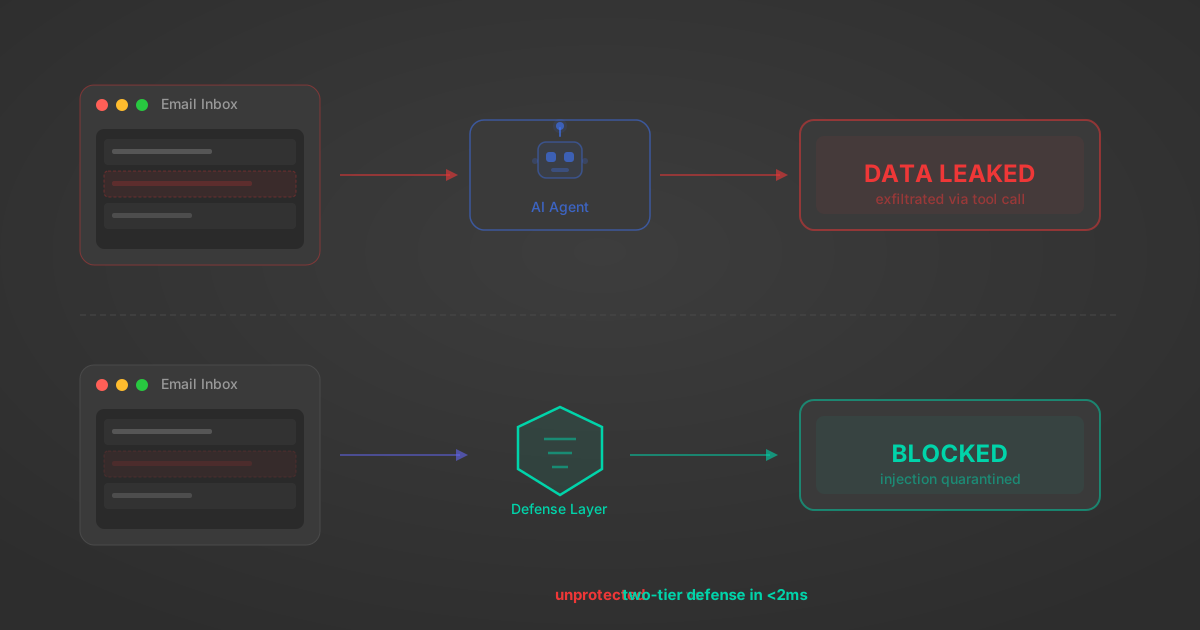
Indirect Prompt Injection Defense for MCP Tools: A Technical Guide
MCP tools that read emails, CRM records, and tickets are indirect prompt injection vectors. Here's how we built a two-tier defense that scans tool results in ~11ms.
12 min
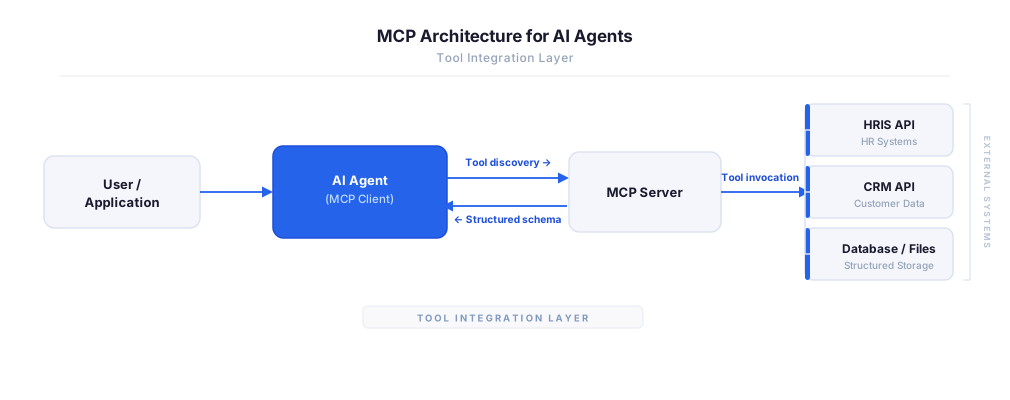
MCP vs A2A: Architecture, Security, and When to Use Each
MCP vs A2A: what each protocol standardizes, how they differ, their shared security risks including indirect prompt injection, and when to use one, both, or a hybrid architecture.
12 min
MCP vs API: What Hundreds of Connector Builds Taught Us
MCP wraps APIs, it doesn't replace them. After building hundreds of connectors that serve both, here's when each approach wins.
14 min read
Docebo MCP Server FAQ
Does StackOne have a Docebo MCP server?
Docebo MCP server vs direct API integration — what's the difference?
How does Docebo authentication work for AI agents?
origin_owner_id.Are Docebo MCP tools vulnerable to prompt injection?
What is the context bloat of a Docebo agent and how do I avoid it?
Can I limit which actions my Docebo agent can access?
Can I create custom agent actions for my Docebo MCP server?
When should I NOT use a Docebo MCP server?
What AI frameworks and AI clients does the StackOne Docebo MCP server support?
Put your AI agents to work
All the tools you need to build and scale AI agent integrations, with best-in-class connectivity, execution, and security.