
Gmail MCP Server
for AI Agents
Connect your AI agent to StackOne's Gmail MCP server and give it 42 MCP tools out of the box. Auth, tool execution, and security all managed.
 StackOne






Coverage
42 Agent Actions
Create, read, update, and delete across Gmail — and extend your agent's capabilities with custom actions.

Authentication
Agent Tool Authentication
Per-user OAuth in one call. Your Gmail MCP server gets session-scoped tokens with zero credentials stored on your infra.
Agent Auth →
Security
Agent Protection
Every Gmail tool response scanned for prompt injection in milliseconds — 88.7% accuracy, all running on CPU.
Prompt Injection Defense →
Performance
Max Agent Context. Min Cost.
Free up to 96% of your agent's context window to enhance reasoning and reduce cost, on every Gmail call.
Tools Discovery →What is the Gmail MCP Server?
A Gmail MCP server lets AI agents read and write Gmail data through the Model Context Protocol — Anthropic's open standard for connecting LLMs to external tools. StackOne's Gmail MCP server ships with 42 pre-built actions, fully extensible via the Connector Builder — plus managed authentication, prompt injection defense, observability, and agent execution runtime. Connect it from MCP clients like Claude Desktop, Claude Code, Cursor, Goose, and VS Code, or from agent frameworks like OpenAI Agents SDK, LangChain, and Vercel AI SDK.
All Gmail MCP Tools
Every action from Gmail's API, ready for your agent. Create, read, update, and delete — scoped to exactly what you need.
Drafts
- Create Draft
Create and save a new unsent email draft in Gmail using RFC 2822 formatted message content encoded as base64url, without sending it to recipients.
- Send Draft
Immediately send a previously saved draft email to all its recipients, removing it from the Drafts folder and placing the sent message in the Sent folder.
- List Drafts
Retrieve a paginated list of all draft emails saved in the authenticated user's Gmail account, returning draft IDs and basic message metadata for subsequent retrieval.
- Get Draft
Retrieve the full content of a specific draft email by its draft ID, with configurable response format to control the verbosity and structure of the data returned.
- Update Draft
Fully replace the content of an existing draft by providing a new RFC 2822 message payload, enabling changes to recipients, subject, body, attachments, or any other email fields.
- Delete Draft
Permanently and irrecoverably delete a draft email by its draft ID, removing it from the Drafts folder immediately with no trash step or recovery option.
Filters
- Create Filter
Create a new Gmail filter rule that automatically processes future incoming messages matching specified criteria, applying labels, archiving, forwarding, or removing other labels.
- List Filters
Retrieve all email filter rules configured in the Gmail account that automatically process incoming messages based on criteria like sender, subject, size, or custom search queries.
- Get Filter
Retrieve the complete configuration of a specific Gmail filter rule by its ID, including the full matching criteria definition and the action applied to messages that match.
- Delete Filter
Permanently remove a Gmail filter rule by its ID, immediately stopping all future automatic processing of incoming messages that previously matched the filter's criteria.
Labels
- Create Label
Create a new custom Gmail label for organizing email messages, with options to set its display name, sidebar visibility, message list visibility, and a color theme.
- List Labels
Retrieve the complete list of Gmail labels in the authenticated user's mailbox, including both built-in system labels and user-created custom labels with their IDs required for filtering and modifying messages.
- Get Label
Retrieve the complete metadata for a specific Gmail label by its ID, including message and thread counts, sidebar visibility settings, and color configuration if set.
- Update Label
Partially update an existing Gmail label's name, visibility settings, or color using a PATCH request that only modifies the fields explicitly provided, leaving all other properties unchanged.
- Delete Label
Permanently remove a custom Gmail label by its ID - all messages that had this label are preserved with the label stripped from them, and the label itself cannot be recovered.
Messages
- Send Message
Immediately send a new email message via Gmail by providing the complete RFC 2822 formatted message content encoded as a base64url string, delivering it directly to recipients without a draft step.
- List Messages
Retrieve a paginated list of email messages from the authenticated user's Gmail mailbox, returning message IDs and thread IDs that can be passed to get_message for full content retrieval.
- Get Message
Retrieve the complete content and metadata of a specific Gmail message by its ID, including all headers, body parts, and attachment references with MIME structure.
- Delete Message
Permanently and irreversibly delete a Gmail message by its ID, bypassing the Trash folder entirely - use trash_message instead if there is any chance recovery may be needed.
IMAP Settings
- Get IMAP Settings
Retrieve the current IMAP protocol settings for the Gmail account, including whether IMAP access is enabled for third-party email clients and how message deletion is handled by those clients.
- Update IMAP Settings
Update the Gmail IMAP protocol settings to enable or disable IMAP access for third-party email clients, and configure how those clients handle message deletion and folder size limits.
POP Settings
- Get POP Settings
Retrieve the current POP3 protocol settings for the Gmail account, showing which messages are accessible via POP3 and what happens to them in Gmail after a POP3 client downloads them.
- Update POP Settings
Update the Gmail POP3 protocol settings to control which messages are downloadable by POP3 clients and what disposition action is applied to those messages in Gmail after a POP3 client retrieves them.
Vacation Settings
- Get Vacation Settings
Retrieve the current vacation responder (out-of-office auto-reply) configuration, including whether it is active, the message content, the scheduled activation window, and recipient restriction policies.
- Update Vacation Settings
Enable, disable, or update the Gmail vacation responder (out-of-office auto-reply) with custom message content, an optional scheduled activation window, and restrictions to limit which senders receive the auto-reply.
Threads
- List Threads
Search and list email conversation threads from Gmail using full Gmail search syntax, with support for filtering by sender, label, date, attachment presence, and other criteria.
- Get Thread
Retrieve the complete email conversation thread including all messages in chronological order, with full MIME content, headers, body parts, and attachment references for each message.
- Delete Thread
Permanently and irreversibly delete an entire email thread and all its messages by thread ID, bypassing Trash - use trash_thread if there is any chance recovery might be needed.
Other (14)
- Get Attachment
Download the base64url-encoded binary content of a specific email attachment by providing the parent message ID and the attachment ID found in the message payload parts.
- List History
Retrieve a chronological log of all mailbox changes since a specific historyId checkpoint, enabling efficient incremental mailbox sync without re-fetching the entire inbox.
- List Forwarding Addresses
Retrieve all email forwarding addresses registered in the Gmail account settings, along with their verification status showing whether each address is authorized to receive forwarded emails.
- Get Forwarding Address
Retrieve the details and verification status of a specific email forwarding address registered in Gmail settings, confirming whether it is authorized to receive automatically forwarded emails.
- Get Auto-Forwarding Settings
Retrieve the current auto-forwarding configuration showing whether all incoming emails are being automatically forwarded to another address and what disposition action is applied to original messages after forwarding.
- List Send-As Aliases
Retrieve all send-as aliases configured for the Gmail account, including the primary address and any additional addresses the user is authorized to send from, along with their signatures and verification status.
- Get Send-As Alias
Retrieve the complete configuration of a specific send-as alias by its email address, including the sender display name, HTML email signature, reply-to address, and verification status.
- Get User Profile
Retrieve the authenticated user's Gmail profile including their primary email address, total mailbox message and thread counts, and the current historyId required to bootstrap an incremental mailbox sync via list_history.
- Modify Message
Add or remove Gmail labels on a specific message in a single call to star it, mark it as read or unread, move it to inbox, archive it, or apply and remove custom organization labels.
- Trash Message
Move a Gmail message to the Trash folder so it can be recovered within 30 days - a safe, reversible alternative to the permanent delete_message operation.
- Untrash Message
Restore a previously trashed Gmail message back to the inbox by removing the TRASH label and restoring INBOX, reversing a trash_message operation within the 30-day recovery window.
- Modify Thread
Apply or remove Gmail labels on every message in an entire conversation thread simultaneously, enabling efficient bulk operations like marking a full conversation as read, starring it, or archiving it.
- Trash Thread
Move an entire email conversation thread and all its messages to the Gmail Trash folder, where it can be recovered within 30 days before automatic permanent deletion.
- Untrash Thread
Restore a trashed email thread and all its messages back to the inbox by removing the TRASH label and restoring INBOX on all messages, reversing a trash_thread operation within the 30-day window.
Set Up Your Gmail MCP Server in Minutes
One endpoint. Any framework. Your agent is talking to Gmail in under 10 lines of code.
Agent Frameworks


 JSON
JSON{
"mcpServers": {
"stackone": {
"command": "npx",
"args": [
"-y",
"mcp-remote@latest",
"https://api.stackone.com/mcp?x-account-id=<account_id>",
"--header",
"Authorization: Basic <YOUR_BASE64_TOKEN>"
]
}
}
}Platform Resources
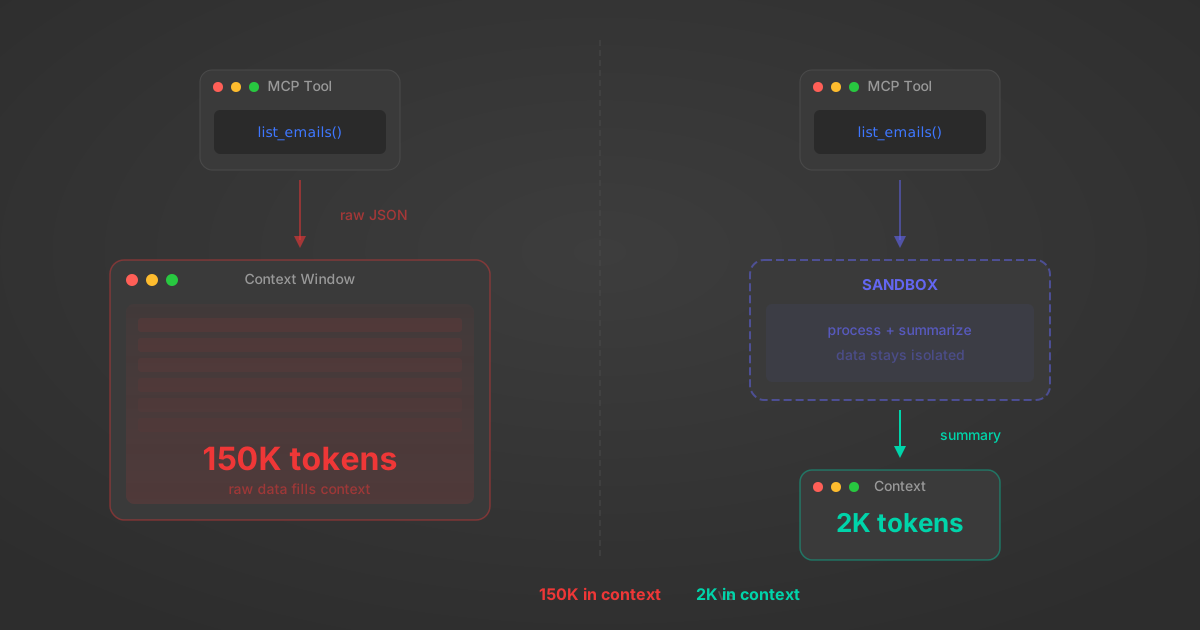
MCP Code Mode: Keeping Tool Responses Out of Agent Context
Anthropic's code_execution processes data already in context. Custom MCP code mode keeps raw tool responses in a sandbox. 14K tokens vs 500.
11 min
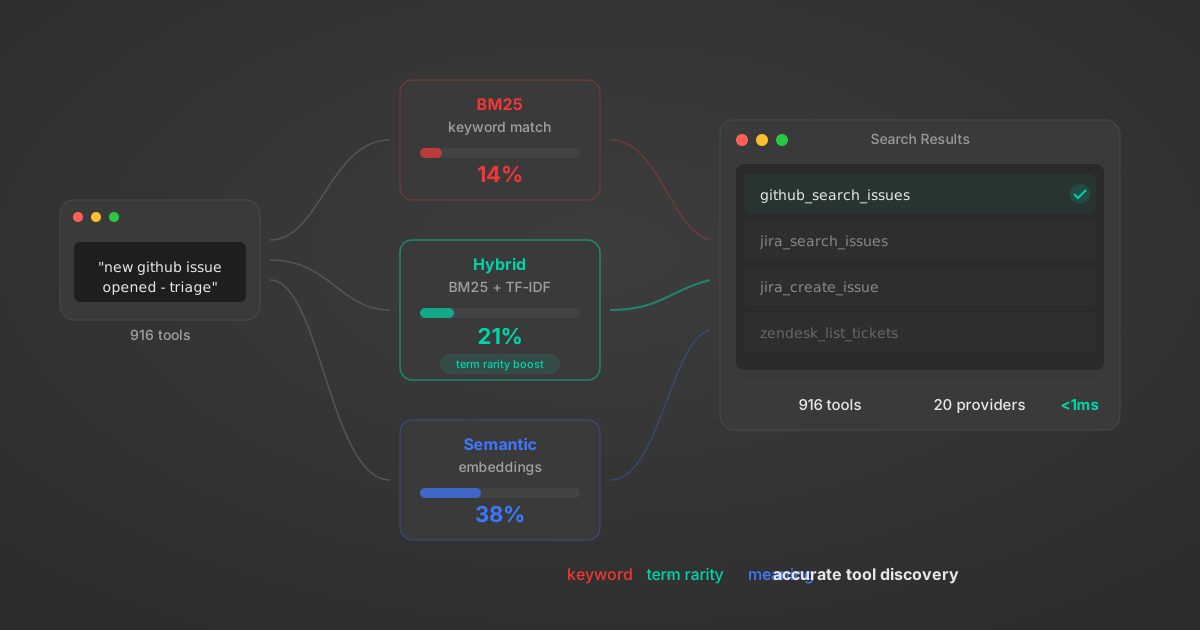
Comparing BM25, TF-IDF, and Hybrid Search for MCP Tool Discovery
Benchmarking BM25, TF-IDF, and hybrid search for MCP tool discovery across 916 tools. The 80/20 TF-IDF/BM25 hybrid hits 21% Top-1 accuracy in under 1ms.
10 min
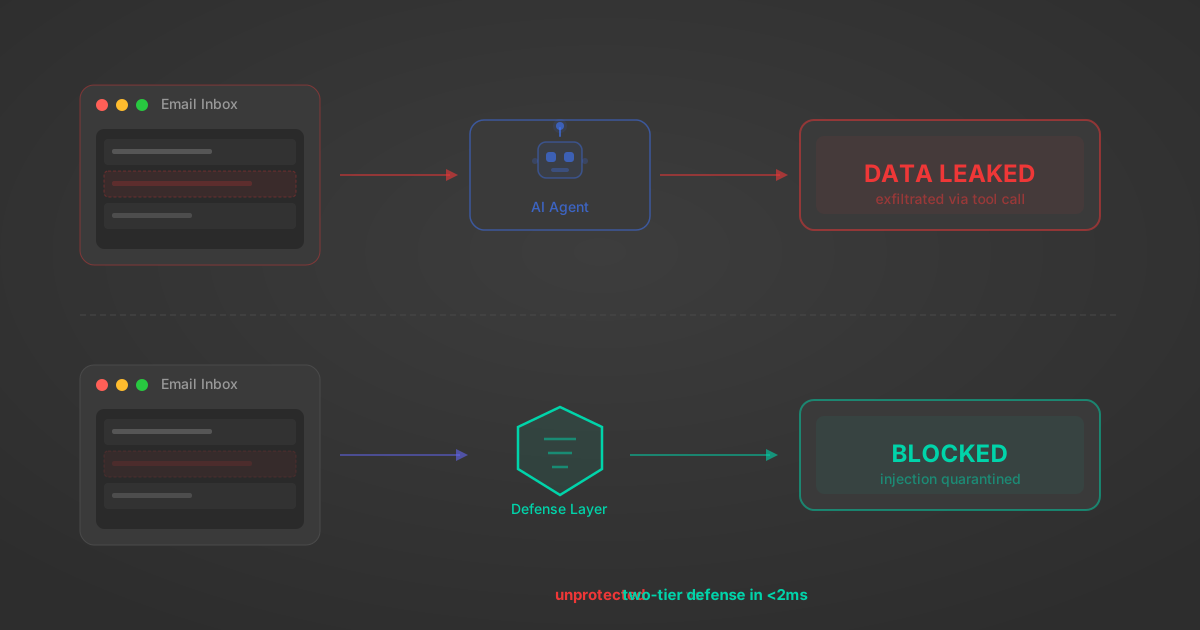
Indirect Prompt Injection Defense for MCP Tools: A Technical Guide
MCP tools that read emails, CRM records, and tickets are indirect prompt injection vectors. Here's how we built a two-tier defense that scans tool results in ~11ms.
12 min
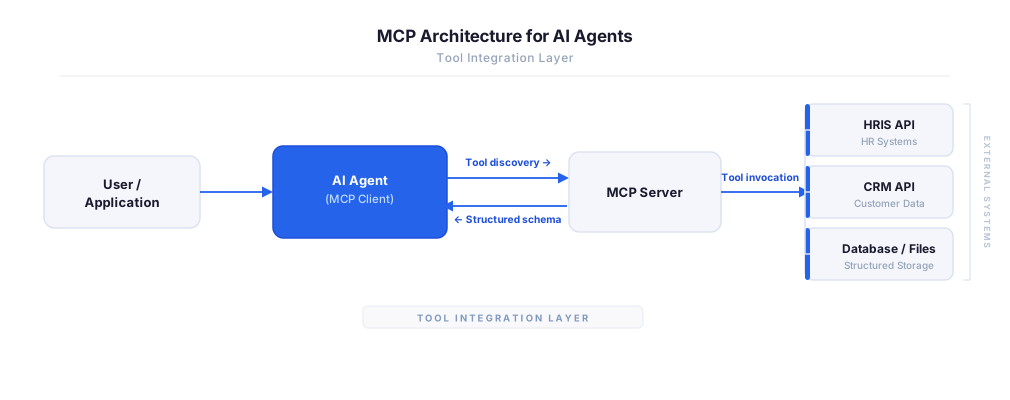
MCP vs A2A: Architecture, Security, and When to Use Each
MCP vs A2A: what each protocol standardizes, how they differ, their shared security risks including indirect prompt injection, and when to use one, both, or a hybrid architecture.
12 min
MCP vs API: What Hundreds of Connector Builds Taught Us
MCP wraps APIs, it doesn't replace them. After building hundreds of connectors that serve both, here's when each approach wins.
14 min read
Gmail MCP Server FAQ
Does StackOne have a Gmail MCP server?
Gmail MCP server vs direct API integration — what's the difference?
How does Gmail authentication work for AI agents?
origin_owner_id.Are Gmail MCP tools vulnerable to prompt injection?
What is the context bloat of a Gmail agent and how do I avoid it?
Can I limit which actions my Gmail agent can access?
Can I create custom agent actions for my Gmail MCP server?
When should I NOT use a Gmail MCP server?
What AI frameworks and AI clients does the StackOne Gmail MCP server support?
Put your AI agents to work
All the tools you need to build and scale AI agent integrations, with best-in-class connectivity, execution, and security.