
HR Cloud MCP Server
for AI Agents
Connect your AI agent to StackOne's HR Cloud MCP server and give it 64 MCP tools out of the box. Auth, tool execution, and security all managed.
 StackOne






Coverage
64 Agent Actions
Create, read, update, and delete across HR Cloud — and extend your agent's capabilities with custom actions.

Authentication
Agent Tool Authentication
Per-user OAuth in one call. Your HR Cloud MCP server gets session-scoped tokens with zero credentials stored on your infra.
Agent Auth →
Security
Agent Protection
Every HR Cloud tool response scanned for prompt injection in milliseconds — 88.7% accuracy, all running on CPU.
Prompt Injection Defense →
Performance
Max Agent Context. Min Cost.
Free up to 96% of your agent's context window to enhance reasoning and reduce cost, on every HR Cloud call.
Tools Discovery →What is the HR Cloud MCP Server?
A HR Cloud MCP server lets AI agents read and write HR Cloud data through the Model Context Protocol — Anthropic's open standard for connecting LLMs to external tools. StackOne's HR Cloud MCP server ships with 64 pre-built actions, fully extensible via the Connector Builder — plus managed authentication, prompt injection defense, observability, and agent execution runtime. Connect it from MCP clients like Claude Desktop, Claude Code, Cursor, Goose, and VS Code, or from agent frameworks like OpenAI Agents SDK, LangChain, and Vercel AI SDK.
All HR Cloud MCP Tools
Every action from HR Cloud's API, ready for your agent. Create, read, update, and delete — scoped to exactly what you need.
Employees
- Create Employee
Create Employee via HR Cloud CoreHR REST API.
- List Employees
List Employees via HR Cloud CoreHR REST API.
- Get Employee
Get Employee via HR Cloud CoreHR REST API.
- Update Employee
Update Employee via HR Cloud CoreHR REST API.
Employee Using Mappings
- Create Employee Using Mapping
Create one or more employees, where nested Lookup objects can reference parent entities (Department, Location, Position, etc.) by a "code" field instead of the primary Id.
- Update Employee Using Mapping
Update one or more employees, identifying each by an alternative field (xEmail, xEmployeeNumber, etc.) instead of the primary Id. Supports nested Lookup objects keyed by code instead of Id. NOTE; the mapping feature requires the Service Account to hold field-level "Set" permission on every lookup field referenced in the mapping query (xDepartmentLookup, xManagerLookup, xLocationLookup, xPositionLookup, etc.). Without it the provider returns HTTP 400 "Validation failed. No set permission on field <lookup>." regardless of body shape. Same Set-permission gate also blocks UPDATEs that include xRecordStatus / xStartDate / xEmail in the body. Per HR Cloud's security-and-permissions docs, customers' HR Admins cannot grant this — only HR Cloud's Account Manager / Support team can flip the backend permission. Until granted, this action stays preview because its core feature (mapping) cannot be exercised.
Departments
- Create Department
Create Department via HR Cloud CoreHR REST API.
- List Departments
List Departments via HR Cloud CoreHR REST API.
- Get Department
Get Department via HR Cloud CoreHR REST API.
- Update Department
Update Department via HR Cloud CoreHR REST API.
Divisions
- Create Division
Create Division via HR Cloud CoreHR REST API.
- List Divisions
List Divisions via HR Cloud CoreHR REST API.
- Get Division
Get Division via HR Cloud CoreHR REST API.
- Update Division
Update Division via HR Cloud CoreHR REST API.
Locations
- Create Location
Create Location via HR Cloud CoreHR REST API.
- List Locations
List Locations via HR Cloud CoreHR REST API.
- Get Location
Get Location via HR Cloud CoreHR REST API.
- Update Location
Update Location via HR Cloud CoreHR REST API.
Positions
- Create Position
Create Position via HR Cloud CoreHR REST API.
- List Positions
List Positions via HR Cloud CoreHR REST API.
- Get Position
Get Position via HR Cloud CoreHR REST API.
- Update Position
Update Position via HR Cloud CoreHR REST API.
Applicants
- Create Applicant
Create Applicant via HR Cloud CoreHR REST API. NOTE: REQUIRES the HR Cloud Recruit app to be installed on the tenant (currently not installed by default — request via Settings → Explore Apps → Recruit → 'I'M INTERESTED'). Without it the xApplicantStatus catalog stays empty so xApplicantStatusLookup cannot be supplied.
- List Applicants
List Applicants via HR Cloud CoreHR REST API.
- Get Applicant
Get a single Applicant by Id. Provider-quirk — when the Id is not found the API returns HTTP 200 with data null instead of 404. Agents must check for null in the response, not just the status code.
- Update Applicant
Update Applicant via HR Cloud CoreHR REST API. NOTE: REQUIRES the HR Cloud Recruit app to be installed on the tenant (currently not installed by default — request via Settings → Explore Apps → Recruit → 'I'M INTERESTED'). Without it no xApplicant records exist to update.
Tasks
- Create Task
Create a workflow task in the HR Cloud Portal, assigned to a group of employees, optionally tied to a specific HR application (coreHr, onboard, offboard, benefits).
- List Tasks
List Tasks via HR Cloud CoreHR REST API.
- Get Task
Get Task via HR Cloud CoreHR REST API.
Employee Groups
- List Employee Groups
List xEmployeeGroup records. Required for resolving `assignedEmployeeGroupId` on create_task.
- Get Employee Group
Get a single xEmployeeGroup by Id.
Bonus Historys
- List Bonus History
List Bonus History via HR Cloud CoreHR REST API.
- Get Bonus History
Get Bonus History via HR Cloud CoreHR REST API.
Rehire Historys
- Create Rehire History
Create a rehire history record (initiate a rehire workflow for an employee). NOTE; provider returns 400 "This action is not available for employment status 'Active'." when the target employee is currently Active. The action only succeeds when xEmployeeLookup points to an employee whose employment status is Terminated (or similar inactive status). Sandbox tenants typically lack pre-Terminated employees, so this action stays preview until tenant has seeded a rehire-eligible employee. Departmentaly some departments are blocked too — provider rejects with "Department can't be <name>" for certain default departments; use a real assignable department (e.g. "HR" with code Id 0d10e0b94428508eff2ba85b7de12569).
- List Rehire History
List Rehire History via HR Cloud CoreHR REST API.
Employment Status Historys
- Create Employment Status History
Create a new employment status history entry (changes an employee's employment status). NOTE; provider returns 400 "There is already a pending change and new changes are disabled." for any employee with an in-flight (un-applied) status change. Once an employee has a pending change, the only way to clear it is to wait for the effective date and process the change in the HR Cloud UI. Test tenants quickly run out of employees in a "no pending change" state, so this action stays preview until callers can supply a fresh employee or wait out the pending state.
- List Employment Status History
List Employment Status History via HR Cloud CoreHR REST API.
Time Off Requests
- Create Time Off Request
Create Time Off Request via HR Cloud CoreHR REST API. NOTE: REQUIRES the HR Cloud Time Off app to be installed on the tenant (currently not installed by default — request via Settings → Explore Apps → Time Off → 'I'M INTERESTED'). Without it the endpoint returns 403 or empty results.
- List Time Off Requests
List Time Off Requests via HR Cloud CoreHR REST API.
- Get Time Off Request
Get Time Off Request via HR Cloud CoreHR REST API.
Employee Attachments
- Create Employee Attachment
Upload an attachment file to an employee. Content-Type is multipart/form-data per HR Cloud docs. NOTE: REQUIRES the HR Cloud Workmates app to be installed on the tenant (currently not installed by default — request via Settings → Explore Apps → Workmates → 'I'M INTERESTED'). Without it the endpoint returns 403 or empty results.
- List Employee Attachments
List Employee Attachments via HR Cloud CoreHR REST API. NOTE: REQUIRES the HR Cloud Workmates app to be installed on the tenant (currently not installed by default — request via Settings → Explore Apps → Workmates → 'I'M INTERESTED'). Without it the endpoint returns 403 or empty results.
- Get Employee Attachment
Get Employee Attachment via HR Cloud CoreHR REST API. NOTE: REQUIRES the HR Cloud Workmates app to be installed on the tenant (currently not installed by default — request via Settings → Explore Apps → Workmates → 'I'M INTERESTED'). Without it the endpoint returns 403 or empty results.
- Delete Employee Attachment
Delete Employee Attachment via HR Cloud CoreHR REST API. NOTE: REQUIRES the HR Cloud Workmates app to be installed on the tenant (currently not installed by default — request via Settings → Explore Apps → Workmates → 'I'M INTERESTED'). Without it the endpoint returns 403 or empty results.
Employee Forms
- List Employee Forms
List Employee Forms via HR Cloud CoreHR REST API.
- Get Employee Form
Retrieve a single form record for an employee, identified by formType + formId.
- Download Employee Form
Download one or all forms for an employee as a zip file. Pass formIdentifier (formType_formId) to download a single form, or leave it empty to download all forms in one zip.
Other (17)
- Upload Applicant Resource (Resume / Cover Letter)
Upload a resource file (resume, cover letter) to HR Cloud. The endpoint returns a resourceId that is then attached to an applicant via xResumeLookup / xCoverLetterLookup on create or update. NOTE: REQUIRES the HR Cloud Recruit app to be installed on the tenant (currently not installed by default — request via Settings → Explore Apps → Recruit → 'I'M INTERESTED'). Without it the endpoint returns 403 or empty results.
- List Employment Statuses
List xEmploymentStatus records. Required for resolving xEmploymentStatusLookup on create/update/upsert_employee.
- List Employment Types
List xEmploymentType records. Required for resolving xEmploymentTypeLookup on create/update/upsert_employee. Note xEmploymentType is a DIFFERENT catalog from xEmploymentStatus — do not reuse Status Ids for Type fields. NOTE; endpoint is not listed in HR Cloud's public Core HR API v5.4 docs but is functional (verified — returns Intern / Contractor / Freelance / Full-Time / Part-Time / Internship records). Same precedent as list_employee_groups; if the provider removes the endpoint in a future release, xEmploymentTypeLookup falls back to admin-UI out-of-band discovery.
- List Position History
List Position History via HR Cloud CoreHR REST API.
- List Applicant Statuses
List xApplicantStatus records. Required for resolving xApplicantStatusLookup on create/update/upsert_applicant.
- List Salary History
List Salary History via HR Cloud CoreHR REST API.
- List Time Off Accruals
List Time Off Accrual History records via HR Cloud CoreHR REST API. Each record represents an adjustment (positive or negative) to an employee's time off balance for a given Time Off Type. NOTE: REQUIRES the HR Cloud Time Off app to be installed on the tenant (currently not installed by default — request via Settings → Explore Apps → Time Off → 'I'M INTERESTED'). Without it the endpoint returns 403 or empty results.
- List Time Off Balances
List employee Time Off Balances via HR Cloud CoreHR REST API. Balances are read-only computed roll-ups of an employee's accrual history and Time Off Requests for a given Time Off Type. NOTE: REQUIRES the HR Cloud Time Off app to be installed on the tenant (currently not installed by default — request via Settings → Explore Apps → Time Off → 'I'M INTERESTED'). Without it the endpoint returns 403 or empty results.
- List Time Off Types
List xTimeOffType records. Required for resolving xTimeOffTypeLookup on create_time_off_request and upsert_time_off_request.
- Download Employee Attachment(s)
Download one or more attachments belonging to an employee. Omit attachmentIds to download ALL attachments as a single zip. Provide a single attachmentId for one file, or a comma-separated list for multiple files (returned as a zip). NOTE: REQUIRES the HR Cloud Workmates app to be installed on the tenant (currently not installed by default — request via Settings → Explore Apps → Workmates → 'I'M INTERESTED'). Without it the endpoint returns 403 or empty results.
- Upsert Employee
Update or create one or more Employees via HR Cloud CoreHR REST API. Records with a matching Id are updated; records whose Id does not yet exist are created.
- Upsert Department
Update or create a Department via HR Cloud CoreHR REST API. If a record matching the Id (or Identifier query field) exists it is updated, otherwise a new department is created.
- Upsert Division
Update or create a Division via HR Cloud CoreHR REST API. If a record matching the Id (or Identifier query field) exists it is updated, otherwise a new division is created.
- Upsert Location
Update or create a Location via HR Cloud CoreHR REST API. If a record matching the Id (or Identifier query field) exists it is updated, otherwise a new location is created.
- Upsert Position
Update or create a Position via HR Cloud CoreHR REST API. If a record matching the Id (or Identifier query field) exists it is updated, otherwise a new position is created.
- Upsert Applicant
Update or create an Applicant via HR Cloud CoreHR REST API. If the Id is found the record is updated, otherwise a new applicant is created. NOTE: REQUIRES the HR Cloud Recruit app to be installed on the tenant (currently not installed by default — request via Settings → Explore Apps → Recruit → 'I'M INTERESTED'). Without it the xApplicantStatus catalog stays empty so new records cannot be created.
- Upsert Time Off Request
Update or create a Time Off Request via HR Cloud CoreHR REST API. If a Time Off Request with the supplied Id exists it is updated, otherwise a new request is created. NOTE: REQUIRES the HR Cloud Time Off app to be installed on the tenant (currently not installed by default — request via Settings → Explore Apps → Time Off → 'I'M INTERESTED'). Without it the endpoint returns 403 or empty results.
HR Cloud AI Agent Use Cases
Connect your AI agent to HR Cloud and help your team scale the HR operations they run by hand today.
Use StackOne to connect your AI agent to your HRIS, identity management, and LMS to automate employee onboarding.
ViewUse StackOne to connect your AI agent to your HRIS, knowledge base, and messaging tools to automate HR policy Q&A.
ViewUse StackOne to connect your AI agent to your ATS and job boards to automate job posting distribution.
ViewSet Up Your HR Cloud MCP Server in Minutes
One endpoint. Any framework. Your agent is talking to HR Cloud in under 10 lines of code.
Agent Frameworks


 JSON
JSON{
"mcpServers": {
"stackone": {
"command": "npx",
"args": [
"-y",
"mcp-remote@latest",
"https://api.stackone.com/mcp?x-account-id=<account_id>",
"--header",
"Authorization: Basic <YOUR_BASE64_TOKEN>"
]
}
}
}Check More HRIS / HCM MCP Servers
163+ actions
162+ actions
129+ actions
127+ actions
120+ actions
117+ actions
116+ actions
Platform Resources
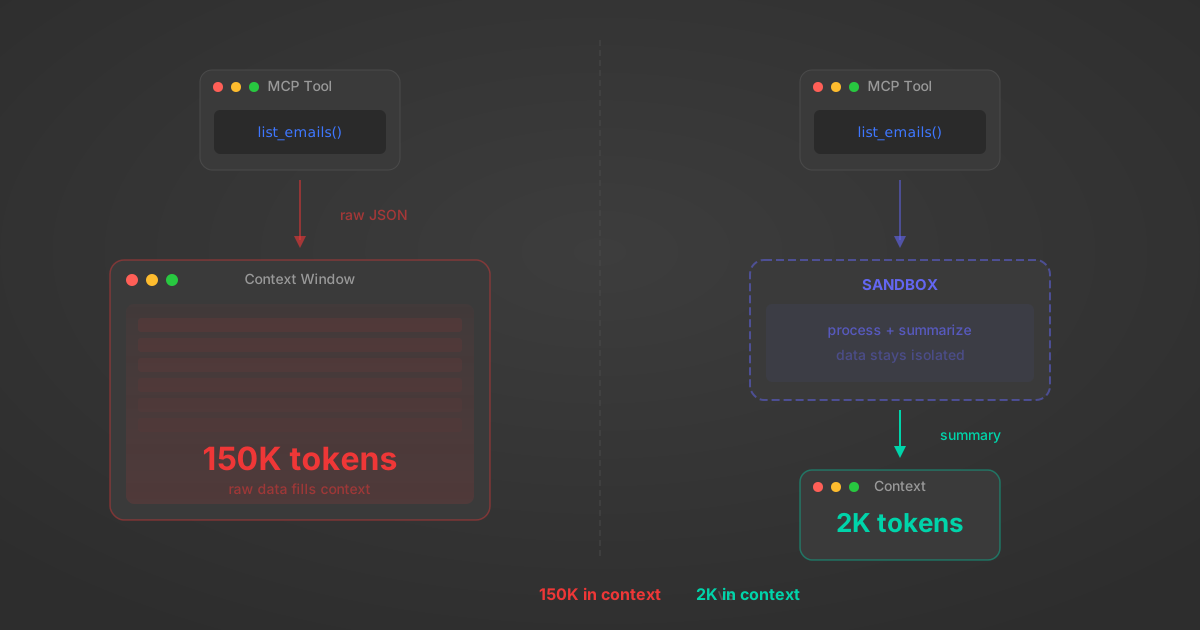
MCP Code Mode: Keeping Tool Responses Out of Agent Context
Anthropic's code_execution processes data already in context. Custom MCP code mode keeps raw tool responses in a sandbox. 14K tokens vs 500.
11 min
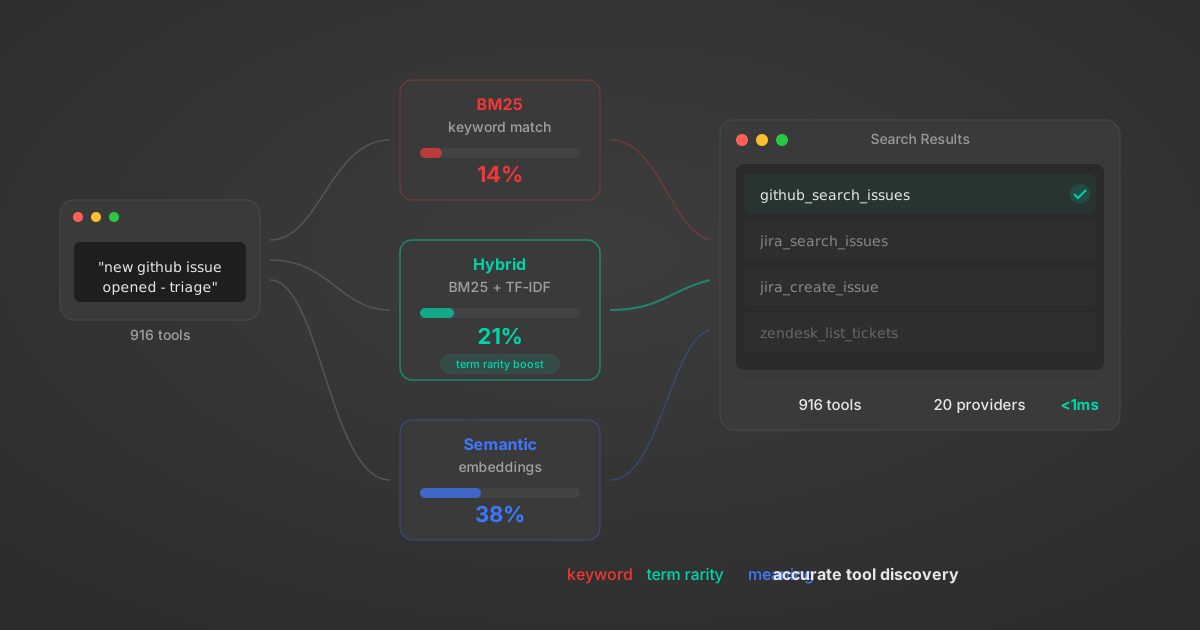
Comparing BM25, TF-IDF, and Hybrid Search for MCP Tool Discovery
Benchmarking BM25, TF-IDF, and hybrid search for MCP tool discovery across 916 tools. The 80/20 TF-IDF/BM25 hybrid hits 21% Top-1 accuracy in under 1ms.
10 min
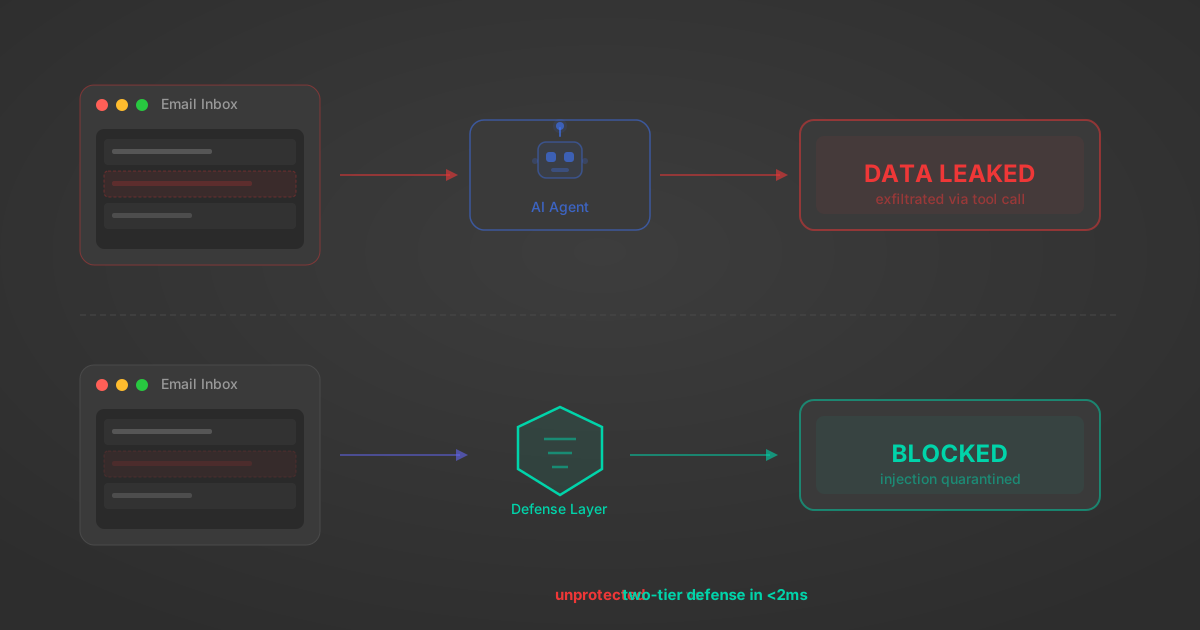
Indirect Prompt Injection Defense for MCP Tools: A Technical Guide
MCP tools that read emails, CRM records, and tickets are indirect prompt injection vectors. Here's how we built a two-tier defense that scans tool results in ~11ms.
12 min
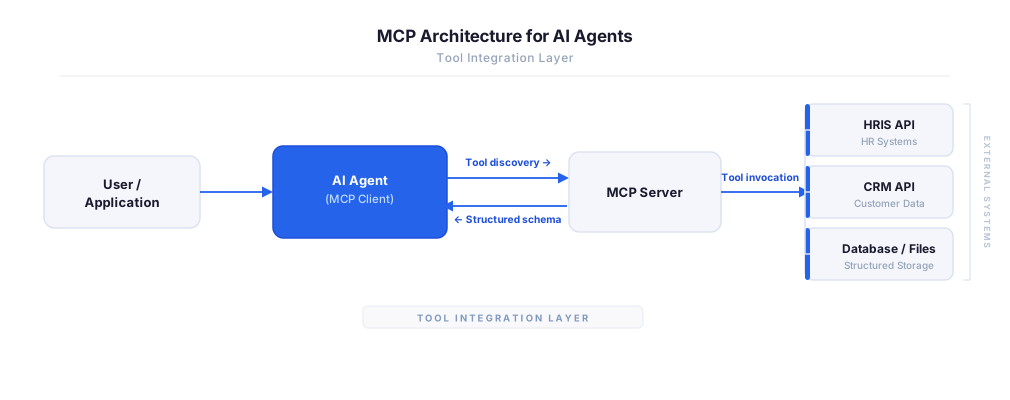
MCP vs A2A: Architecture, Security, and When to Use Each
MCP vs A2A: what each protocol standardizes, how they differ, their shared security risks including indirect prompt injection, and when to use one, both, or a hybrid architecture.
12 min
MCP vs API: What Hundreds of Connector Builds Taught Us
MCP wraps APIs, it doesn't replace them. After building hundreds of connectors that serve both, here's when each approach wins.
14 min read
HR Cloud MCP Server FAQ
Does StackOne have a HR Cloud MCP server?
HR Cloud MCP server vs direct API integration — what's the difference?
How does HR Cloud authentication work for AI agents?
origin_owner_id.Are HR Cloud MCP tools vulnerable to prompt injection?
What is the context bloat of a HR Cloud agent and how do I avoid it?
Can I limit which actions my HR Cloud agent can access?
Can I create custom agent actions for my HR Cloud MCP server?
When should I NOT use a HR Cloud MCP server?
What AI frameworks and AI clients does the StackOne HR Cloud MCP server support?
Put your AI agents to work
All the tools you need to build and scale AI agent integrations, with best-in-class connectivity, execution, and security.