
Jamf Pro MCP Server
for AI Agents
Connect your AI agent to StackOne's Jamf Pro MCP server and give it 62 MCP tools out of the box. Auth, tool execution, and security all managed.
 StackOne






Coverage
62 Agent Actions
Create, read, update, and delete across Jamf Pro — and extend your agent's capabilities with custom actions.

Authentication
Agent Tool Authentication
Per-user OAuth in one call. Your Jamf Pro MCP server gets session-scoped tokens with zero credentials stored on your infra.
Agent Auth →
Security
Agent Protection
Every Jamf Pro tool response scanned for prompt injection in milliseconds — 88.7% accuracy, all running on CPU.
Prompt Injection Defense →
Performance
Max Agent Context. Min Cost.
Free up to 96% of your agent's context window to enhance reasoning and reduce cost, on every Jamf Pro call.
Tools Discovery →What is the Jamf Pro MCP Server?
A Jamf Pro MCP server lets AI agents read and write Jamf Pro data through the Model Context Protocol — Anthropic's open standard for connecting LLMs to external tools. StackOne's Jamf Pro MCP server ships with 62 pre-built actions, fully extensible via the Connector Builder — plus managed authentication, prompt injection defense, observability, and agent execution runtime. Connect it from MCP clients like Claude Desktop, Claude Code, Cursor, Goose, and VS Code, or from agent frameworks like OpenAI Agents SDK, LangChain, and Vercel AI SDK.
All Jamf Pro MCP Tools
Every action from Jamf Pro's API, ready for your agent. Create, read, update, and delete — scoped to exactly what you need.
Computers
- Get Computers
Retrieve a paginated list of computer inventory records from Jamf Pro
- Get Computer
Retrieve a single computer by its Jamf Pro ID, returning only the lightweight General section by default and optionally narrowing to specific sections. Preferred action for computer lookups.
- Update Computer
Update specific fields on a computer inventory record in Jamf Pro
- Delete Computer
Permanently remove a computer inventory record from Jamf Pro
Smart Computer Groups
- Create Smart Computer Group
Create a new smart computer group with criteria-based dynamic membership
- Get Smart Computer Group
Retrieve a single smart computer group by its Jamf Pro ID
- Delete Smart Computer Group
Delete a smart computer group from Jamf Pro by its ID
Static Computer Groups
- Create Static Computer Group
Create a new static computer group with an explicit set of computer assignments
- Get Static Computer Group
Retrieve a single static computer group by its Jamf Pro ID
- Delete Static Computer Group
Delete a static computer group from Jamf Pro by its ID
Mobile Devices
- Get Mobile Devices
Retrieve a paginated list of mobile devices enrolled in Jamf Pro
- Get Mobile Device
Retrieve a single mobile device by its Jamf Pro instance ID
- Update Mobile Device
Update user-modifiable fields on an existing mobile device record
Mobile Device Smart Groups
- Create Mobile Device Smart Group
Create a new mobile device smart group in Jamf Pro
- Get Mobile Device Smart Groups
Retrieve a paginated list of mobile device smart groups from Jamf Pro
- Get Mobile Device Smart Group
Retrieve a single mobile device smart group from Jamf Pro by its identifier
Mobile Device Static Groups
- Create Mobile Device Static Group
Create a new mobile device static group in Jamf Pro
- Get Mobile Device Static Groups
Retrieve a paginated list of mobile device static groups from Jamf Pro
- Get Mobile Device Static Group
Retrieve a single mobile device static group from Jamf Pro by its identifier
Users
- Create User
Create a new end-user inventory record in Jamf Pro
- Get Users
Retrieve a paginated list of end-user inventory records from Jamf Pro
- Get User
Retrieve a single Jamf Pro end-user record by its ID
- Update User
Update an existing end-user inventory record in Jamf Pro
- Delete User
Delete an end-user inventory record from Jamf Pro
Scripts
- Create Script
Create a new script in Jamf Pro
- Search Scripts
Retrieve a list of scripts from Jamf Pro
- Get Script
Retrieve a single script by its Jamf Pro ID
- Delete Script
Delete a script from Jamf Pro
Categorys
- Create Category
Create a new category record in Jamf Pro
- Get Category
Retrieve a single category by its Jamf Pro ID
- Delete Category
Remove a category record from Jamf Pro
Buildings
- Create Building
Create a new building record in Jamf Pro
- Search Buildings
Retrieve a paginated list of buildings from Jamf Pro
- Get Building
Retrieve a single building by its Jamf Pro ID
- Delete Building
Delete a building record from Jamf Pro
Departments
- Create Department
Create a new department record in Jamf Pro
- Search Departments
Retrieve a paginated list of departments from the Jamf Pro instance
- Delete Department
Delete a department record from Jamf Pro
MDM Commands
- Create MDM Command
Send an MDM command to one or more managed devices in Jamf Pro
- Get MDM Commands
Retrieve a list of MDM commands queued or completed in the Jamf Pro account
Policys
- Create Policy
Create a new policy on the Jamf Pro server using raw XML
- Update Policy
Update an existing policy on the Jamf Pro server using raw XML
- Delete Policy
Delete a policy from the Jamf Pro server
Unified Groups
- List Unified Groups
List unified groups (Jamf Pro account groups) in Jamf Pro.
- Get Unified Group
Get a unified Jamf Pro account group by ID.
Unified Roles
- List Unified Roles
List unified roles (Jamf Pro privilege sets) in Jamf Pro.
- Get Unified Role
Get a unified Jamf Pro privilege set by ID.
Unified Users
- List Unified Users
List unified users (Jamf Pro user accounts) in Jamf Pro.
- Get Unified User
Get a unified Jamf Pro user account by ID.
Other (13)
- Get Computer Detail
Retrieve ALL sections of a single computer inventory record at once by its Jamf Pro ID. Use only when the user has explicitly asked for the full/complete computer details.
- Get Computer FileVault
Retrieve FileVault disk-encryption information for a specific computer
- Search Computer Smart Groups
Retrieve a paginated list of smart computer groups from Jamf Pro
- Search Computer Static Groups
Retrieve a paginated list of static computer groups from Jamf Pro
- Get Mobile Device Detail
Retrieve the full inventory detail record for a mobile device
- Get Categories
Retrieve a list of category objects from Jamf Pro
- Get Unified Credentials
Get the current Jamf Pro connection's unified credentials and identity.
- Erase Mobile Device
Queue a remote wipe (Erase Device) MDM command for a mobile device
- Replace Script
Replace an existing script in Jamf Pro
- Find Policies
Retrieve a list of all policies from the Jamf Pro server
- Find Policy
Retrieve a single policy by its Jamf Pro ID
- Find MacOS Configuration Profiles
Retrieve a list of all macOS configuration profiles from Jamf Pro
- Find Mobile Device Configuration Profiles
Retrieve a list of all mobile device (iOS/iPadOS) configuration profiles from Jamf Pro
Set Up Your Jamf Pro MCP Server in Minutes
One endpoint. Any framework. Your agent is talking to Jamf Pro in under 10 lines of code.
Agent Frameworks


 JSON
JSON{
"mcpServers": {
"stackone": {
"command": "npx",
"args": [
"-y",
"mcp-remote@latest",
"https://api.stackone.com/mcp?x-account-id=<account_id>",
"--header",
"Authorization: Basic <YOUR_BASE64_TOKEN>"
]
}
}
}Check More developer MCP Servers
266+ actions
124+ actions
119+ actions
102+ actions
87+ actions
71+ actions
68+ actions
Platform Resources
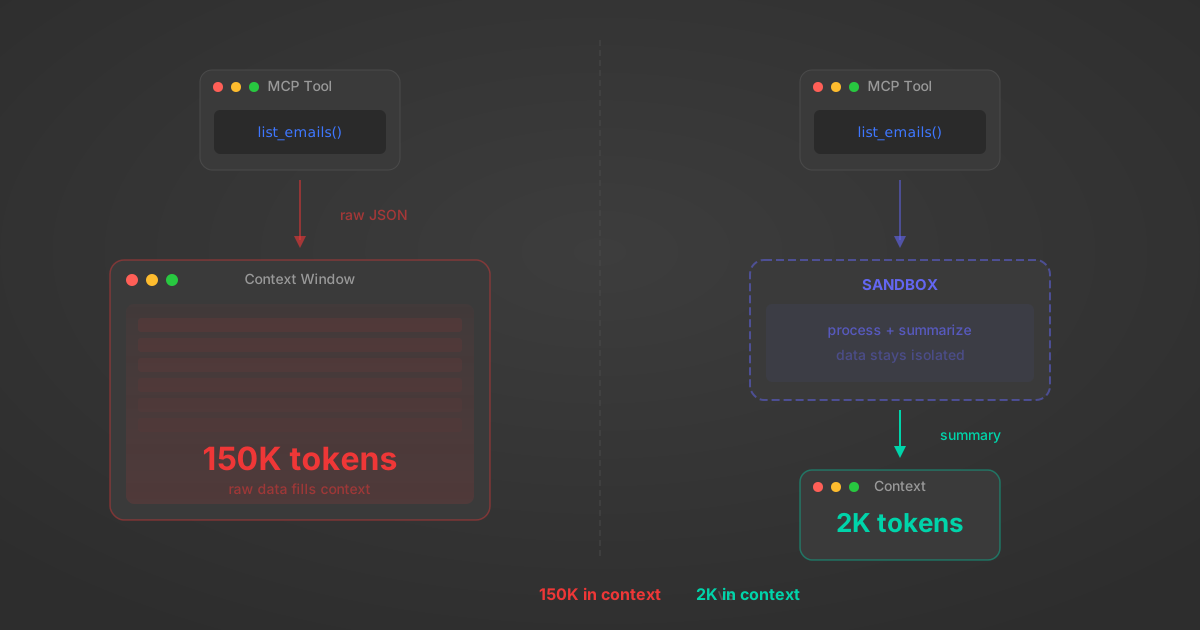
MCP Code Mode: Keeping Tool Responses Out of Agent Context
Anthropic's code_execution processes data already in context. Custom MCP code mode keeps raw tool responses in a sandbox. 14K tokens vs 500.
11 min
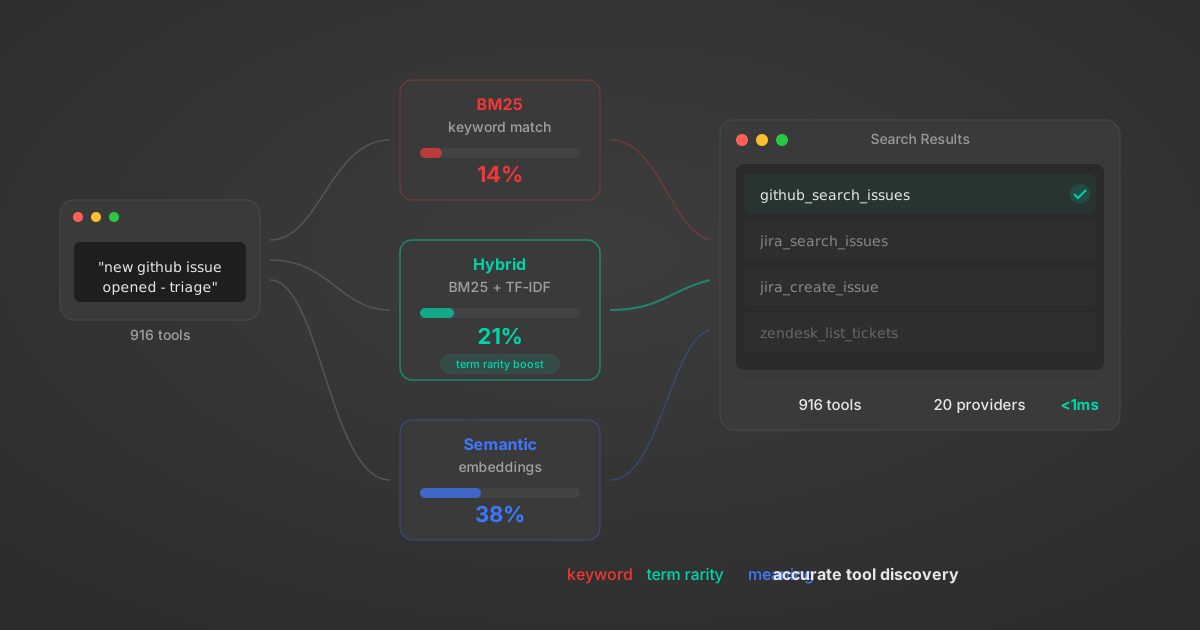
Comparing BM25, TF-IDF, and Hybrid Search for MCP Tool Discovery
Benchmarking BM25, TF-IDF, and hybrid search for MCP tool discovery across 916 tools. The 80/20 TF-IDF/BM25 hybrid hits 21% Top-1 accuracy in under 1ms.
10 min
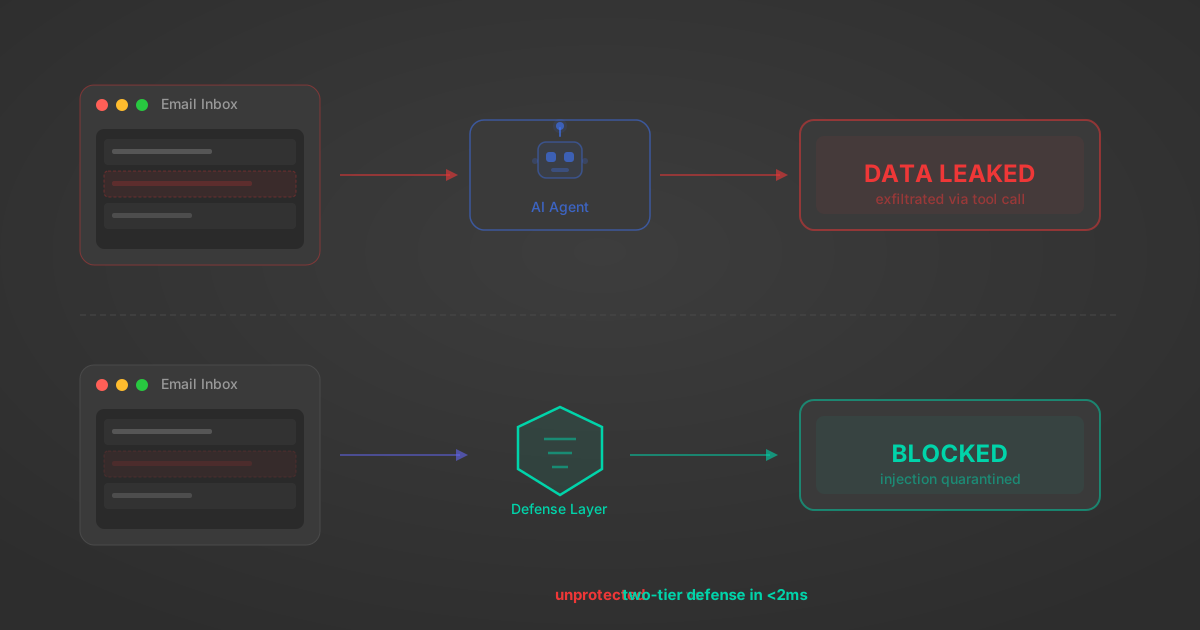
Indirect Prompt Injection Defense for MCP Tools: A Technical Guide
MCP tools that read emails, CRM records, and tickets are indirect prompt injection vectors. Here's how we built a two-tier defense that scans tool results in ~11ms.
12 min
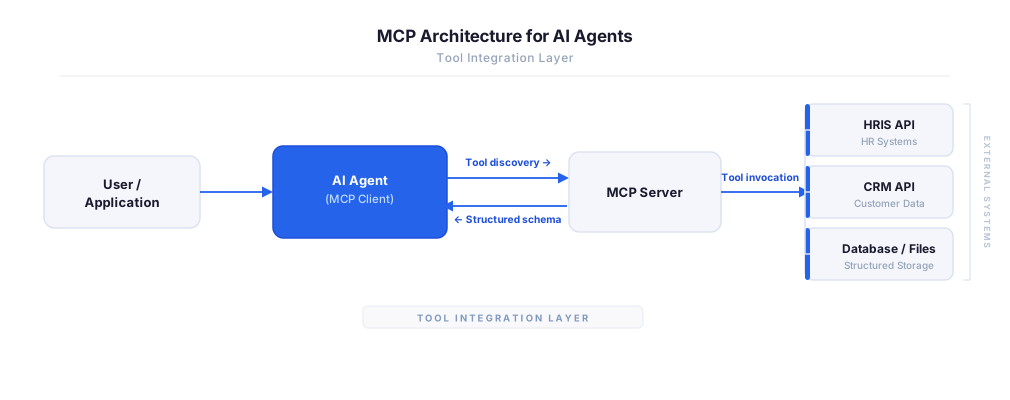
MCP vs A2A: Architecture, Security, and When to Use Each
MCP vs A2A: what each protocol standardizes, how they differ, their shared security risks including indirect prompt injection, and when to use one, both, or a hybrid architecture.
12 min
MCP vs API: What Hundreds of Connector Builds Taught Us
MCP wraps APIs, it doesn't replace them. After building hundreds of connectors that serve both, here's when each approach wins.
14 min read
Jamf Pro MCP Server FAQ
Does StackOne have a Jamf Pro MCP server?
Jamf Pro MCP server vs direct API integration — what's the difference?
How does Jamf Pro authentication work for AI agents?
origin_owner_id.Are Jamf Pro MCP tools vulnerable to prompt injection?
What is the context bloat of a Jamf Pro agent and how do I avoid it?
Can I limit which actions my Jamf Pro agent can access?
Can I create custom agent actions for my Jamf Pro MCP server?
When should I NOT use a Jamf Pro MCP server?
What AI frameworks and AI clients does the StackOne Jamf Pro MCP server support?
Put your AI agents to work
All the tools you need to build and scale AI agent integrations, with best-in-class connectivity, execution, and security.