
Paychex MCP Server
for AI Agents
Connect your AI agent to StackOne's Paychex MCP server and give it 41 MCP tools out of the box. Auth, tool execution, and security all managed.
 StackOne






Coverage
41 Agent Actions
Create, read, update, and delete across Paychex — and extend your agent's capabilities with custom actions.

Authentication
Agent Tool Authentication
Per-user OAuth in one call. Your Paychex MCP server gets session-scoped tokens with zero credentials stored on your infra.
Agent Auth →
Security
Agent Protection
Every Paychex tool response scanned for prompt injection in milliseconds — 88.7% accuracy, all running on CPU.
Prompt Injection Defense →
Performance
Max Agent Context. Min Cost.
Free up to 96% of your agent's context window to enhance reasoning and reduce cost, on every Paychex call.
Tools Discovery →What is the Paychex MCP Server?
A Paychex MCP server lets AI agents read and write Paychex data through the Model Context Protocol — Anthropic's open standard for connecting LLMs to external tools. StackOne's Paychex MCP server ships with 41 pre-built actions, fully extensible via the Connector Builder — plus managed authentication, prompt injection defense, observability, and agent execution runtime. Connect it from MCP clients like Claude Desktop, Claude Code, Cursor, Goose, and VS Code, or from agent frameworks like OpenAI Agents SDK, LangChain, and Vercel AI SDK.
All Paychex MCP Tools
Every action from Paychex's API, ready for your agent. Create, read, update, and delete — scoped to exactly what you need.
Companies
- Companies
Array of companies that your application has been granted with some level of access. Your Application (API Key) can be granted access to one or more companies (clients) accounts that are associated with one or more product lines within Paychex.
A Companys
- A Company
Information about a single company that your application has access to.
Company Locations
- Company Locations
Array of locations set at the company level.
- Company Location
Information about a single Location.
Company Workers
- Company Workers
Lists workers (employees and contractors) for a company your application has been granted access to.
Workers
- Worker
Information about a unique worker (employee and contractor) that your application has been granted access to. Currently workers that exist within Paychex Flex payroll will be available, future enhancements will make workers from other Paychex systems available.
- Worker
Update a unique worker (employee and contractor) that your application has been granted access to modify.
- Worker
Delete in progress Worker
In Progress Workers
- In Progress Workers
Add one or more workers to a specific company that your application has access to. Workers will be added with an IN_PROGRESS status assigned to them and will need to be completed in Flex. Required fields are givenName, familyName, & workerType (when adding multiple workers at a time you will need to also include a "workerCorrelationId" data element on each worker, that will be used as an identifier in our responses). For more information on IN_PROGRESS workers, including how to send an invite for the worker to add their information in Flex, [see the Worker page](https://developer.paychex.com/resources/worker) in Developer Resources. A worker's federal tax elections will be generated and defaulted automatically to withheld with 0 deductions/income and a filing status of single/married filing separately. Upon successfully posting a new in-progress worker, the response will generate a new workerId. This ID can then be used in subsequent calls to update existing worker properties like federal taxes, or add more details to the worker's communications, direct deposit, compensation, and state taxes.
Worker Communications
- Worker Communications
Information about "Active" or "In-progress" workers communications.
- Worker Communication
A "Active" or "In-progress" workers single communication item.
- Worker Communication
Add a single communication to the "Active" or "In-progress" worker.
- Worker Communication
Update a "Active" or "In-progress" workers specific communication item.
- Worker Communication
Remove a communication item from an "Active" or "In-Progress" worker. A communication type of "STREET_ADDRESS" or "PO_BOX_ADDRESS" cannot be removed from the worker.
Worker Contacts
- Worker Contacts
Get all contacts for the specified worker.
- Worker Contact
Get a worker contact by contactId.
- Worker Contacts
Add one or more contacts to a worker. A contact may represent a person or entity (organization) but not both. A contact must have at least one communication (telecom, postal, or email). Person contacts can have multiple communications for each communication type (telecom, postal, or email) to support BUSINESS and PERSONAL. Exactly one contact must be marked as primary for each contact type. If one or more contacts are posted for the same contact type, and there are currently no contacts of that type for the worker, the first contact in the list will be made primary unless another in the list is expressly marked as primary. When a new contact is made primary the previous primary contact will be marked as not primary. Use the GET /companies/{companyId}/contacttypes endpoint to get a full list of available contact types and relationship types (used for person contacts).
- Worker Contacts
Update a worker contact. A contact may represent a person or entity (organization) but not both. A contact must have at least one communication (telecom, postal, or email). Person contacts can have multiple communications for each communication type (telecom, postal, or email) to support BUSINESS and PERSONAL. Exactly one contact must be marked as primary for each contact type. When a new contact is made primary the previous primary contact will be marked as not primary. A postal contact can be switched from a street address to a PO box and vice versa. This is done by setting either streetLineOne or postOfficeBox (a postal communication may not have both). Use the GET /companies/{companyId}/contacttypes endpoint to get a full list of available contact types and relationship types (used for person contacts).
- Worker Contact
Delete a worker contact by contactId.
Worker Custom Fields
- Worker Custom Fields
Get the worker's customFields
- Worker Custom Field
Get the worker's customFields by workerCustomFieldId
- Worker Custom Field
Create CustomField at the worker level
- Worker Custom Field
Delete CustomField at the worker level
Worker CustomFields
- Worker CustomField
Update CustomField at the worker level
Worker Direct Deposits
- Worker Direct Deposits
Array of direct deposits for an "Active" or "In-Progress" worker.
- Worker Direct Deposit
Single direct deposit for an "Active" or "In-Progress" worker.
- Worker Direct Deposit
Add a direct deposit to an "Active" or "In-Progress" worker.
- Worker Direct Deposit
Update a single direct deposit for an "Active" or "In-Progress" worker. "In-Progress" workers cannot be PATCHED using Content Type "application/json-patch+json"
- Worker Direct Deposits
Update multiple direct deposits for an "Active" or "In-Progress" worker at a time. "In-Progress" workers cannot be PATCHED using Content Type "application/json-patch+json"
- Worker Direct Deposit
Remove a single direct deposit for an "Active" or "In-Progress" worker.
Worker Pay Rates
- Worker Pay Rates
Information about a workers compensation rates. A worker can have up to 25 different rates.It’s not required for a worker to have a rate in the system.
- Worker Pay Rate
A workers single compensation rate.
- Worker Pay Rate
Add a single compensation rate to the "Active" or "In-progress" worker.
- Worker Pay Rate
Update a workers specific compensation rate.
- Worker Pay Rate
Remove a compensation rate from a worker.
Worker Compensations
- Worker Compensation
Information about a workers compensation.
Worker Federal Taxs
- Worker Federal Tax
Federal tax setup for an "Active" or "In-progress" worker.
- Worker Federal Tax
WARNING: This endpoint will be deprecated on 1/30/2026. Until this date, POST federal tax will behave both as a POST and PATCH call accordingly, depending on if the worker already has a federal tax setup. NOTE: In-progress workers are created with a federal tax setup automatically. See POST In-progress worker. If a worker does not have a federal tax set up, this endpoint will create one with the values given in the request.
- Worker Federal Tax
Update the federal tax setup for an "Active" or "In-progress" worker. The patching will allow you to change the combination that you have with the extra and overrides.
Worker State Taxs
- Worker State Tax
Information about worker's state tax allocation.
- Worker State Tax
<h3>Add and Replace existing state tax data for a given worker</h3>
Paychex AI Agent Use Cases
Connect your AI agent to Paychex and help your team scale the HR operations they run by hand today.
Use StackOne to connect your AI agent to your HRIS, identity management, and LMS to automate employee onboarding.
ViewUse StackOne to connect your AI agent to your HRIS, knowledge base, and messaging tools to automate HR policy Q&A.
ViewUse StackOne to connect your AI agent to your HRIS, identity management, and ITSM to automate employee offboarding and deprovisioning.
ViewSet Up Your Paychex MCP Server in Minutes
One endpoint. Any framework. Your agent is talking to Paychex in under 10 lines of code.
Agent Frameworks


 JSON
JSON{
"mcpServers": {
"stackone": {
"command": "npx",
"args": [
"-y",
"mcp-remote@latest",
"https://api.stackone.com/mcp?x-account-id=<account_id>",
"--header",
"Authorization: Basic <YOUR_BASE64_TOKEN>"
]
}
}
}Check More HRIS / HCM MCP Servers
163+ actions
162+ actions
129+ actions
127+ actions
120+ actions
117+ actions
116+ actions
Platform Resources
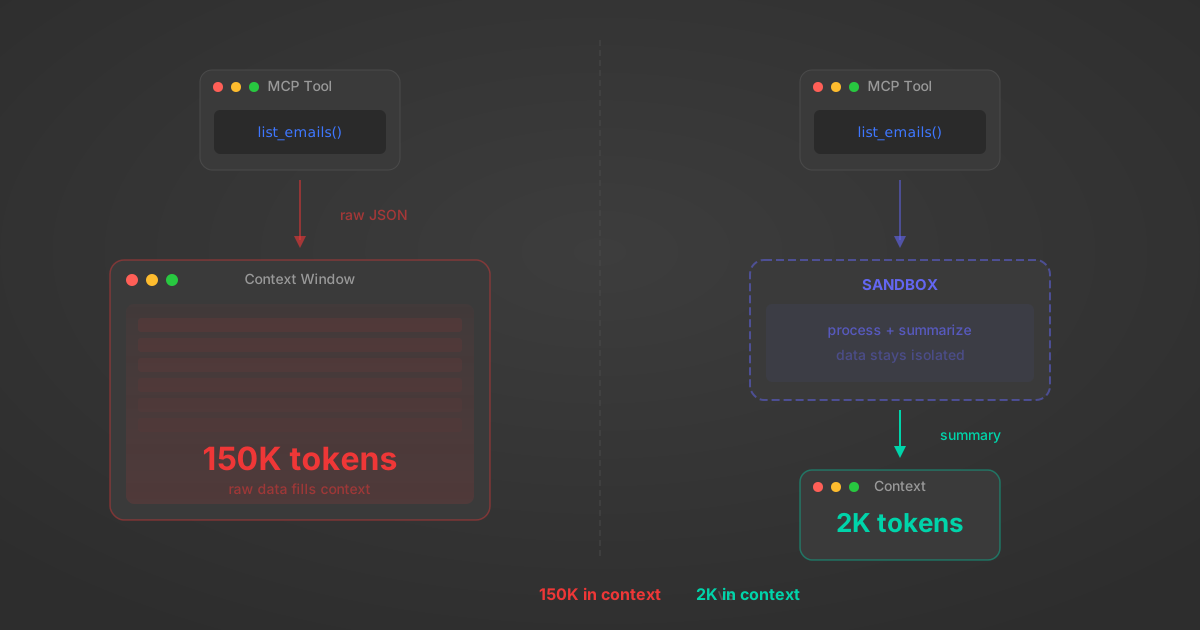
MCP Code Mode: Keeping Tool Responses Out of Agent Context
Anthropic's code_execution processes data already in context. Custom MCP code mode keeps raw tool responses in a sandbox. 14K tokens vs 500.
11 min
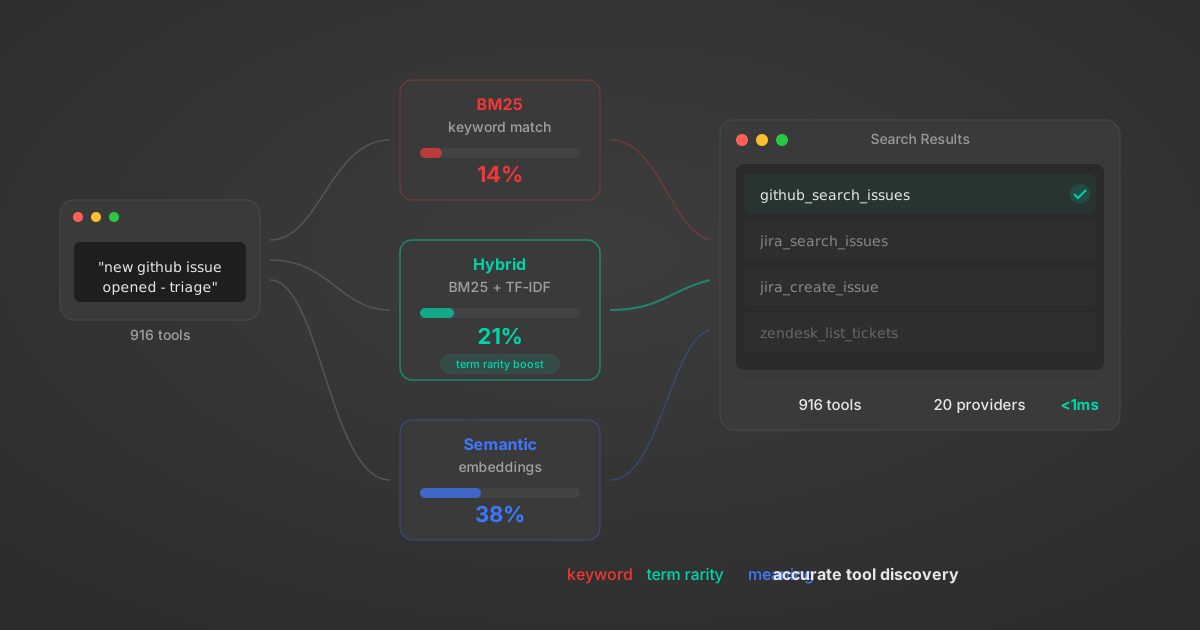
Comparing BM25, TF-IDF, and Hybrid Search for MCP Tool Discovery
Benchmarking BM25, TF-IDF, and hybrid search for MCP tool discovery across 916 tools. The 80/20 TF-IDF/BM25 hybrid hits 21% Top-1 accuracy in under 1ms.
10 min
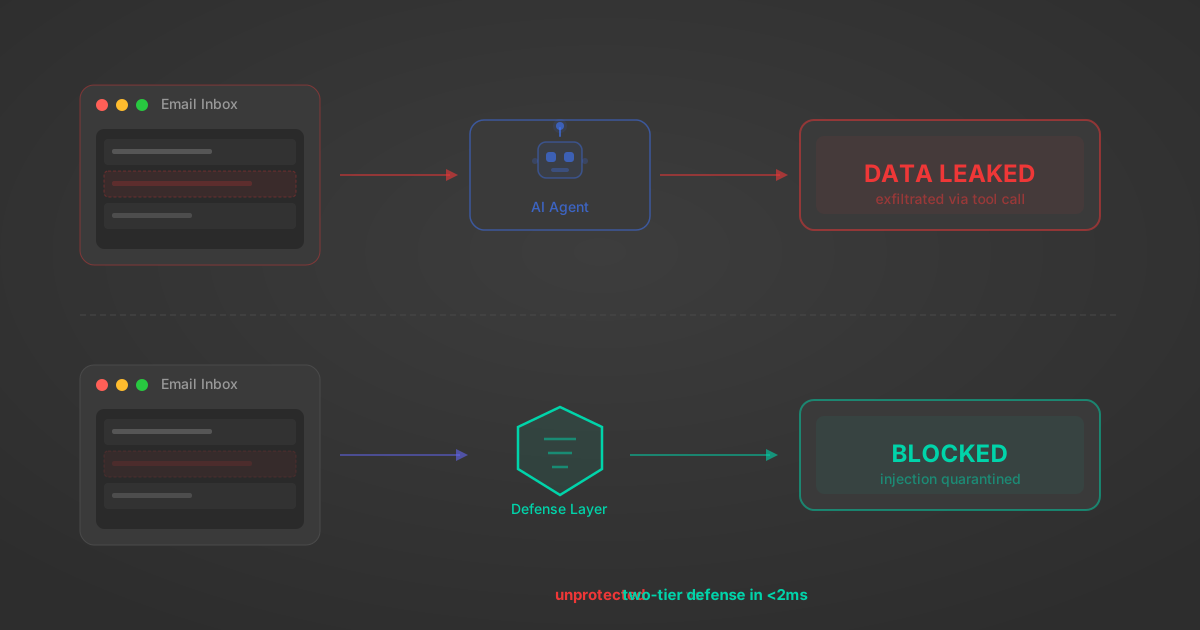
Indirect Prompt Injection Defense for MCP Tools: A Technical Guide
MCP tools that read emails, CRM records, and tickets are indirect prompt injection vectors. Here's how we built a two-tier defense that scans tool results in ~11ms.
12 min
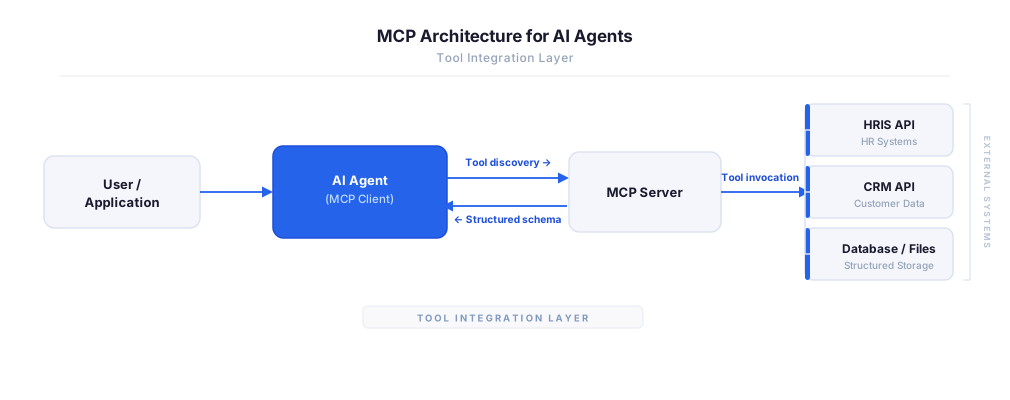
MCP vs A2A: Architecture, Security, and When to Use Each
MCP vs A2A: what each protocol standardizes, how they differ, their shared security risks including indirect prompt injection, and when to use one, both, or a hybrid architecture.
12 min
MCP vs API: What Hundreds of Connector Builds Taught Us
MCP wraps APIs, it doesn't replace them. After building hundreds of connectors that serve both, here's when each approach wins.
14 min read
Paychex MCP Server FAQ
Does StackOne have a Paychex MCP server?
Paychex MCP server vs direct API integration — what's the difference?
How does Paychex authentication work for AI agents?
origin_owner_id.Are Paychex MCP tools vulnerable to prompt injection?
What is the context bloat of a Paychex agent and how do I avoid it?
Can I limit which actions my Paychex agent can access?
Can I create custom agent actions for my Paychex MCP server?
When should I NOT use a Paychex MCP server?
What AI frameworks and AI clients does the StackOne Paychex MCP server support?
Put your AI agents to work
All the tools you need to build and scale AI agent integrations, with best-in-class connectivity, execution, and security.