
Qlik MCP Server
for AI Agents
Connect your AI agent to StackOne's Qlik MCP server and give it 112 MCP tools out of the box. Auth, tool execution, and security all managed.
 StackOne






Coverage
112 Agent Actions
Create, read, update, and delete across Qlik — and extend your agent's capabilities with custom actions.

Authentication
Agent Tool Authentication
Per-user OAuth in one call. Your Qlik MCP server gets session-scoped tokens with zero credentials stored on your infra.
Agent Auth →
Security
Agent Protection
Every Qlik tool response scanned for prompt injection in milliseconds — 88.7% accuracy, all running on CPU.
Prompt Injection Defense →
Performance
Max Agent Context. Min Cost.
Free up to 96% of your agent's context window to enhance reasoning and reduce cost, on every Qlik call.
Tools Discovery →What is the Qlik MCP Server?
A Qlik MCP server lets AI agents read and write Qlik data through the Model Context Protocol — Anthropic's open standard for connecting LLMs to external tools. StackOne's Qlik MCP server ships with 112 pre-built actions, fully extensible via the Connector Builder — plus managed authentication, prompt injection defense, observability, and agent execution runtime. Connect it from MCP clients like Claude Desktop, Claude Code, Cursor, Goose, and VS Code, or from agent frameworks like OpenAI Agents SDK, LangChain, and Vercel AI SDK.
All Qlik MCP Tools
Every action from Qlik's API, ready for your agent. Create, read, update, and delete — scoped to exactly what you need.
API Keys
- Create API Key
Creates an API key for a user or for configuring SCIM. SCIM keys do not accept 'expiry' field.
- List API Keys
Lists API keys for the tenant with cursor-based pagination
- Get API Key
Returns an API key for a given ID
- Delete API Key
Deletes or revokes an API key
API Keys Configurations
- Get API Keys Configuration
Retrieves the API key configuration for a tenant
- Update API Keys Configuration
Updates the API keys configuration for a tenant using JSON Patch operations. max_keys_per_user requires a number value.
Audit Events
- List Audit Events
Retrieves list of events for subscribed services for your tenant. Stores events for 90 days, after which they can be accessed via `/v1/audits/archive`.
- Get Audit Event
Finds and returns a specific audit events for the given event ID.
Automations
- Create Automation
Creates a new automation. The requesting user must be assigned the `AutomationCreator` role.
- List Automations
Retrieves a list of the automations that the requesting user has access to. Filter uses SCIM syntax (e.g. name eq "value").
- Get Automation
Retrieves the full definition of an automation. The requesting user must be the owner of the automation.
- Update Automation
Updates the full definition of an automation. Requires ownership or TenantAdmin role.
- Move Automation
Changes the owner of an automation to another user. This action removes the history and change logs of this automation. All linked connections used in the automation are detached and not moved to the new owner.
- Delete Automation
Deletes an automation. The requesting user must be the owner of the automation, or be assigned the `TenantAdmin` role.
Automation Runs
- List Automation Runs
Retrieves a list of runs for a specific automation. The requesting user must be the owner of the automation, or be assigned the `TenantAdmin` role.
- Get Automation Run
Retrieves a specific run for an automation. The requesting user must be the owner of the automation.
Brands
- List Brands
List brands
- Get Brand
Retrieve a brand
- Update Brand
Update a brand
- Delete Brand
Delete a brand
Brand Files
- Get Brand File
Download brand file
- Delete Brand File
Delete a brand file
Collections
- Create Collection
Creates and returns a new collection
- List Collections
Retrieves the collections that the user has access to
- Get Collection
Finds and returns a collection
- Update Collection
Updates a collection's name and description
- Delete Collection
Deletes a collection and removes all items from the collection
An Items
- Get An Item
Finds and returns an item in a specific collection
- Remove An Item
Removes an item from a collection
Extensions
- List Extensions
List all extensions
- Get Extension
Get a specific extension
- Delete Extension
Delete a specific extension
Groups
- Create Group
Creates a new group
- List Groups
Returns a list of groups with cursor-based pagination
- Get Group
Returns the requested group
- Update Group
Updates the requested group
- Delete Group
Deletes the requested group
Unified Groups
- List Unified Groups
List all Qlik Cloud groups (regular plus system groups like com.qlik.Everyone) from GET /groups, mapped to the StackOne IAM unified group schema. Supports expand=roles to inline each group's assigned roles. The framework iterates pages by extracting the cursor from links.next.href via JEXL regexMatch. Requires admin.users:read scope.
- Get Unified Group
Retrieve a single Qlik Cloud group by its unique ID, mapped to the StackOne IAM unified group schema. Supports expand=roles to inline assigned roles. Requires admin.users:read scope.
Unified Organizations
- List Unified Organizations
List the single Qlik Cloud tenant associated with this connection, mapped to the StackOne IAM unified organization schema. Returns one record built from /users/me. Qlik Cloud binds one credential set to one tenant; multi-tenant enumeration is not supported.
- Get Unified Organization
Retrieve the single Qlik Cloud tenant associated with this connection, mapped to the StackOne IAM unified organization schema. The id input is the tenant id; only one tenant is reachable per credential set.
Unified Roles
- List Unified Roles
List all Qlik Cloud roles from GET /roles, mapped to the StackOne IAM unified role schema. Returns role identity, type (admin or basic), description, and timestamps. The framework iterates pages by extracting the cursor from links.next.href via JEXL regexMatch. Requires admin.users:read scope.
- Get Unified Role
Retrieve a single Qlik Cloud role by its unique ID, mapped to the StackOne IAM unified role schema. Returns role identity, type (admin or basic), description, and timestamps. Requires admin.users:read scope.
Unified Users
- List Unified Users
List all Qlik Cloud users from GET /users, mapped to the StackOne IAM unified user schema. Returns identity, enabled/disabled/pending status, and profile fields. expand=roles returns the effective role set (direct plus group-granted); expand=groups inlines assigned groups. The framework iterates pages by extracting the cursor from links.next.href via JEXL regexMatch. Requires admin.users:read scope.
- Get Unified User
Retrieve a single Qlik Cloud user by their unique ID, mapped to the StackOne IAM unified user schema. expand=roles returns the effective role set (direct plus group-granted); expand=groups inlines assigned groups. Requires admin.users:read scope.
Items
- List Items
Lists catalog items (apps, datasets, automations, and other resources) that the user has access to
- Get Item
Finds and returns an item
- Update Item
Updates an item
- Delete Item
Deletes an item and removes the item from all collections
Roles
- Create Role
Creates a custom role
- List Roles
Returns a list of roles using cursor-based pagination
- Get Role
Returns the requested role
- Update Role
Updates the requested role
- Delete Role
Deletes the requested role
Spaces
- Create Space
Creates a space
- List Spaces
Retrieves spaces that the current user has access to and match the query
- Get Space
Retrieves a single space by ID
- Update Space
Updates a space
- Delete Space
Deletes a space
An Assignment For A Spaces
- Retrieve An Assignment For A Space
Retrieves a single assignment by assignment ID
- Update An Assignment For A Space
Updates a single assignment by assignment ID
A Space Shares
- Create A Space Share
Creates a share
- Retrieve A Space Share
Retrieves a single space share by ID
- Delete A Space Share
Deletes a space share
Tasks
- List Tasks
List tasks
- Get Task
Get a task
- Delete Task
Delete a task
Users
- Create User
Create a new user in the Qlik Cloud tenant
- List Users
Retrieve a paginated list of users in the Qlik Cloud tenant
- Get User
Retrieve details of a specific user by ID
- Update User
Update fields for a user by ID using JSON Patch operations. Use 'replace' for assignedRoles and status (not 'add' or 'set').
- Delete User
Delete a user from the Qlik Cloud tenant
Other (40)
- Add Item To Collection
Adds an item to a collection and returns the item
- List Archived Audit Events
Retrieves audit events from long-term storage. Returns all archived audit events for the specified date and tenant, formatted as a JSON array. Archived events are retained for the full lifetime of the tenant, and are not removed or size-limited.
- Get Audit Settings
Returns the server configuration options. It includes options that represent the server configuration state and parameters that were used to run the server with certain functionality.
- List Audit Sources
Finds and returns the list of possible event sources for this tenant.
- List Audit Event Types
Finds and returns the list of possible event types for this tenant.
- Export Automation Run Log
Retrieves the URL for the debug log of a specific automation run. The requesting user must be the owner of the automation.
- Get Automation Usage Metrics
Retrieves paginated usage metrics for automations. The requesting user must be assigned the `TenantAdmin` role.
- Get Active Brand
Retrieve active brand
- List Items In A Collection
Retrieves items from a collection that the user has access to
- Get User's Favorites Collection
Lists the user's favorites collection
- Get Extension Archive
Download extension as an archive
- Get Extension File
Download file from extension archive
- Get Group Settings
Returns the tenant's group settings
- Get Unified Credentials
Return the authenticated identity and auth type for the current Qlik Cloud connection. Fetches /users/me and inlines the user record. auth_type is derived at runtime from credentials.accessToken presence (oauth when present, api_key otherwise) via a static_values bridge step. Both auth methods are supported. Requires users:read scope.
- List Unified Resource Types
Returns the Qlik Cloud resource types that support resource-scoped permission queries via unified_list_resource_users.
- List Unified Resource Users
List users, groups, and bots that hold assignments on a Qlik Cloud space, mapped to the unified IamUser schema with resource-scoped roles. Each grantee returns the roles[] they hold on the space (consumer, contributor, facilitator, producer, publisher, dataconsumer, datapreview, codeveloper, basicconsumer, operator). Requires admin.spaces:read scope.
- List Collections Of An Item
Finds and returns the collections (and tags) of an item
- Get Items Settings
Finds and returns the items service settings for the current tenant
- List Assignments For A Space
Retrieves the assignments of the space matching the query
- List Space Shares
Retrieves the shares of the space matching the query
- List Space Types
Gets a list of distinct space types available for use in the tenant
- Get Current User
Retrieve the currently authenticated user's profile. Returns 301 redirect with user ID if non-tenant-specific base URL is used.
- Update API Key Description
Updates an API key description using JSON Patch operations
- Delete An Assignment
Deletes an assignment
- Change Automation Owner
Changes the owner of an automation to another user. This action removes the history and change logs of this automation. All linked connections used in the automation are detached and not moved to the new owner.
- Change Automation Space
Changes the space of an automation by specifying a new space.
- Duplicate Automation
Duplicates an existing automation. The requesting user must be the owner of the automation.
- Disable Automation
Disables an automation so that it cannot be run. The requesting user must be the owner of the automation, or be assigned the `TenantAdmin` role.
- Enable Automation
Enables an automation so that it can be run. The requesting user must be the owner of the automation, or be assigned the `TenantAdmin` role.
- Run Automation
Creates a runs for a specific automation. The requesting user must be the owner of the automation.
- Retry Automation Run
Retries a specific run by creating a new run using the same inputs. The requesting user must be the owner of the automation.
- Stop Automation Run
Forcefully stops an automation run immediately. The requesting user must be the owner of the automation.
- Activate Brand
Activate a brand
- Deactivate Brand
Deactivate a brand
- Filter Groups
Retrieves a list of groups matching the filter using advanced query string
- Assign User Or Group To A Space
Creates an assignment for a user or group (assignee) to a space with the specified roles. Returns 409 if assignment already exists.
- Start Task
Start a task
- Count Users
Get the total count of users in the tenant
- Filter Users
Filter users using POST-body SCIM filter criteria. Use this instead of list_users when the filter is complex or long.
- Invite Users
Send invitation emails to new users
Set Up Your Qlik MCP Server in Minutes
One endpoint. Any framework. Your agent is talking to Qlik in under 10 lines of code.
Agent Frameworks


 JSON
JSON{
"mcpServers": {
"stackone": {
"command": "npx",
"args": [
"-y",
"mcp-remote@latest",
"https://api.stackone.com/mcp?x-account-id=<account_id>",
"--header",
"Authorization: Basic <YOUR_BASE64_TOKEN>"
]
}
}
}Check More Data & Analytics MCP Servers
203+ actions
122+ actions
115+ actions
102+ actions
98+ actions
76+ actions
73+ actions
Platform Resources
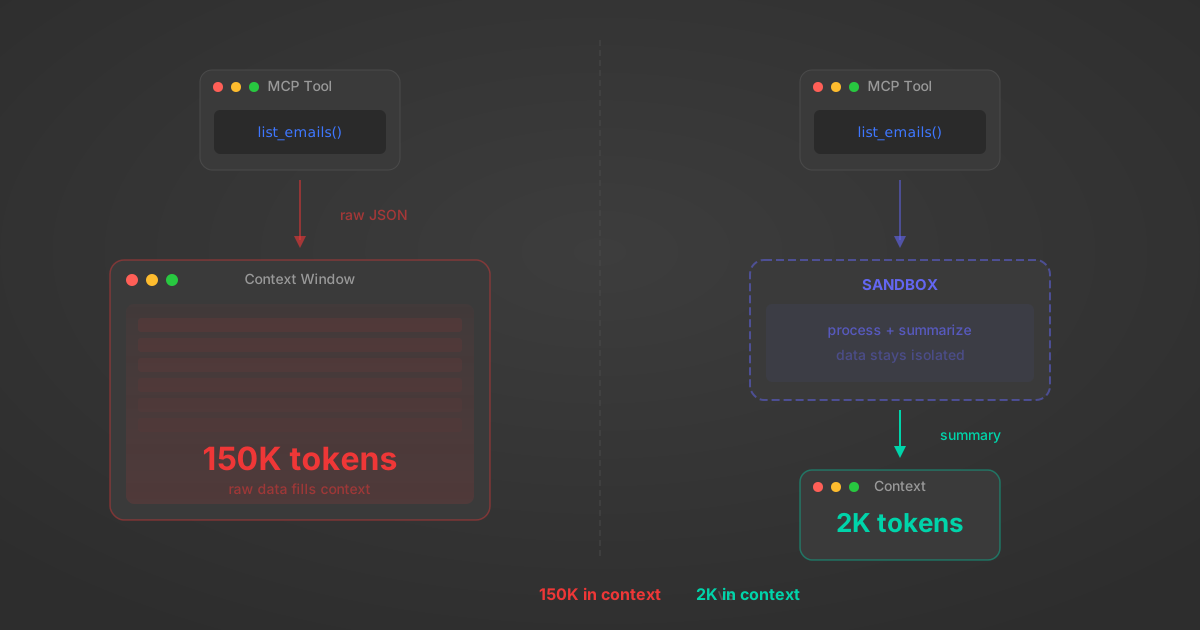
MCP Code Mode: Keeping Tool Responses Out of Agent Context
Anthropic's code_execution processes data already in context. Custom MCP code mode keeps raw tool responses in a sandbox. 14K tokens vs 500.
11 min
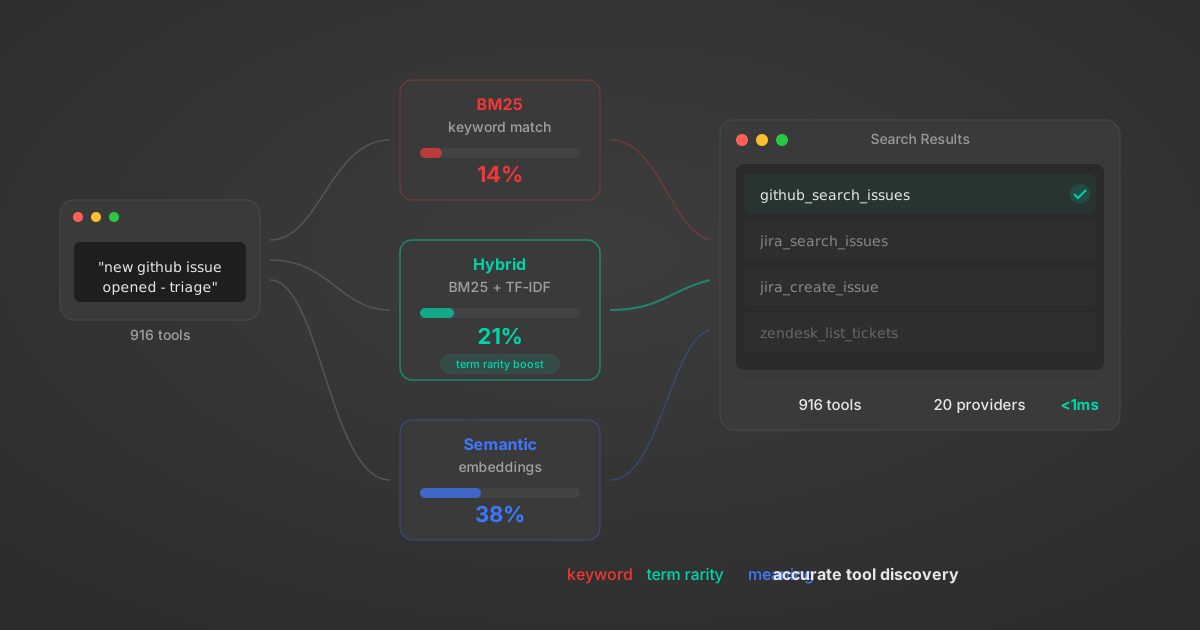
Comparing BM25, TF-IDF, and Hybrid Search for MCP Tool Discovery
Benchmarking BM25, TF-IDF, and hybrid search for MCP tool discovery across 916 tools. The 80/20 TF-IDF/BM25 hybrid hits 21% Top-1 accuracy in under 1ms.
10 min
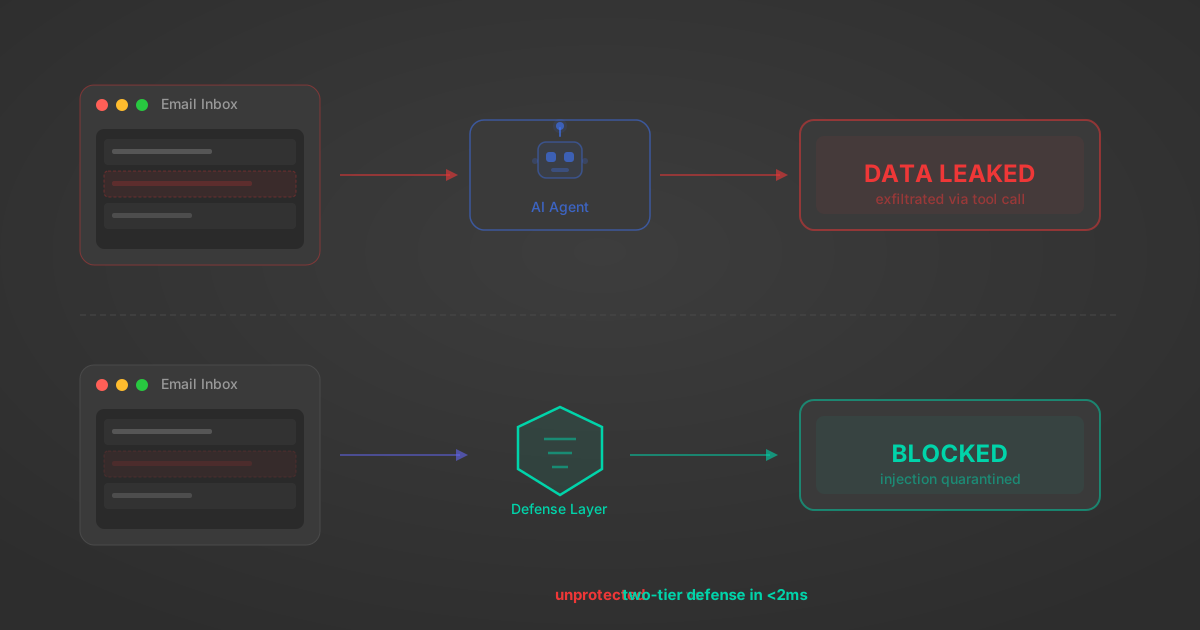
Indirect Prompt Injection Defense for MCP Tools: A Technical Guide
MCP tools that read emails, CRM records, and tickets are indirect prompt injection vectors. Here's how we built a two-tier defense that scans tool results in ~11ms.
12 min
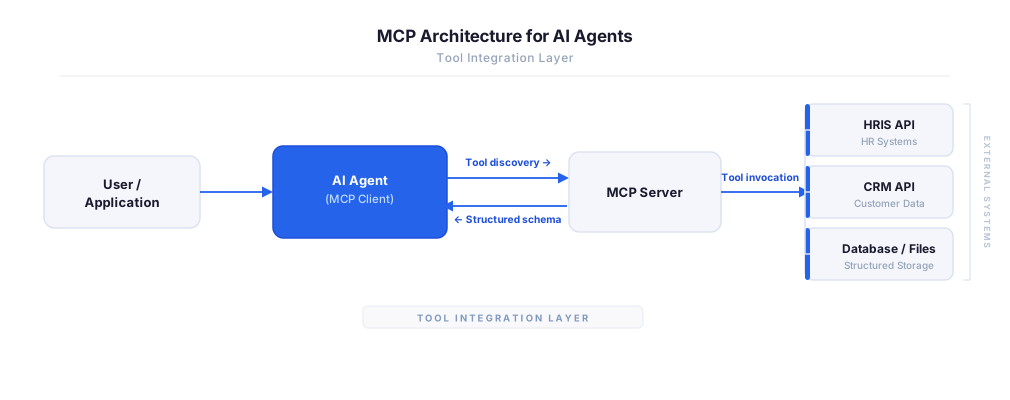
MCP vs A2A: Architecture, Security, and When to Use Each
MCP vs A2A: what each protocol standardizes, how they differ, their shared security risks including indirect prompt injection, and when to use one, both, or a hybrid architecture.
12 min
MCP vs API: What Hundreds of Connector Builds Taught Us
MCP wraps APIs, it doesn't replace them. After building hundreds of connectors that serve both, here's when each approach wins.
14 min read
Qlik MCP Server FAQ
Does StackOne have a Qlik MCP server?
Qlik MCP server vs direct API integration — what's the difference?
How does Qlik authentication work for AI agents?
origin_owner_id.Are Qlik MCP tools vulnerable to prompt injection?
What is the context bloat of a Qlik agent and how do I avoid it?
Can I limit which actions my Qlik agent can access?
Can I create custom agent actions for my Qlik MCP server?
When should I NOT use a Qlik MCP server?
What AI frameworks and AI clients does the StackOne Qlik MCP server support?
Put your AI agents to work
All the tools you need to build and scale AI agent integrations, with best-in-class connectivity, execution, and security.