Connect
Optimize
Secure
Announcing StackOne Defender: leading open-source prompt injection guard for your agent • Read More →
We fine-tuned a lightweight retrieval model so your agent finds the right tool on the first try — without loading hundreds of schemas into its context window.
No matter how many MCP tools — our fine-tuned tool discovery model finds the right one first.
Your agent gets tool_search and tool_execute.
Tool search surfaces the most relevant actions across your agent's connectors — reducing hundreds down to a few to pick from and execute.
Your context window stays clean for reasoning.
Use via MCP
 Claude Desktop Claude Code
  Cursor
  Windsurf
  VS Code
  n8n |
n8n |  LangChain
  Google ADK
 Build with the SDK
 OpenAI SDK
  Vercel AI SDK LangChain
  Pydantic AI
  CrewAI Google ADK
  Azure Foundry |
  TypeScript
  Python
 prompt
Find all deals closing this quarter worth over $50K
agent action
1/2tool_search("deals closing this quarter over 50K")
searching 371 tools across 8 connectors...
match: salesforce_search_opportunities 0.96
agent action
2/2tool_execute(salesforce_search_opportunities, { stage: "Negotiation", min_amount: 50000 })
response
3 opportunities found:
| deal | amount | close |
|---|---|---|
| Acme Corp | $120K | Jun 15 |
| Globex Inc | $85K | Jun 28 |
| Wayne Ent | $52K | Jun 30 |
Your agent describes what it needs in plain language. Our semantic model finds the right tool across thousands of actions — even when no words match. 92.8% accuracy on the first try, including connectors the model was never trained on.
Query: "Find open deals closing this quarter"
salesforce_search_opportunities Query: "Enroll the new hire in compliance training"
workday_create_learning_enrollment Query: "Route P1 bugs to the platform team"
jira_transition_issue Semantic search finds your agent's tools. Server-side execution runs them. Production prompt injection guard protects them.
Action descriptions expanded with synonyms and related terms before embedding. +14 percentage points over standard semantic search.
Auto mode tries the semantic API first, falls back to hybrid BM25 + TF-IDF locally. Zero downtime, no network dependency.
Action RPC across 200+ connectors with automatic account routing. Works natively with Claude, ChatGPT, Cursor, and Windsurf.
Batch multiple actions in a single tool_execute call. Array input, parallel execution, all results returned. No artificial cap.
One URL parameter. Without it, the MCP server returns all tools as before. Zero migration, zero breaking changes.
Every tool call passes through StackOne's prompt injection defense before reaching your systems.
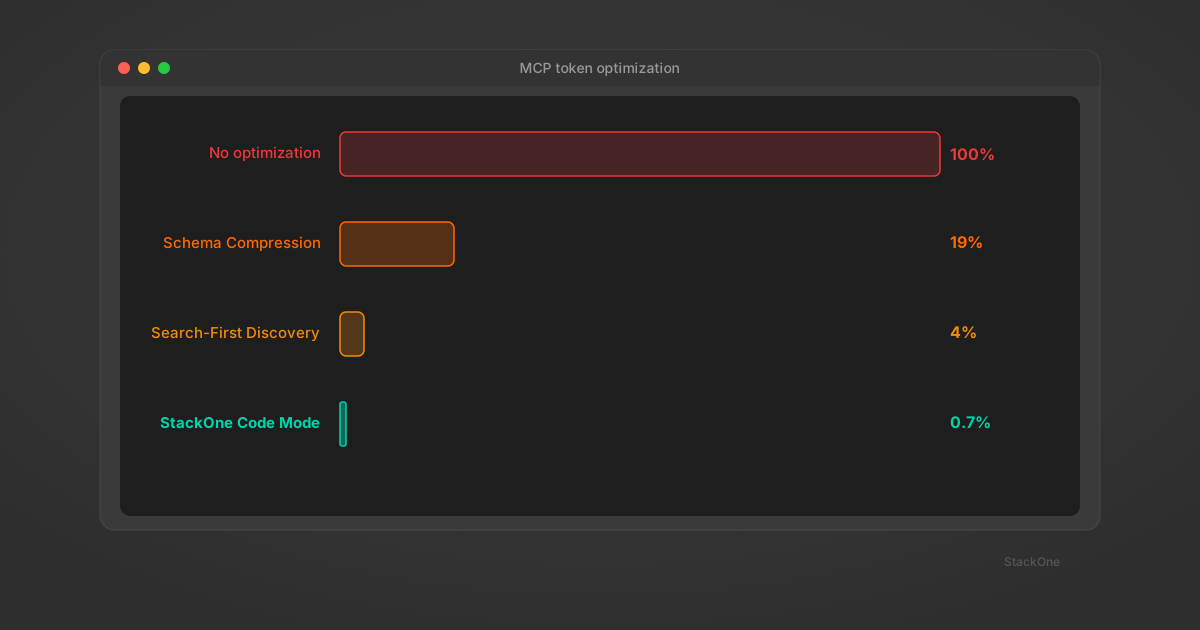
Dramatically reduce in-context tool loading and reduce token spend per session. Your agent loads only 2 tools instead of 100s. Context stays clean. Costs drop.
Off-the-shelf AI agents
Paste into your MCP client
https://api.stackone.com/mcp?x-account-id=xyztool-mode=search_execute&token={token}
Claude Desktop Claude Code Cursor Windsurf VS Code n8n | LangChain Google ADK Agents you're building
Add to your agent code
npm install @stackone/ai
# or: pip install stackone-ai
OpenAI SDK Vercel AI SDK LangChain Pydantic AI CrewAI Google ADK Azure Foundry 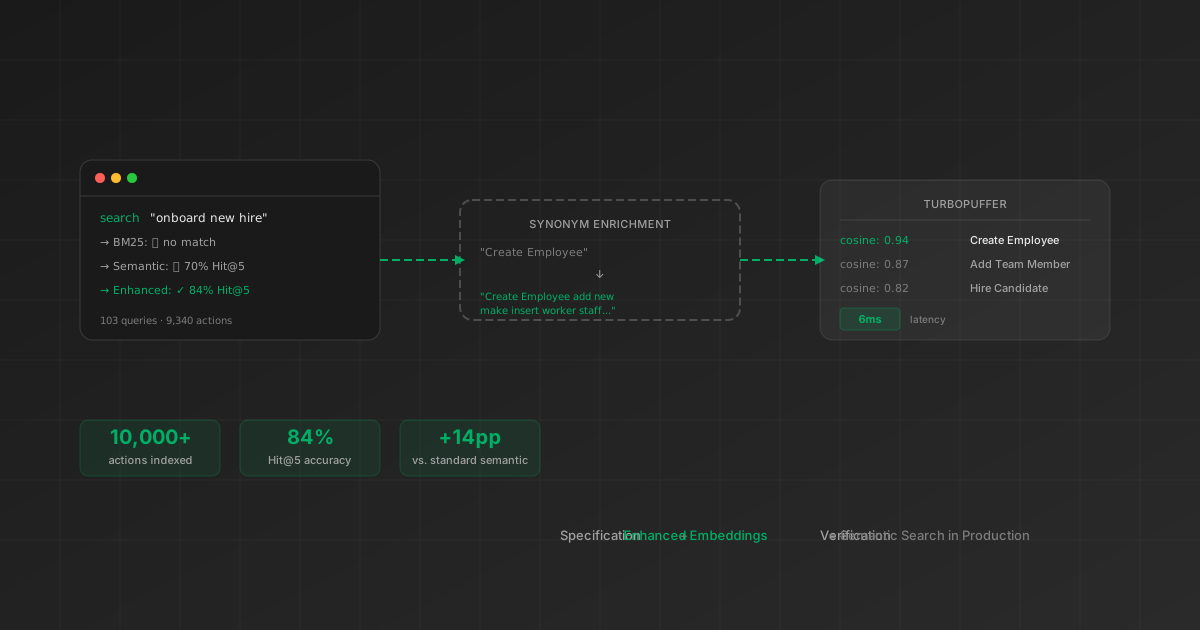
Blog
How enriched embeddings achieve 84% Hit@5 across 9,340 actions — and why reranking didn't help.

Blog
The evaluation methodology behind our local fallback search — 2,700 test cases across 270 tools.
Blog
Four strategies from schema compression to code execution — and the 460x reduction from search-first discovery.

Blog
How tool schemas, API responses, and multi-step workflows compound to exhaust your agent's reasoning space.
workday_create_learning_enrollment even with zero word overlap — picking the correct tool on the first try 92.8% of the time across 14 unseen connectors.auto mode uses semantic first and falls back to BM25+TF-IDF locally if the API is unreachable.tool-mode=search_execute to your StackOne MCP URL. Your agent will see two tools — tool_search and tool_execute — instead of hundreds of individual definitions. Remove the parameter to revert. No migration, no code changes.tool-mode=search_execute to your StackOne MCP URL and paste it into any MCP client — Claude, ChatGPT, Cursor, Windsurf, VS Code, Zed. The agent sees tool_search and tool_execute instead of hundreds of definitions. No SDK or code changes needed on the client side.tool-mode parameter is set at URL level, not per-request. Code-mode execution (sandbox) is a separate future capability.Start with Search & Execute — zero migration, one URL parameter.
