
Ashby MCP Server
for AI Agents
Connect your AI agent to StackOne's Ashby MCP server and give it 138 MCP tools out of the box. Auth, tool execution, and security all managed.
 StackOne






Coverage
138 Agent Actions
Create, read, update, and delete across Ashby — and extend your agent's capabilities with custom actions.

Authentication
Agent Tool Authentication
Per-user OAuth in one call. Your Ashby MCP server gets session-scoped tokens with zero credentials stored on your infra.
Agent Auth →
Security
Agent Protection
Every Ashby tool response scanned for prompt injection in milliseconds — 88.7% accuracy, all running on CPU.
Prompt Injection Defense →
Performance
Max Agent Context. Min Cost.
Free up to 96% of your agent's context window to enhance reasoning and reduce cost, on every Ashby call.
Tools Discovery →What is the Ashby MCP Server?
A Ashby MCP server lets AI agents read and write Ashby data through the Model Context Protocol — Anthropic's open standard for connecting LLMs to external tools. StackOne's Ashby MCP server ships with 138 pre-built actions, fully extensible via the Connector Builder — plus managed authentication, prompt injection defense, observability, and agent execution runtime. Connect it from MCP clients like Claude Desktop, Claude Code, Cursor, Goose, and VS Code, or from agent frameworks like OpenAI Agents SDK, LangChain, and Vercel AI SDK.
All Ashby MCP Tools
Every action from Ashby's API, ready for your agent. Create, read, update, and delete — scoped to exactly what you need.
Departments
- Create Department
Create a new department in the organization
- List Departments
Retrieve a paginated list of departments with cursor-based pagination and incremental sync support.
- Get Department
Get details for a single department
- Update Department
Update an existing department's details
- Move Department
Move a department to another parent
Job Postings
- List Job Postings
List job postings that are available on job boards
- Get Job Posting
Get details for a single job posting
- Update Job Posting
Update selected fields on an existing job posting
Jobs
- Create Job
Create a new job in Ashby
- Search Jobs
Search for jobs by title or requisition ID
- List Jobs
List all open, closed, and archived jobs
- Get Job
Get details about a single job by ID
- Update Job
Update an existing job by ID
Locations
- Create Location
Create a new location or location hierarchy
- List Locations
Retrieve a paginated list of locations with cursor-based pagination and incremental sync support.
- Get Location
Get details for a single location
- Move Location
Move a location within the location hierarchy
Openings
- Create Opening
Create a new opening/requisition with the provided configuration (title, department, locations, target dates, and metadata).
- Get Opening
Retrieve details for a specific opening, including status, associated jobs, locations, and key metadata. Useful for powering career site detail pages or syncing openings into downstream planning tools.
- List Openings
Retrieve a paginated list of openings with cursor-based pagination and incremental sync support.
- Search Openings
Search openings by identifier.
- Update Opening
Update fields on an existing opening (e.g., title, state, targets, locations).
Candidates
- Create Candidate
Create a new candidate profile with basic contact information and optional metadata.
- List Candidates
Retrieve a paginated list of candidates with cursor-based pagination and incremental sync support.
- Search Candidates
Search candidates by email and/or name; results limited to 100.
- Update Candidate
Update candidate profile fields or custom data.
Candidate Tags
- Add Candidate Tag
Add a tag to a candidate.
- Create Candidate Tag
Create a new candidate tag.
- List Candidate Tags
Retrieve a paginated list of candidate tags with cursor-based pagination and incremental sync support.
- Remove Candidate Tag
Remove a tag from a candidate
Projects
- List Projects
Retrieve a paginated list of projects with cursor-based pagination and incremental sync support.
- Search Projects
Search projects by title (limited to 100 results).
- Get Project
Get project details by ID.
Applications
- Create Application
Create a new application for a candidate and job posting.
- List Applications
Retrieve a paginated list of applications. The expand parameter only supports 'openings' — applicationFormSubmissions and referrals are NOT available on this endpoint (use get_application_by_id for those).
- Update Application
Update fields on an existing application.
Application Historys
- List Application History
Retrieve a paginated list of history events for an application with cursor-based pagination.
- Update Application History
Append history entries to an application.
Application Hiring Team Members
- Add Application Hiring Team Member
Add a hiring team member to an application.
- Remove Application Hiring Team Member
Remove a hiring team member from an application.
Interview Stages
- List Interview Stages
List interview stages with pagination to drive scheduling flows.
- Get Interview Stage
Retrieve details for a specific interview stage.
Interviews
- List Interviews
Retrieve a paginated list of interviews with cursor-based pagination and incremental sync support.
- Get Interview
Retrieve details for a specific interview.
Interview Schedules
- Create Interview Schedule
Create a new interview schedule for an application.
- List Interview Schedules
Retrieve a paginated list of interview schedules with cursor-based pagination and incremental sync support.
- Update Interview Schedule
Update details of an interview schedule (time, participants, etc.).
Feedback Form Definitions
- List Feedback Form Definitions
Retrieve a paginated list of feedback form definitions with cursor-based pagination and incremental sync support.
- Get Feedback Form Definition
Retrieve details of a specific feedback form definition by ID.
Users
- List Users
Retrieve a paginated list of Ashby users. Use this to find users by name (search_users only supports email lookup).
- Get User
Retrieve details for a specific user.
- Search Users
Search users by email address only. For finding users by name, use list_users instead.
User Interviewer Settings
- Get User Interviewer Settings
Retrieve interviewer settings for a user.
- Update User Interviewer Settings
Update interviewer settings for a user including daily and weekly interview capacity limits.
Offers
- Create Offer
Create a new offer for an application with structured field submissions including compensation, start date, and custom fields.
- List Offers
Retrieve a paginated list of offers with cursor-based pagination and incremental sync support.
- Get Offer
Retrieve details of a specific offer.
- Update Offer
Update fields on an existing offer. Currency fields require an object with 'value' (number) and 'currencyCode' (e.g. 'USD'). Boolean fields require a raw boolean (true/false), not a string.
Start Offer Process
- Start Offer Process
Start the offer process for an application (initializes an offer).
- Start Offer Process
Start an offer process workflow for an application.
Custom Fields
- Create Custom Field
Create a new custom field for applications, candidates, jobs, employees, projects, openings, or offers
- List Custom Fields
List all custom fields defined in your Ashby organization
- Get Custom Field
Get detailed information about a specific custom field by ID
Survey Requests
- Create Survey Request
Create a survey request for a candidate.
- List Survey Requests
Retrieve a paginated list of survey requests with cursor-based pagination and incremental sync support.
Survey Submissions
- Create Survey Submission
Submit survey responses for a candidate.
- List Survey Submissions
Retrieve a paginated list of survey submissions with cursor-based pagination and incremental sync support.
Webhooks
- Create Webhook
Create a webhook subscription.
- Get Webhook
Retrieve webhook details by ID.
- Update Webhook
Update webhook configuration. At least one of enabled, requestUrl, or secretToken must be provided.
- Delete Webhook
Delete a webhook subscription.
Other (67)
- Add Job To Opening
Attach an existing job to an opening/requisition.
- Add Location To Opening
Add a location to an opening
- Upload Candidate Resume
Complete 3-step workflow to upload and parse a candidate's resume with automatic profile population
- Upload Candidate File
Complete 3-step workflow to upload and attach any file type to a candidate's profile without parsing
- Add Candidate To Project
Associate a candidate with a recruiting project.
- Create Candidate Note As String
Add a note to a candidate profile using plain string content (text or HTML).
- Create Candidate Note As Object
Add a note to a candidate profile using structured object with explicit content type specification.
- Add Completed Assessment To Candidate
Add a completed assessment result to a candidate profile.
- Add Candidate Email Message
Add an email message to a candidate's profile timeline
- Create Referral
Create a candidate referral record.
- Add Hiring Team Member To Application
Add a user to an application's hiring team with a specified role.
- Add Hiring Team Member To Job
Add a user to a job-level hiring team with a specified role.
- Add Hiring Team Member To Opening
Add a user to an opening-level hiring team with a specified role.
- List Interview Plans
Retrieve a paginated list of interview plans with cursor-based pagination and incremental sync support.
- List Job Boards
List job boards configured in Ashby
- List Job Templates
Retrieve a paginated list of job templates with cursor-based pagination and incremental sync support.
- Get File
Retrieve metadata and download information for an uploaded file (e.g., resume or attachment) using its file ID.
- Get Candidate (by ID)
Retrieve detailed information for a single candidate by ID.
- Get Candidate (by External Mapping ID)
Retrieve detailed information for a single candidate by external mapping ID.
- List Candidate Notes
Retrieve a paginated list of candidate notes with cursor-based pagination and incremental sync support.
- List Candidate Projects
Retrieve a paginated list of candidate projects with cursor-based pagination and incremental sync support.
- List Candidate Client Info
Retrieve client-facing candidate info records with cursor-based pagination and incremental sync support.
- Get Application (by ID)
Retrieve detailed information about a specific application.
- Get Application (by Submitted Form Instance ID)
Retrieve detailed information about a specific application.
- List Audit Log
List audit log entries for an organization, newest first. Use targetIds to filter by specific candidate, application, or job. Requires auditLogsRead permission.
- List Interview Stage Groups
List interview stage groups for pipeline configuration.
- List Interviewer Pools
Retrieve a paginated list of interviewer pools with cursor-based pagination and incremental sync support.
- List Interview Events
List individual scheduled calendar events (the actual meetings between candidates and interviewers).
- List Application Feedback
Retrieve a paginated list of application feedback with cursor-based pagination and incremental sync support.
- List Approvals
Retrieve a paginated list of approvals with cursor-based pagination and incremental sync support.
- List Communication Templates
List communication templates for messaging and notifications.
- List Sources
List candidate sources for attribution and reporting.
- List Source Tracking Links
List tracking links for sources to support campaign attribution.
- Get Survey Form Definition
Retrieve survey form definition details by ID.
- Get Referral Form
Retrieve the referral form definition for submitting referrals.
- List Archive Reasons
List archive (rejection) reasons for applications.
- List Close Reasons
List close reasons for jobs/openings.
- List Hiring Team Roles
List available hiring team roles for assignments.
- List Brands
Retrieve a paginated list of brands with cursor-based pagination support.
- Update Job Compensation
Update compensation tiers for an existing job
- Set Job Status
Set the status of a job by ID
- Update Location Address
Update the address of a location or location hierarchy
- Update Location Name
Update the name of a location
- Update Location Workplace Type
Update the workplace type of a location
- Update Location External Name
Update a location's external (candidate-facing) name
- Set Opening State
Set the state of an opening
- Set Opening Archived Status
Set the archived state of an opening
- Update Approval Definition
Update approval definitions for approval workflows.
- Set Custom Field Value
Set the value of a custom field for a specific object (application, candidate, job, or opening)
- Set Custom Field Values (Batch)
Set values for multiple custom fields on an object in a single atomic operation
- Update Custom Field Selectable Values
Update the selectable values (options) for ValueSelect or MultiValueSelect custom fields
- Remove Job From Opening
Remove an associated job from an opening/requisition.
- Remove Location From Opening
Remove a location from an opening
- Remove Candidate From Project
Remove a candidate from a project
- Archive Department
Archive a department
- Restore Department
Restore an archived department
- Archive Location
Archive a location or location hierarchy
- Restore Location
Restore an archived location or location hierarchy
- Anonymize Candidate
Anonymize a candidate record for privacy/compliance purposes.
- Transfer Application
Transfer an application to a different job.
- Change Application Stage
Move an application to a new interview stage.
- Change Application Source
Update the source attribution for an application.
- Cancel Interview Schedule
Cancel a scheduled interview.
- Submit Application Feedback
Submit interview feedback for an application using a feedback form definition.
- Approve Offer
Approve an offer using offer.approve.
- Generate Report
Generate an asynchronous report.
- Generate Report (Synchronous)
Generate a synchronous report.
Ashby AI Agent Use Cases
Connect your AI agent to Ashby and help your team scale the recruiting operations they run by hand today.
Use StackOne to connect your AI agent to your ATS and job boards to automate job posting distribution.
ViewUse StackOne to connect your AI agent to your ATS, survey tools, and messaging systems to automate reference checks.
ViewUse StackOne to connect your AI agent to your ATS, HRIS, and document management tools to automate offer letter generation.
ViewSet Up Your Ashby MCP Server in Minutes
One endpoint. Any framework. Your agent is talking to Ashby in under 10 lines of code.
Agent Frameworks


 JSON
JSON{
"mcpServers": {
"stackone": {
"command": "npx",
"args": [
"-y",
"mcp-remote@latest",
"https://api.stackone.com/mcp?x-account-id=<account_id>",
"--header",
"Authorization: Basic <YOUR_BASE64_TOKEN>"
]
}
}
}Check More Recruiting MCP Servers
247+ actions
231+ actions
169+ actions
132+ actions
129+ actions
127+ actions
111+ actions
Ashby Resources
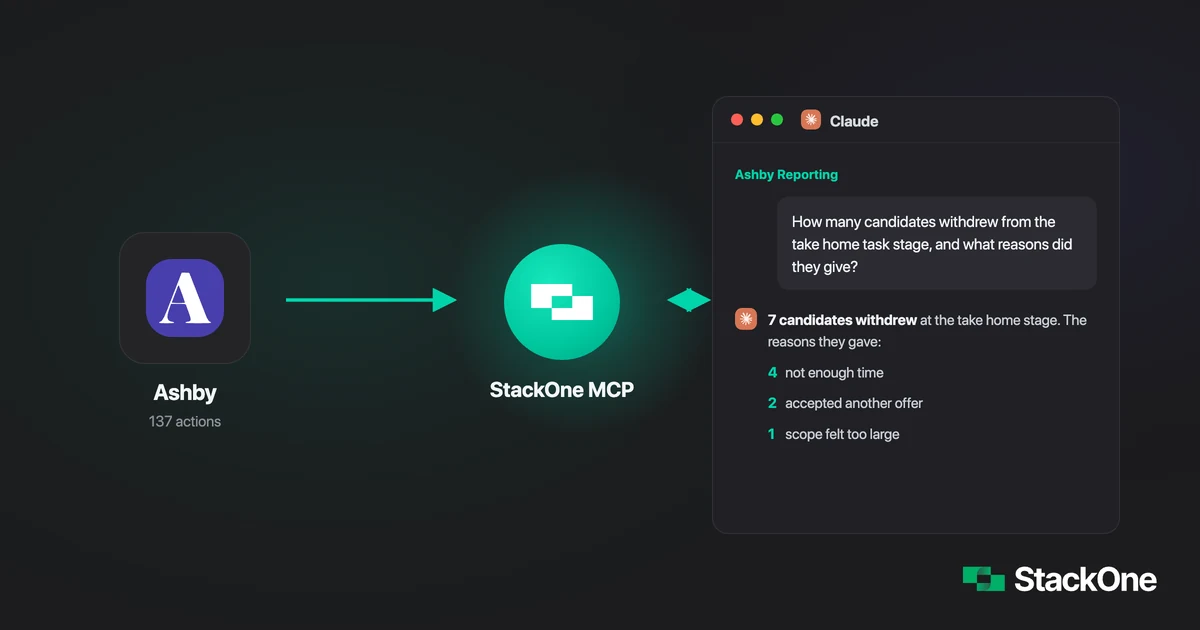
How I Built an AI Hiring Analyst in Under an Hour
A Head of People connected Claude to Ashby through StackOne's MCP gateway to answer hiring questions from real-time data via chat. No code required.
5 min read
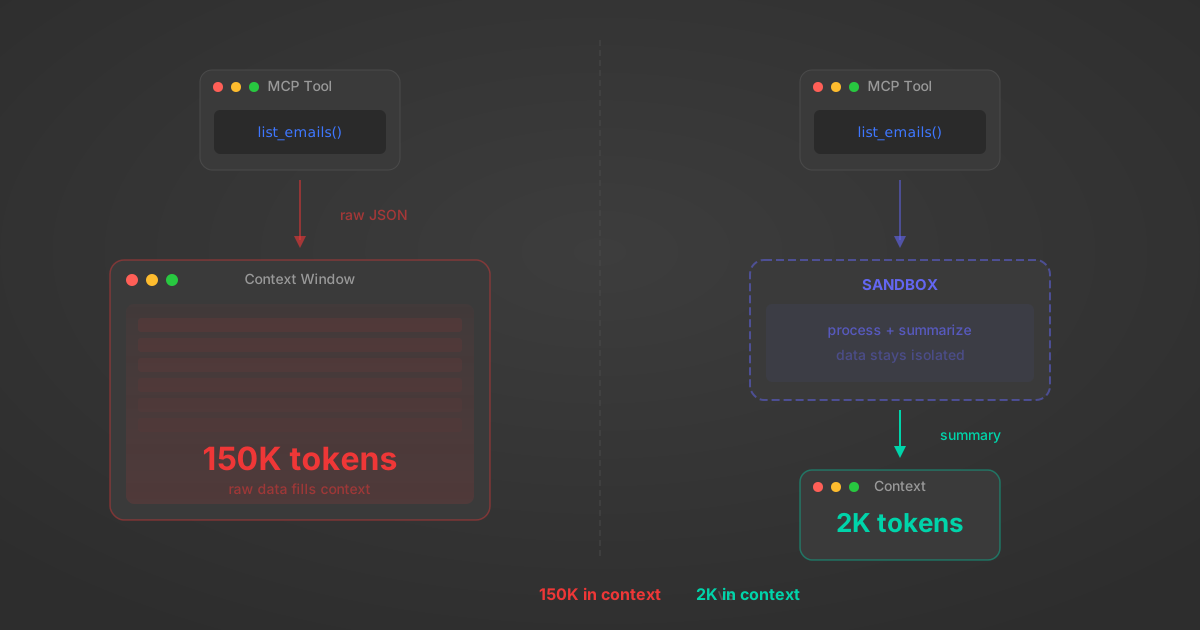
MCP Code Mode: Keeping Tool Responses Out of Agent Context
Anthropic's code_execution processes data already in context. Custom MCP code mode keeps raw tool responses in a sandbox. 14K tokens vs 500.
11 min
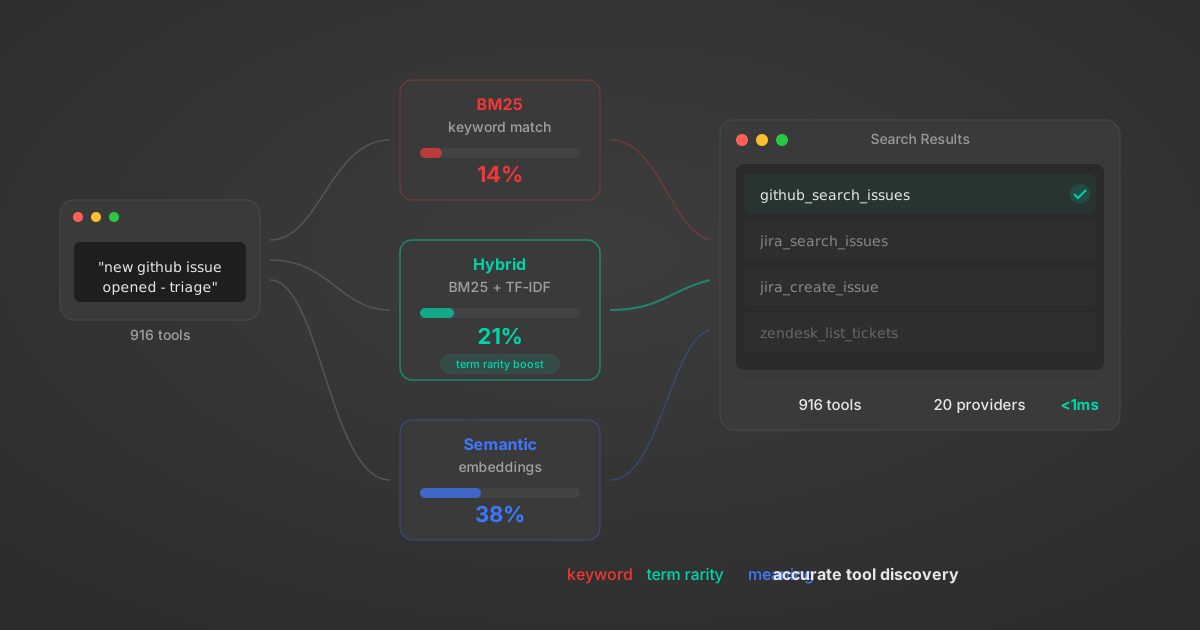
Comparing BM25, TF-IDF, and Hybrid Search for MCP Tool Discovery
Benchmarking BM25, TF-IDF, and hybrid search for MCP tool discovery across 916 tools. The 80/20 TF-IDF/BM25 hybrid hits 21% Top-1 accuracy in under 1ms.
10 min
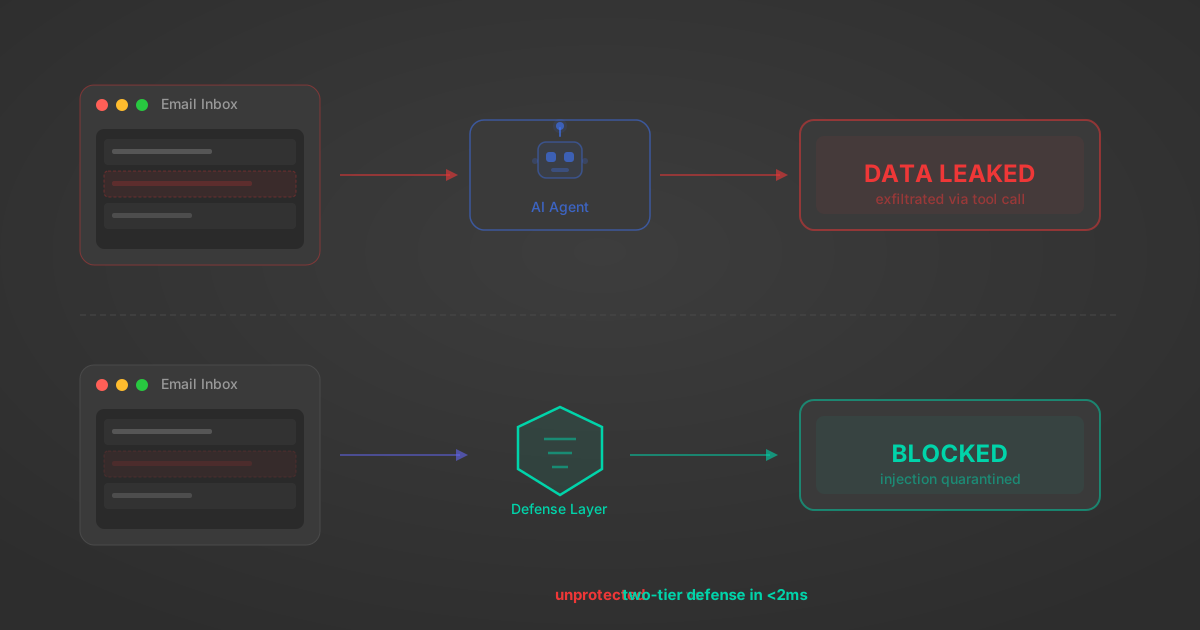
Indirect Prompt Injection Defense for MCP Tools: A Technical Guide
MCP tools that read emails, CRM records, and tickets are indirect prompt injection vectors. Here's how we built a two-tier defense that scans tool results in ~11ms.
12 min
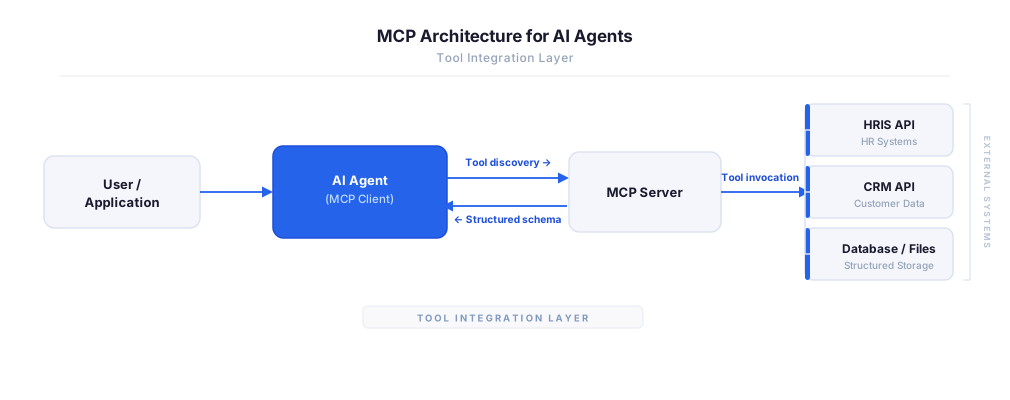
MCP vs A2A: Architecture, Security, and When to Use Each
MCP vs A2A: what each protocol standardizes, how they differ, their shared security risks including indirect prompt injection, and when to use one, both, or a hybrid architecture.
12 min
MCP vs API: What Hundreds of Connector Builds Taught Us
MCP wraps APIs, it doesn't replace them. After building hundreds of connectors that serve both, here's when each approach wins.
14 min read
Ashby MCP Server FAQ
Does StackOne have a Ashby MCP server?
Ashby MCP server vs direct API integration — what's the difference?
How does Ashby authentication work for AI agents?
origin_owner_id.Are Ashby MCP tools vulnerable to prompt injection?
What is the context bloat of a Ashby agent and how do I avoid it?
Can I limit which actions my Ashby agent can access?
Can I create custom agent actions for my Ashby MCP server?
When should I NOT use a Ashby MCP server?
What AI frameworks and AI clients does the StackOne Ashby MCP server support?
Put your AI agents to work
All the tools you need to build and scale AI agent integrations, with best-in-class connectivity, execution, and security.