
Eventbrite MCP Server
for AI Agents
Connect your AI agent to StackOne's Eventbrite MCP server and give it 90 MCP tools out of the box. Auth, tool execution, and security all managed.
 StackOne






Coverage
90 Agent Actions
Create, read, update, and delete across Eventbrite — and extend your agent's capabilities with custom actions.

Authentication
Agent Tool Authentication
Per-user OAuth in one call. Your Eventbrite MCP server gets session-scoped tokens with zero credentials stored on your infra.
Agent Auth →
Security
Agent Protection
Every Eventbrite tool response scanned for prompt injection in milliseconds — 88.7% accuracy, all running on CPU.
Prompt Injection Defense →
Performance
Max Agent Context. Min Cost.
Free up to 96% of your agent's context window to enhance reasoning and reduce cost, on every Eventbrite call.
Tools Discovery →What is the Eventbrite MCP Server?
A Eventbrite MCP server lets AI agents read and write Eventbrite data through the Model Context Protocol — Anthropic's open standard for connecting LLMs to external tools. StackOne's Eventbrite MCP server ships with 90 pre-built actions, fully extensible via the Connector Builder — plus managed authentication, prompt injection defense, observability, and agent execution runtime. Connect it from MCP clients like Claude Desktop, Claude Code, Cursor, Goose, and VS Code, or from agent frameworks like OpenAI Agents SDK, LangChain, and Vercel AI SDK.
All Eventbrite MCP Tools
Every action from Eventbrite's API, ready for your agent. Create, read, update, and delete — scoped to exactly what you need.
Formats
- List Formats
List all event formats
- Get Format
Retrieve format details by ID
Discounts
- Create Discount
Create a new discount code
- Retrieve Discount
Retrieve discount details by ID
- Update Discount
Update an existing discount
- Delete Discount
Delete a discount
Display Settings
- Retrieve Display Settings
Retrieve display settings for an event
- Update Display Settings
Update display settings for an event
Events
- Create Event
Create a new event
- Publish Event
Publish an event to make it publicly visible
- Retrieve Event
Retrieve event details by ID
- Update Event
Update an existing event
- Delete Event
Delete an event
Unified Organizations
- List Unified Organizations
List unified organizations in Eventbrite.
- Get Unified Organization
Get a unified Eventbrite organization by ID.
Unified Roles
- List Unified Roles
List unified roles across every Eventbrite organization the connection belongs to.
- Get Unified Role
Get a unified Eventbrite role by ID.
Unified Users
- List Unified Users
List the members of one Eventbrite organization mapped to the IAM unified user schema, cursor-paginated. filter.organization_id is optional — auto-resolved when the connection sees exactly one organization, otherwise a 400 asks for it.
- Get Unified User
Get a unified Eventbrite user by ID.
An Inventory Tiers
- Create An Inventory Tier
Create a single inventory tier for an event
- Retrieve An Inventory Tier
Retrieve a specific inventory tier by ID
- Update An Inventory Tier
Update a specific inventory tier
- Delete An Inventory Tier
Delete a specific inventory tier
Multiple Inventory Tiers
- Create Multiple Inventory Tiers
Create multiple inventory tiers for an event in a single request
- Update Multiple Inventory Tiers
Update multiple inventory tiers in a single request
Default Question By Ids
- Get Default Question By Id
Retrieve a specific default question by ID
- Update Default Question By Id
Update a default question for an event
- Delete Default Question By Id
Delete a default question from an event
Teams
- Create Team
Create a new team for an event
- Retrieve Team
Retrieve team details by ID
A Ticket Groups
- Create A Ticket Group
Create a new ticket group for an organization
- Retrieve A Ticket Group
Retrieve ticket group details by ID
- Update A Ticket Group
Update an existing ticket group
- Delete A Ticket Group
Delete a ticket group
Ticket Class
- Create Ticket Class
Create a new ticket type for an event
- Retrieve Ticket Class
Retrieve ticket class details by ID
- Update Ticket Class
Update an existing ticket class
Ticket Buyer Settings By Events
- Retrieve Ticket Buyer Settings By Event
Retrieve ticket buyer settings for an event
- Update Ticket Buyer Settings By Event
Update ticket buyer settings for an event
Venues
- Create Venue
Create a new venue
- Retrieve Venue
Retrieve venue details by ID
- Update Venue
Update an existing venue
Other (48)
- Copy An Event
Copy an existing event to create a duplicate
- Create A Custom Question For An Event
Create a custom question for an event
- Create A Default Question For An Event
Create a default (canned) question for an event
- Create An Event Schedule
Create a schedule for a series parent event
- Create Webhook By Organization ID
Create a new webhook for an organization
- List Attendees By Organization
List attendees across all organization events
- List Attendees By Event
List attendees for a specific event
- Get Attendee
Retrieve attendee details by ID
- List Categories
List all event categories
- Get Category
Retrieve category details by ID
- List Subcategories
List all event subcategories
- Get Subcategory
Retrieve subcategory details by ID
- Search Discounts By Organizations
Search and list discount codes for an organization
- Retrieve Full HTML Description
Retrieve the full HTML description for an event
- Retrieve Latest Published Version Of Structured Content By Event
Retrieve latest published structured content for an event
- List Events By Organization
List all events for an organization
- List Events By Venue
List events at a specific venue
- List Events By Series
List events in a series
- Get Unified Credentials
Get the current Eventbrite connection's unified credentials and identity.
- List Inventory Tiers By Event
List all inventory tiers for an event
- List Members Of Organization
List all members of an organization
- List Roles By Organization
List all roles available in an organization
- List Orders By Organization ID
List all orders for an organization
- List Orders By Event ID
List orders for a specific event
- List Orders By User ID
List orders placed by a specific user
- Get Order
Retrieve order details by ID
- List Your Organizations
List the Organizations to which you are a Member. Returns a paginated response.
- List Organizations By User
List Organizations by User ID. Returns a paginated response.
- List Default Questions By Event
List default questions for an event
- List Custom Questions By Event
List custom questions for an event
- Get Custom Question By Id
Retrieve a specific custom question by ID
- Retrieve An Event Series
Retrieve details of an event series
- List Teams By Event
Returns a list of teams for the event. Returns a paginated response.
- Search Teams By Name
Search teams by name for an event
- List Attendees By Team
Returns attendees for a single team. Returns a paginated response.
- List Ticket Groups By Organization
List ticket groups for an organization
- List Ticket Classes By Event
List ticket types for an event
- Retrieve Information About Your User Account
Retrieve information about the authenticated user account
- Retrieve Information About A User Account
Retrieve information about a specific user account
- List Venues By Organization
List venues for an organization
- List Webhooks By Organization ID
List all webhooks for an organization
- Delete Event Question
Delete a custom question from an event
- Delete Webhook By ID
Delete a webhook
- (Create/Update) Set Structured Content (Text) By Event Id And Version
Create or update structured content with text modules for an event by version
- (Create/Update) Set Structured Content (Image) By Event Id And Version
Create or update structured content with image modules for an event by version
- (Create/Update) Set Structured Content (Video) By Event Id And Version
Create or update structured content with video modules for an event by version
- Unpublish Event
Unpublish an event to return it to draft status
- Cancel Event
Cancel an event
Set Up Your Eventbrite MCP Server in Minutes
One endpoint. Any framework. Your agent is talking to Eventbrite in under 10 lines of code.
Agent Frameworks


 JSON
JSON{
"mcpServers": {
"stackone": {
"command": "npx",
"args": [
"-y",
"mcp-remote@latest",
"https://api.stackone.com/mcp?x-account-id=<account_id>",
"--header",
"Authorization: Basic <YOUR_BASE64_TOKEN>"
]
}
}
}Check More Commerce MCP Servers
172+ actions
138+ actions
137+ actions
128+ actions
120+ actions

90+ actions
72+ actions
Platform Resources
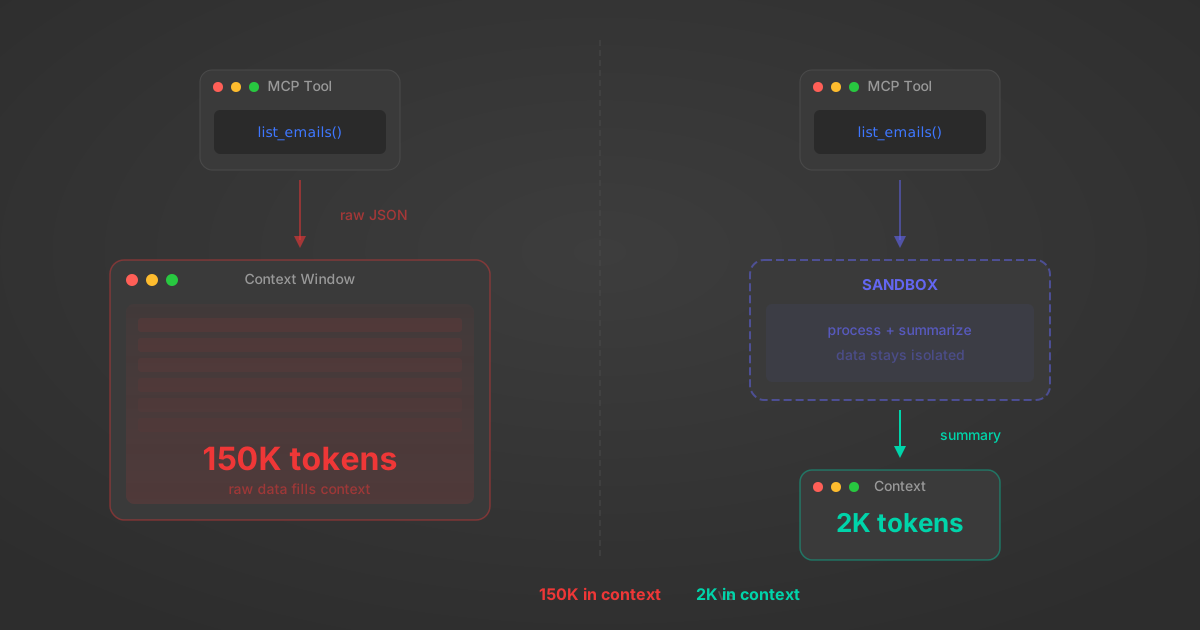
MCP Code Mode: Keeping Tool Responses Out of Agent Context
Anthropic's code_execution processes data already in context. Custom MCP code mode keeps raw tool responses in a sandbox. 14K tokens vs 500.
11 min
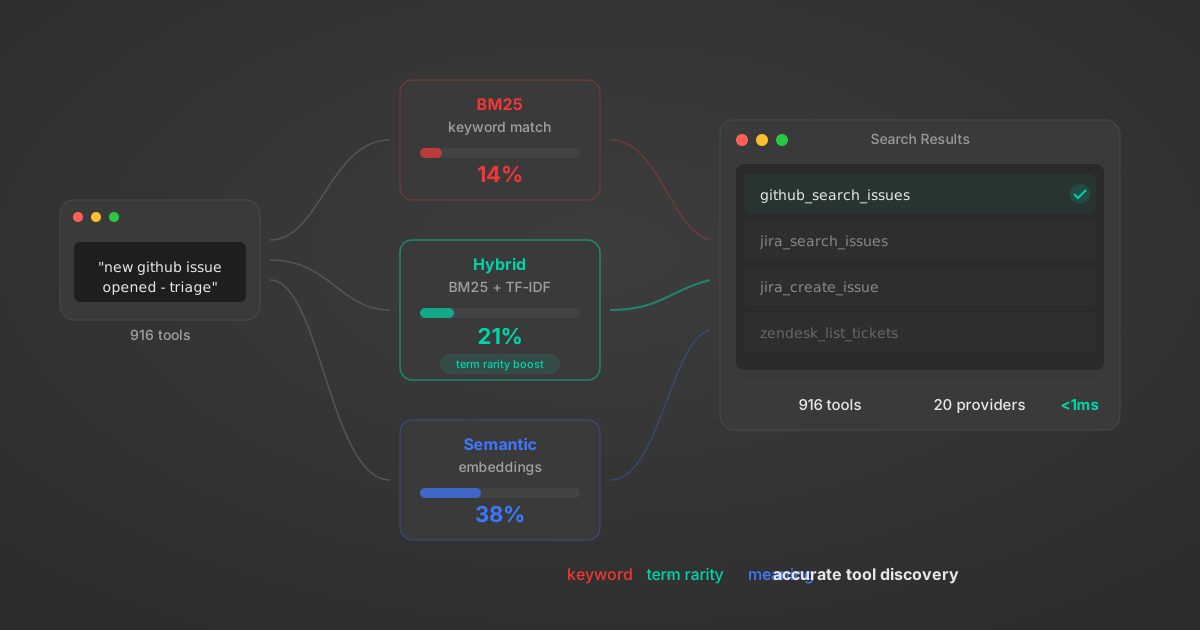
Comparing BM25, TF-IDF, and Hybrid Search for MCP Tool Discovery
Benchmarking BM25, TF-IDF, and hybrid search for MCP tool discovery across 916 tools. The 80/20 TF-IDF/BM25 hybrid hits 21% Top-1 accuracy in under 1ms.
10 min
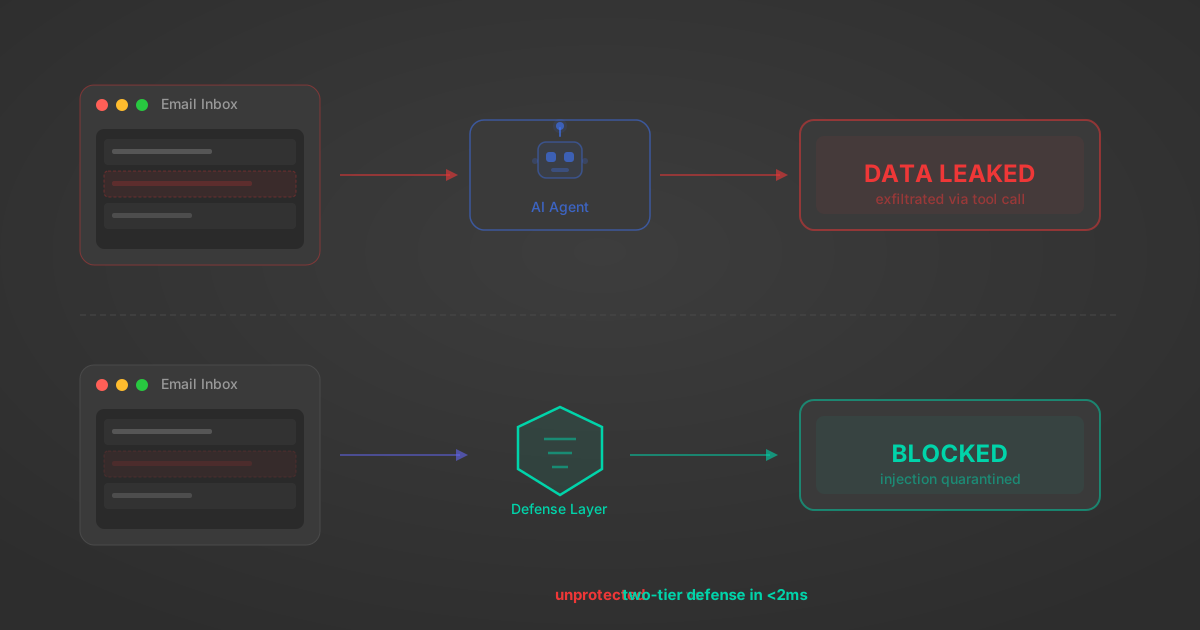
Indirect Prompt Injection Defense for MCP Tools: A Technical Guide
MCP tools that read emails, CRM records, and tickets are indirect prompt injection vectors. Here's how we built a two-tier defense that scans tool results in ~11ms.
12 min
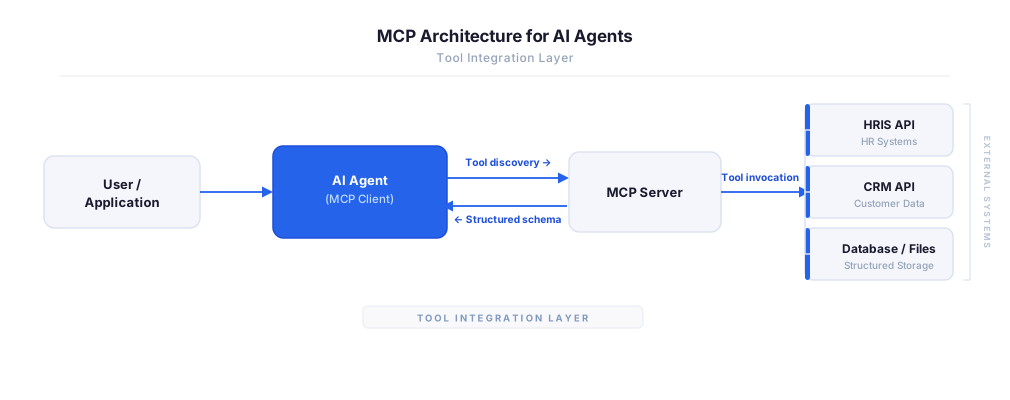
MCP vs A2A: Architecture, Security, and When to Use Each
MCP vs A2A: what each protocol standardizes, how they differ, their shared security risks including indirect prompt injection, and when to use one, both, or a hybrid architecture.
12 min
MCP vs API: What Hundreds of Connector Builds Taught Us
MCP wraps APIs, it doesn't replace them. After building hundreds of connectors that serve both, here's when each approach wins.
14 min read
Eventbrite MCP Server FAQ
Does StackOne have a Eventbrite MCP server?
Eventbrite MCP server vs direct API integration — what's the difference?
How does Eventbrite authentication work for AI agents?
origin_owner_id.Are Eventbrite MCP tools vulnerable to prompt injection?
What is the context bloat of a Eventbrite agent and how do I avoid it?
Can I limit which actions my Eventbrite agent can access?
Can I create custom agent actions for my Eventbrite MCP server?
When should I NOT use a Eventbrite MCP server?
What AI frameworks and AI clients does the StackOne Eventbrite MCP server support?
Put your AI agents to work
All the tools you need to build and scale AI agent integrations, with best-in-class connectivity, execution, and security.