
Shopify MCP Server
for AI Agents
Connect your AI agent to StackOne's Shopify MCP server and give it 90 MCP tools out of the box. Auth, tool execution, and security all managed.

 StackOne






Coverage
90 Agent Actions
Create, read, update, and delete across Shopify — and extend your agent's capabilities with custom actions.

Authentication
Agent Tool Authentication
Per-user OAuth in one call. Your Shopify MCP server gets session-scoped tokens with zero credentials stored on your infra.
Agent Auth →
Security
Agent Protection
Every Shopify tool response scanned for prompt injection in milliseconds — 88.7% accuracy, all running on CPU.
Prompt Injection Defense →
Performance
Max Agent Context. Min Cost.
Free up to 96% of your agent's context window to enhance reasoning and reduce cost, on every Shopify call.
Tools Discovery →What is the Shopify MCP Server?
A Shopify MCP server lets AI agents read and write Shopify data through the Model Context Protocol — Anthropic's open standard for connecting LLMs to external tools. StackOne's Shopify MCP server ships with 90 pre-built actions, fully extensible via the Connector Builder — plus managed authentication, prompt injection defense, observability, and agent execution runtime. Connect it from MCP clients like Claude Desktop, Claude Code, Cursor, Goose, and VS Code, or from agent frameworks like OpenAI Agents SDK, LangChain, and Vercel AI SDK.
All Shopify MCP Tools
Every action from Shopify's API, ready for your agent. Create, read, update, and delete — scoped to exactly what you need.
Products
- Create Product
Create a new product with optional variants, images, options, metafields, SEO tags, and published_at. Only title is required — all other fields are optional
- List Products
Retrieve a paginated list of products with filtering by status, vendor, product type, collection, title, published_status (published/unpublished/any), and date ranges (created_at, published_at, updated_at). Returns next_page_info cursor for pagination — pass it as page_info input to fetch subsequent pages
- Get Product
Retrieve a single product by ID, returning full details including each variant's inventory_item_id. After finding a product by name with list_products, call get_product with its id to obtain the inventory_item_id.
- Update Product
Update an existing product by product_id. Supports updating title, description, vendor, tags, status, variants, images, options, metafields, and SEO tags
- Delete Product
Delete a product
Product Variants
- Create Product Variant
Add a new variant to a product with pricing, inventory, fulfillment, image, and metafields options. Requires product_id as path parameter
- List Product Variants
Retrieve all variants for a given product_id with pricing, SKU, inventory, and option values. Returns next_page_info cursor for pagination — pass it as page_info input to fetch subsequent pages
- Get Product Variant
Retrieve a specific product variant
- Update Product Variant
Update variant pricing, inventory, fulfillment, options, barcode, image, tax code, and metafields by variant_id. All fields optional — only pass fields to change
- Delete Product Variant
Remove a variant from a product
Product Images
- Create Product Image
Add a new image to a product
- List Product Images
Retrieve all images for a product
- Get Product Image
Retrieve a single product image
- Update Product Image
Modify a product image's position, alt text, variant associations, metafields, or replace image content via src URL
- Delete Product Image
Remove an image from a product
Orders
- Create Order
Create a new order with line items (supporting variant_id, title, price, SKU, quantity, grams, taxable, requires_shipping, product_id, vendor, gift_card, fulfillment_service, total_discount, properties, tax_lines, discount_allocations, duties, attributed_staffs), customer, billing/shipping addresses, tax lines, discount codes, fulfillment status, fulfillments, currency, inventory behaviour, shipping lines, transactions, note, tags, note_attributes, and metafields
- List Orders
Retrieve a paginated list of orders with filtering by status, fulfillment state, financial state, date ranges, and app attribution. Supports cursor-based pagination via page_info parameter
- Get Order
Retrieve a single order by ID
- Update Order
Update an existing order's properties including note, tags, email, phone, marketing preferences, note_attributes, and metafields
Customers
- Create Customer
Create a new customer with name, email, phone, addresses, tags, verified_email, send_email_welcome, and metafields options
- List Customers
Retrieve a paginated list of customers. Supports cursor-based pagination via page_info parameter
- Get Customer
Retrieve a single customer by ID
- Search Customers
Search customers by query criteria such as email, name, phone, or tag with cursor-based pagination, or retrieve all customers when no query is provided
- Update Customer
Update an existing customer by customer_id. Supports updating name, email, phone, addresses, tags, note, tax_exempt, verified_email, and metafields
Customer Address
- Create Customer Address
Add a new shipping or billing address to a customer by customer_id. All address fields (address1, city, country, etc.) are optional — only customer_id is required
- Get Customer Address
Retrieve a specific customer address
- Update Customer Address
Update an existing address
- Delete Customer Address
Remove an address from customer (cannot delete default address)
Inventory Items
- List Inventory Items
Retrieve inventory items by IDs (required on first request, max 100). Returns next_page_info cursor for pagination — pass it as page_info to fetch subsequent pages (omit ids when using page_info)
- Update Inventory Item
Update an inventory item's SKU, tracking status, shipping requirement, harmonized system code, and country/province of origin by inventory_item_id
Inventory Levels
- List Inventory Levels
Retrieve inventory levels across locations
- Set Inventory Level
Set absolute inventory quantity at a location
Locations
- List Locations
Retrieve all store locations (warehouses, retail stores, and fulfillment centers) with cursor-based pagination extracted from Shopify's Link response header
- Get Location
Retrieve a specific location
Fulfillments
- Create Fulfillment
Create a fulfillment for fulfillment orders
- List Fulfillments
Retrieve fulfillments for an order. Supports cursor-based pagination via page_info parameter
Custom Collections
- Create Custom Collection
Create a new custom collection with title, description, image, sort order, collects (to include products), and metafields
- List Custom Collections
Retrieve all custom collections with cursor-based pagination
- Update Custom Collection
Update an existing custom collection by collection_id. Supports updating title, description, image, sort order, published status, collects (to add products), and metafields
- Delete Custom Collection
Permanently delete a custom collection
Collects
- Create Collect
Add a product to a collection
- List Collects
Retrieve product-collection associations with cursor-based pagination
- Delete Collect
Remove a product from a collection
Webhooks
- Create Webhook
Register a new webhook subscription with topic, address, format, fields, and metafield namespaces
- List Webhooks
Retrieve all registered webhooks. Supports cursor-based pagination via page_info parameter
- Update Webhook
Modify an existing webhook subscription
- Delete Webhook
Unregister a webhook subscription
Draft Orders
- Create Draft Order
Create a new draft order with line items (supporting variant_id, title, price, quantity, sku, grams, taxable, requires_shipping, gift_card, applied_discount, properties), billing/shipping addresses, order-level applied discount, and customer
- List Draft Orders
Retrieve all draft orders. Supports cursor-based pagination via page_info parameter
- Get Draft Order
Retrieve a single draft order by ID
- Update Draft Order
Modify an existing draft order's line items, customer, shipping address, discounts, note, email, or tags via PUT /admin/api/2025-10/draft_orders/{draft_order_id}.json
- Delete Draft Order
Permanently delete a draft order
Transactions
- Create Transaction
Create a payment transaction (requires existing authorization)
- List Transactions
Retrieve payment transactions for an order
Refunds
- Create Refund
Create a refund for order items (requires captured payment)
- List Refunds
Retrieve all refunds for a specific order_id, including line items, transactions, and adjustments. Returns next_page_info cursor for pagination — pass it as page_info to fetch subsequent pages
- Get Refund
Retrieve a specific refund by ID
Product Metafields
- Create Product Metafield
Create a metafield for a product
- List Product Metafields
Retrieve metafields for a product
- Get Product Metafield
Retrieve a specific metafield attached to a product by product_id and metafield_id. Use the fields query param to return only specific fields (e.g., id,namespace,key,value,type)
- Update Product Metafield
Update a product metafield's value or type
- Delete Product Metafield
Delete a metafield from a product
Customer Metafields
- Create Customer Metafield
Create a metafield for a customer
- List Customer Metafields
Retrieve metafields for a customer
- Update Customer Metafield
Update a customer metafield's value or type by customer_id and metafield_id. Only the value and type fields can be changed on an existing metafield
- Delete Customer Metafield
Delete a metafield from a customer
Order Metafields
- Create Order Metafield
Create a metafield on an order to store custom metadata or flags (e.g. is_gift). Use this to reliably add an order metafield — metafields supplied inline to create_order are not reliably persisted, so call this after the order is created (update_order also accepts a metafields input).
- List Order Metafields
Retrieve metafields for an order
- Update Order Metafield
Update an order metafield's value or type by order_id and metafield_id. Only the value and type fields can be changed on an existing metafield
- Delete Order Metafield
Delete a metafield from an order
Price Rules
- List Price Rules
Retrieve all price rules
- Get Price Rule
Retrieve a single price rule by ID
Unified Organizations
- List Unified Organizations
List unified organizations (the connected store) in Shopify.
- Get Unified Organization
Get a unified Shopify organization (the connected store) by ID.
Unified Users
- List Unified Users
List unified users (store staff) in Shopify.
- Get Unified User
Get a unified Shopify user (store staff member) by ID.
Other (14)
- List Customer Addresses
Retrieve all addresses for a customer. Supports cursor-based pagination via page_info parameter
- List Abandoned Checkouts
Retrieve abandoned checkouts with filtering by status (open or closed), date ranges, and cursor-based pagination. Returns checkout details including customer info, line items, totals, and recovery URLs
- Get Unified Credentials
Get the current Shopify connection's unified credentials and identity.
- Count Products
Get total count of products
- Count Product Variants
Get count of variants for a product
- Cancel Order
Cancel an order
- Count Orders
Get total count of orders matching filter criteria for reporting and dashboards
- Close Order
Close an order
- Open Order
Reopen a closed order
- Count Customers
Get total count of customers
- Adjust Inventory Level
Adjust inventory quantity at a location (requires inventory tracking enabled)
- Connect Inventory To Location
Connect an inventory item to a location
- Complete Draft Order
Convert draft order to regular order
- Calculate Refund
Calculate refund amounts before processing with line items, restock type, location, already_stocked flag, and shipping
Set Up Your Shopify MCP Server in Minutes
One endpoint. Any framework. Your agent is talking to Shopify in under 10 lines of code.
Agent Frameworks


 JSON
JSON{
"mcpServers": {
"stackone": {
"command": "npx",
"args": [
"-y",
"mcp-remote@latest",
"https://api.stackone.com/mcp?x-account-id=<account_id>",
"--header",
"Authorization: Basic <YOUR_BASE64_TOKEN>"
]
}
}
}Check More Commerce MCP Servers
172+ actions
138+ actions
137+ actions
128+ actions
120+ actions
90+ actions
72+ actions
Platform Resources
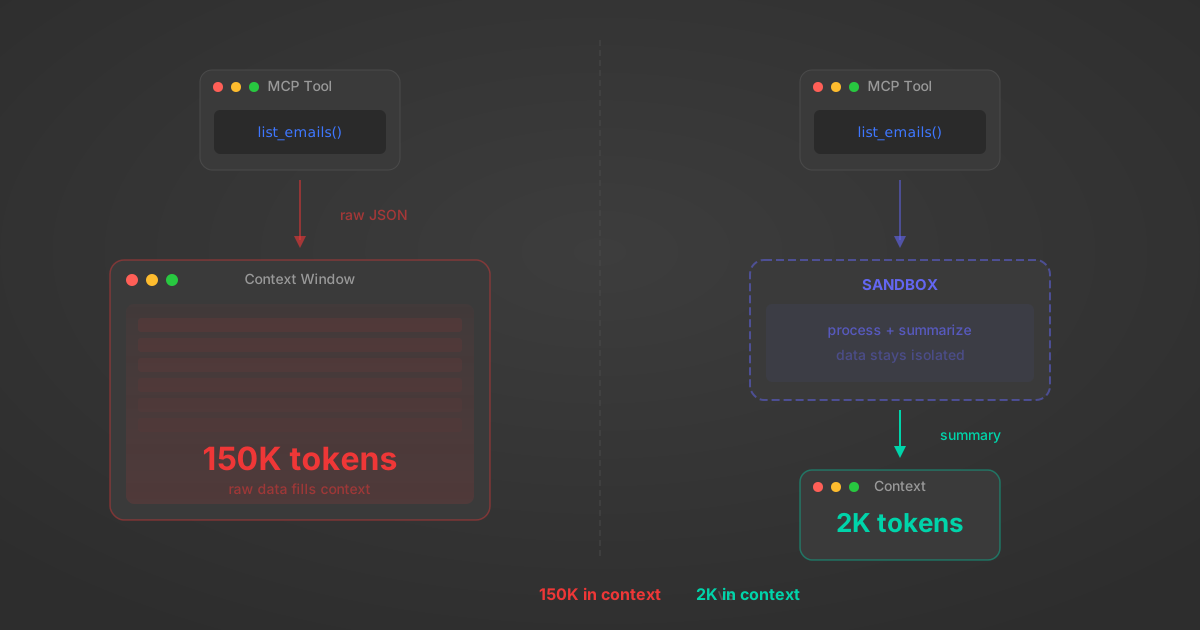
MCP Code Mode: Keeping Tool Responses Out of Agent Context
Anthropic's code_execution processes data already in context. Custom MCP code mode keeps raw tool responses in a sandbox. 14K tokens vs 500.
11 min
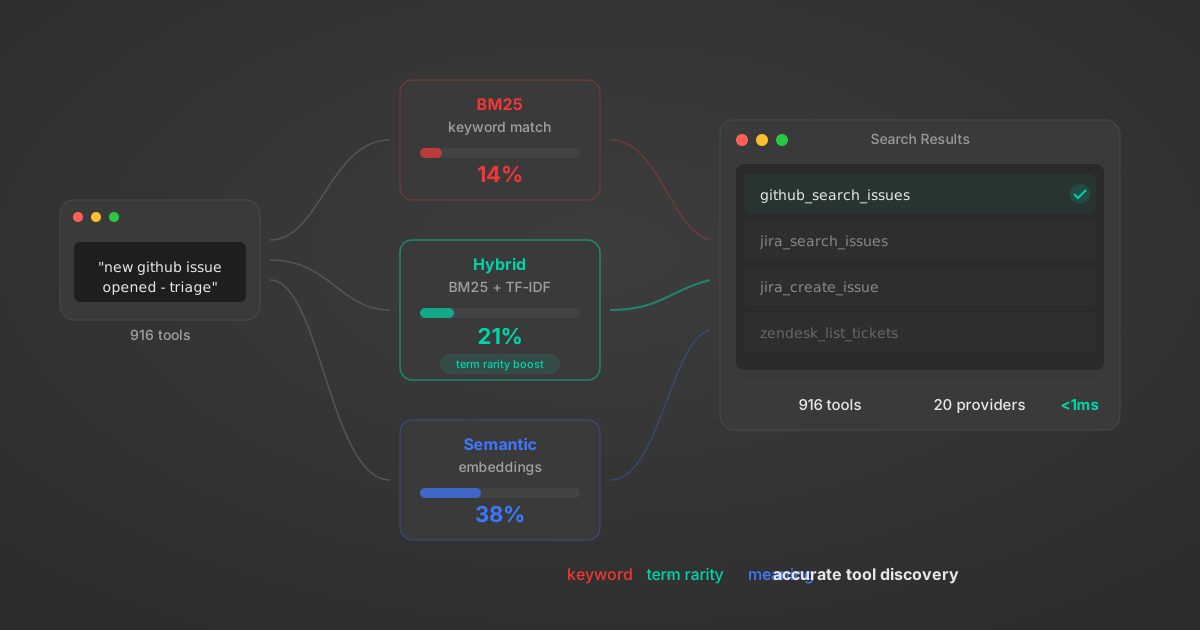
Comparing BM25, TF-IDF, and Hybrid Search for MCP Tool Discovery
Benchmarking BM25, TF-IDF, and hybrid search for MCP tool discovery across 916 tools. The 80/20 TF-IDF/BM25 hybrid hits 21% Top-1 accuracy in under 1ms.
10 min
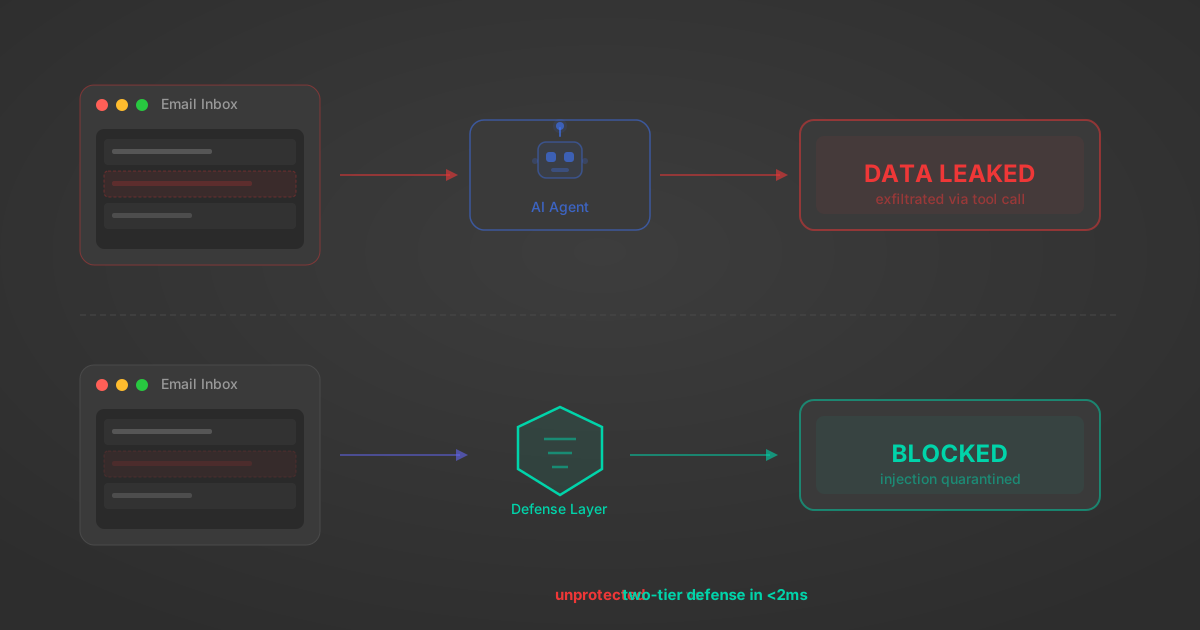
Indirect Prompt Injection Defense for MCP Tools: A Technical Guide
MCP tools that read emails, CRM records, and tickets are indirect prompt injection vectors. Here's how we built a two-tier defense that scans tool results in ~11ms.
12 min
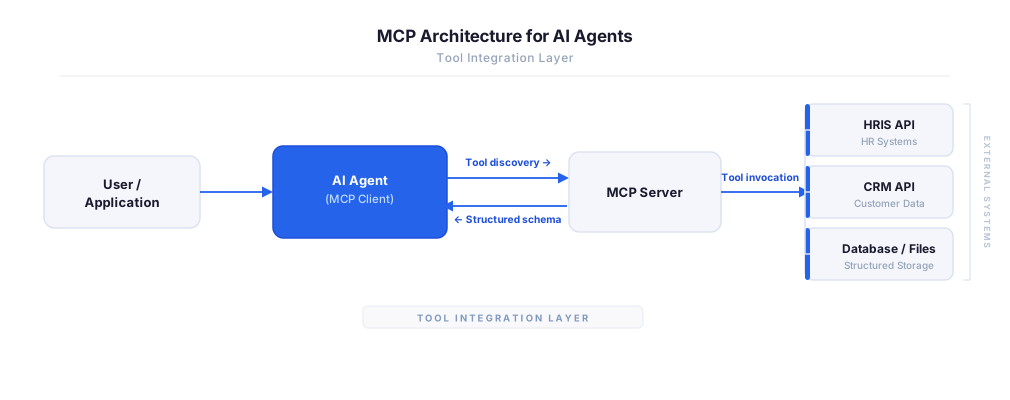
MCP vs A2A: Architecture, Security, and When to Use Each
MCP vs A2A: what each protocol standardizes, how they differ, their shared security risks including indirect prompt injection, and when to use one, both, or a hybrid architecture.
12 min
MCP vs API: What Hundreds of Connector Builds Taught Us
MCP wraps APIs, it doesn't replace them. After building hundreds of connectors that serve both, here's when each approach wins.
14 min read
Shopify MCP Server FAQ
Does StackOne have a Shopify MCP server?
Shopify MCP server vs direct API integration — what's the difference?
How does Shopify authentication work for AI agents?
origin_owner_id.Are Shopify MCP tools vulnerable to prompt injection?
What is the context bloat of a Shopify agent and how do I avoid it?
Can I limit which actions my Shopify agent can access?
Can I create custom agent actions for my Shopify MCP server?
When should I NOT use a Shopify MCP server?
What AI frameworks and AI clients does the StackOne Shopify MCP server support?
Put your AI agents to work
All the tools you need to build and scale AI agent integrations, with best-in-class connectivity, execution, and security.