
Pipedrive MCP Server
for AI Agents
Connect your AI agent to StackOne's Pipedrive MCP server and give it 132 MCP tools out of the box. Auth, tool execution, and security all managed.
 StackOne






Coverage
132 Agent Actions
Create, read, update, and delete across Pipedrive — and extend your agent's capabilities with custom actions.

Authentication
Agent Tool Authentication
Per-user OAuth in one call. Your Pipedrive MCP server gets session-scoped tokens with zero credentials stored on your infra.
Agent Auth →
Security
Agent Protection
Every Pipedrive tool response scanned for prompt injection in milliseconds — 88.7% accuracy, all running on CPU.
Prompt Injection Defense →
Performance
Max Agent Context. Min Cost.
Free up to 96% of your agent's context window to enhance reasoning and reduce cost, on every Pipedrive call.
Tools Discovery →What is the Pipedrive MCP Server?
A Pipedrive MCP server lets AI agents read and write Pipedrive data through the Model Context Protocol — Anthropic's open standard for connecting LLMs to external tools. StackOne's Pipedrive MCP server ships with 132 pre-built actions, fully extensible via the Connector Builder — plus managed authentication, prompt injection defense, observability, and agent execution runtime. Connect it from MCP clients like Claude Desktop, Claude Code, Cursor, Goose, and VS Code, or from agent frameworks like OpenAI Agents SDK, LangChain, and Vercel AI SDK.
All Pipedrive MCP Tools
Every action from Pipedrive's API, ready for your agent. Create, read, update, and delete — scoped to exactly what you need.
Users
- Add User
Invite a new user to the Pipedrive company account by email with configurable app access
- List Users
Retrieve all users in the Pipedrive company account, including active and inactive team members
- Get User
Retrieve full profile details of a specific Pipedrive user by their numeric ID
- Update User
Activate or deactivate a Pipedrive user account — uses HTTP PUT and requires active_flag in the body
Pipelines
- Add Pipeline
Create a new named sales pipeline in Pipedrive with optional per-stage deal probability tracking
- List Pipelines
Retrieve all sales pipelines in the Pipedrive account using cursor-based pagination
- Get Pipeline
Retrieve the full record of a single pipeline by its numeric ID, including name, active status, and deal probability settings
- Update Pipeline
Perform a partial update on an existing pipeline by ID — rename it or toggle deal probability tracking
- Delete Pipeline
Permanently delete a pipeline by its ID — deals in the pipeline are not deleted but become unlinked from the pipeline
Stages
- Add Stage
Create a new stage in a pipeline with a name, optional deal probability, and optional deal rot detection
- List Stages
Retrieve all pipeline stages in the Pipedrive account with optional filtering by pipeline ID
- Get Stage
Retrieve the full record of a single pipeline stage by its numeric ID, including pipeline assignment, deal probability, and deal rot settings
- Update Stage
Perform a partial update on an existing pipeline stage by ID — rename it, move it to another pipeline, or change its deal probability and rot settings
- Delete Stage
Permanently delete a stage by its ID — deals in the stage are not deleted but become detached from the stage
Organizations
- Add Organization
Create a new organization (company/account) record in Pipedrive, optionally setting address, owner, visibility, labels, and custom fields
- List Organizations
Retrieve a paginated list of all organizations (companies/accounts) in Pipedrive with rich filtering by owner, update time, and saved filters
- Get Organization
Retrieve the full record of a single organization by its numeric ID, including address, owner, visibility, and optional computed counts
- Search Organizations
Full-text search across organizations by name, address, notes, or custom fields using GET /api/v2/organizations/search
- Update Organization
Perform a partial update on an existing organization by ID using HTTP PATCH — only fields provided in the request body are modified
- Delete Organization
Mark an organization as deleted by its ID — the record enters a 30-day grace period before permanent removal
Persons
- Add Person
Create a new person (contact) record in Pipedrive with name, emails, phones, linked organization, and custom fields
- List Persons
Retrieve a paginated list of all persons (contacts) in Pipedrive with filtering by owner, organization, deal, and update timestamps
- Get Person
Retrieve the full record of a single person (contact) by their numeric ID, including emails, phones, linked organization, and optional computed counts
- Search Persons
Full-text search across persons by name, email, phone, notes, or custom fields using GET /api/v2/persons/search with optional organization scoping
- Update Person
Perform a partial update on an existing person by ID using HTTP PATCH — only fields provided in the request body are modified
- Delete Person
Mark a person as deleted by their ID — the record enters a 30-day grace period before permanent removal
Deals
- Add Deal
Create a new sales deal in Pipedrive, optionally linking it to a person, organization, pipeline, and stage
- List Deals
Retrieve a paginated list of all Pipedrive deals with rich filtering by owner, person, organization, pipeline, stage, status, and time range
- Get Deal
Retrieve complete details of a single deal by ID, including value, pipeline position, linked contacts, and optional computed fields
- Search Deals
Full-text search across deals by title, custom fields, or notes with optional filters for person, organization, and status
- Update Deal
Perform a partial update on an existing deal by ID using HTTP PATCH — only fields provided in the request body are modified
- Delete Deal
Mark a deal as deleted by its ID — the deal enters a 30-day grace period before permanent removal
Products
- Add Product
Add a new product to the Pipedrive product inventory with pricing, tax, visibility, and custom field support
- List Products
Retrieve a paginated list of products from the Pipedrive inventory with optional filtering by owner, IDs, and update time
- Get Product
Retrieve full details of a single product by its numeric ID, including pricing, tax, visibility, and custom fields
- Search Products
Full-text search for products by name, SKU code, or custom field values with optional exact matching
- Update Product
Update one or more properties of an existing product by its numeric ID — only provided fields are changed
- Delete Product
Soft-delete a product by its numeric ID — the product is recoverable for 30 days before permanent deletion
Activitys
- Add Activity
Create a new activity (call, meeting, task, email, etc.) in Pipedrive and optionally link it to a deal, lead, person, or organization
- Get Activity
Retrieve full details of a single activity by its numeric ID, including type, due date, participants, and linked entities
- Update Activity
Update one or more properties of an existing activity by its numeric ID — only provided fields are changed
- Delete Activity
Soft-delete an activity by its numeric ID — the activity is recoverable for 30 days before permanent deletion
Activity Types
- Add Activity Type
Create a new custom activity type with a name, icon, and optional color to categorize activities
- List Activity Types
Retrieve all activity type definitions (call, meeting, task, email, etc.) — use the key values when creating activities
Leads
- Add Lead
Create a new unqualified sales lead linked to a person or organization, before it enters a sales pipeline as a deal
- List Leads
Retrieve a paginated list of non-archived leads with optional filtering by owner, person, organization, or filter ID
- Get Lead
Retrieve full details of a single lead by its UUID, including value, expected close date, labels, and linked contact
- Search Leads
Full-text search for leads by title, notes, or custom field values with optional filtering by linked person or organization
- Update Lead
Update one or more properties of an existing lead by its UUID — only provided fields are changed
- Delete Lead
Permanently and immediately delete a lead by its UUID — this cannot be undone
Notes
- Add Note
Create a new HTML note and attach it to a deal, person, organization, or lead with optional pinning
- List Notes
Retrieve a paginated list of notes with filtering by linked entity (deal, person, org, lead), author, date range, and pin status
- Get Note
Retrieve the full content and metadata of a specific note by its numeric ID
- Update Note
Update an existing note's content, linked entities, pin status, or author — uses HTTP PUT but omitted fields are preserved; send null to explicitly clear a field
- Delete Note
Soft-delete a note by its numeric ID — the note is hidden but remains fetchable with active_flag=false
Projects
- Add Project
Create a new project in Pipedrive with title, board, phase, status, linked deals/person/organization, and template — requires Pipedrive Professional plan or higher
- List Projects
Retrieve all projects in Pipedrive with optional filtering by status or phase — requires Pipedrive Professional plan or higher
- Get Project
Retrieve the full record of a single project by its numeric ID — requires Pipedrive Professional plan or higher
- Update Project
Update properties of an existing project by ID — only fields provided are modified — requires Pipedrive Professional plan or higher
- Delete Project
Permanently delete a project by its ID — requires Pipedrive Professional plan or higher
Filters
- Add Filter
Create a new saved filter with AND/OR condition logic to reuse in list_deals, list_persons, list_organizations, and other list actions
- List Filters
Retrieve all saved Pipedrive filters with optional filtering by entity type (deals, leads, persons, organizations, products, activities, projects)
- Get Filter
Retrieve the full definition of a single saved filter by its ID, including the nested condition logic
- Update Filter
Update an existing saved filter's name or conditions — the conditions object is required even when only updating the name
- Delete Filter
Permanently delete a saved filter by its ID — any list actions currently using this filter_id will no longer be able to reference it
Goals
- Add Goal
Create a new sales or activity goal with an assignee, type, target metric, duration, and tracking interval — Pipedrive automatically creates a progress report
- Update Goal
Update an existing goal's title, assignee, type, expected outcome, duration, or interval — uses HTTP PUT; include all fields you want to preserve
- Delete Goal
Permanently delete a goal by its ID — this also removes the associated goal progress report
Roles
- Add Role
Create a new user role in Pipedrive with an optional parent role for hierarchical permission structures — requires admin scope
- List Roles
Retrieve all user roles within the Pipedrive company account — roles define permissions and data visibility for users
- Get Role
Retrieve the full record of a single user role by its numeric ID, including its name and parent role relationship
- Update Role
Update an existing role's name or parent role assignment — uses HTTP PUT; include all fields you want to preserve
- Delete Role
Permanently delete a role by its ID — users assigned to the deleted role are automatically reassigned to the default role
Webhooks
- Create Webhook
Create a new webhook subscription to receive real-time event notifications at a public URL when Pipedrive records are created, changed, or deleted
- List Webhooks
Retrieve all configured webhook subscriptions for the Pipedrive company account — requires admin scope
- Delete Webhook
Permanently delete a webhook subscription by its ID — Pipedrive will immediately stop sending events to the subscription URL
Deal Fields
- Add Deal Field
Create a new custom field on deal records to capture additional deal-specific data
- List Deal Fields
Retrieve all deal field definitions (standard and custom) to understand deal schema and discover custom field hash keys
- Get Deal Field
Retrieve the full metadata of a single deal field by its field code, including type, options, and key
- Update Deal Field
Rename an existing custom deal field — field type and field code cannot be changed after creation
- Delete Deal Field
Permanently delete a custom deal field by its field code — standard system fields cannot be deleted
Person Fields
- Add Person Field
Create a new custom field on person (contact) records to capture additional contact-specific data
- List Person Fields
Retrieve all person field definitions (standard and custom) to understand the contact schema and discover custom field hash keys
- Get Person Field
Retrieve the full metadata of a single person field by its field code, including type, options, and UI visibility
- Update Person Field
Rename an existing custom person field or update its UI visibility settings — field type and field code are immutable
- Delete Person Field
Permanently delete a custom person field by its field code — standard system fields cannot be deleted
Organization Fields
- Add Organization Field
Create a new custom field on organization records to capture additional company-specific data
- List Organization Fields
Retrieve all organization field definitions (standard and custom) to understand the organization schema and discover custom field keys
- Get Organization Field
Retrieve the full metadata of a single organization field by its field code, including type, options, and UI visibility
- Update Organization Field
Rename an existing custom organization field or update its UI visibility settings
- Delete Organization Field
Permanently delete a custom organization field by its field code — standard system fields cannot be deleted
Product Fields
- Add Product Field
Create a new custom field on product records to capture additional product-specific attributes
- List Product Fields
Retrieve all product field definitions (standard and custom) to discover field keys, category IDs, and enum options
- Get Product Field
Retrieve the full metadata of a single product field by its field code, including type, options, and optional UI visibility
- Update Product Field
Rename an existing custom product field or update its add product modal visibility — field type and code are immutable
- Delete Product Field
Permanently delete a custom product field by its field code — standard system fields cannot be deleted
Files
- Add File
Upload a file to Pipedrive and optionally associate it with a deal, person, organization, product, activity, lead, or project
- List Files
Retrieve all files attached to Pipedrive records (deals, persons, organizations, products, notes, activities) using offset-based pagination
- Get File
Retrieve full metadata of a specific file by its ID, including name, size, MIME type, associated entity, and download URL
- Delete File
Mark a file as deleted by its ID — the file enters a 30-day grace period before permanent removal and is unlinked from its associated entity
Unified Groups
- List Unified Groups
List unified groups in Pipedrive.
- Get Unified Group
Get a unified Pipedrive group by ID.
Unified Organizations
- List Unified Organizations
List unified organizations in Pipedrive.
- Get Unified Organization
Get a unified Pipedrive organization by ID.
Unified Roles
- List Unified Roles
List unified roles in Pipedrive.
- Get Unified Role
Get a unified Pipedrive role by ID.
Unified Users
- List Unified Users
List unified users in Pipedrive.
- Get Unified User
Get a unified Pipedrive user by ID.
Other (24)
- Add Product To Deal
Attach an existing product to a deal as a line item with a specified price, quantity, tax, and discount — the product must already exist in the product catalog
- Get Current User
Retrieve the profile of the currently authenticated user — used as the credential test action
- List Permission Sets
Retrieve all permission sets to use when assigning role-based access levels to new or existing users
- Get User Permissions
Retrieve the full aggregated permission set for a specific user showing what they can access and modify
- Get Pipeline Conversion Rates
Retrieve stage-by-stage deal conversion rate statistics for a pipeline over a specified date range to identify bottlenecks
- Get Pipeline Movement Statistics
Retrieve deal movement statistics for a pipeline over a date range — counts of new deals, stage moves, won deals, and lost deals
- List Deal Products
Retrieve all products attached to a specific deal, including per-product pricing, quantity, tax, discount, and variation details
- Get Deals Summary
Retrieve aggregated deal totals and counts with optional filtering — identical to get_deal_summary but available as a standalone action
- List Activities
Retrieve a paginated list of activities (calls, meetings, tasks, emails) with filtering by owner, deal, person, lead, or organization
- List Lead Labels
Retrieve all lead label definitions (hot, warm, cold, and custom) — use the returned UUIDs in add_lead and update_lead
- List Lead Sources
Retrieve all predefined lead source types to understand how leads entered the Pipedrive system
- Get Goal Results
Retrieve actual vs expected progress results for a specific goal within a date period
- Search Items
Perform a global full-text search across all Pipedrive record types — deals, persons, organizations, products, leads, files, and projects — in a single request
- Search Items By Field
Search within a specific entity type by a specific field value — useful for field-level lookups and autocomplete functionality
- Get Unified Credentials
Get the current Pipedrive connection's unified credentials and identity.
- List Unified Resource Types
List unified resource types in Pipedrive.
- List Unified Resource Users
List unified resource users in Pipedrive.
- Update File Details
Update the visible name or description of an existing file — does not modify the file content itself
- Find Users
Search for Pipedrive users by name or email address to resolve user IDs
- Merge Organizations
Permanently merge a source organization into a target organization — the source is deleted and all associated data is transferred to the target
- Merge Persons
Permanently merge a source person into a target person — the source is deleted and all associated data is transferred to the target
- Duplicate Deal
Create an exact copy of an existing deal in the same pipeline and stage — useful for creating similar deals quickly
- Merge Deals
Permanently merge a source deal into a target deal — the source is deleted and all its associated data is transferred to the target
- Find Goals
Search for goals using type, title, assignee, active status, expected outcome, or date period filters
Pipedrive AI Agent Use Cases
Connect your AI agent to Pipedrive and help your team scale the sales operations they run by hand today.
Use StackOne to connect your AI agent to your CRM, email, and calendar tools to automate post-demo follow-up.
ViewUse StackOne to connect your AI agent to your CRM, email, and calendar tools to automate deal risk scoring and pipeline alerts.
ViewUse StackOne to connect your AI agent to your CRM, sales engagement, and messaging tools to automate outbound prospecting.
ViewSet Up Your Pipedrive MCP Server in Minutes
One endpoint. Any framework. Your agent is talking to Pipedrive in under 10 lines of code.
Agent Frameworks


 JSON
JSON{
"mcpServers": {
"stackone": {
"command": "npx",
"args": [
"-y",
"mcp-remote@latest",
"https://api.stackone.com/mcp?x-account-id=<account_id>",
"--header",
"Authorization: Basic <YOUR_BASE64_TOKEN>"
]
}
}
}Check More CRM MCP Servers
380+ actions
158+ actions
136+ actions
125+ actions
90+ actions
88+ actions
88+ actions
Platform Resources
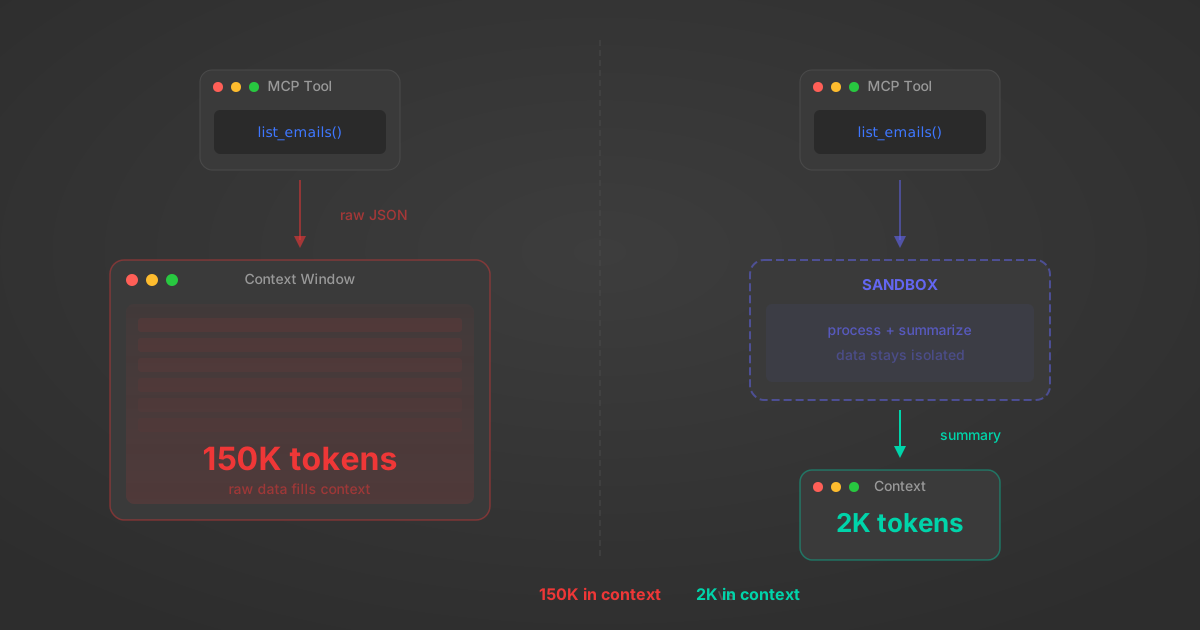
MCP Code Mode: Keeping Tool Responses Out of Agent Context
Anthropic's code_execution processes data already in context. Custom MCP code mode keeps raw tool responses in a sandbox. 14K tokens vs 500.
11 min
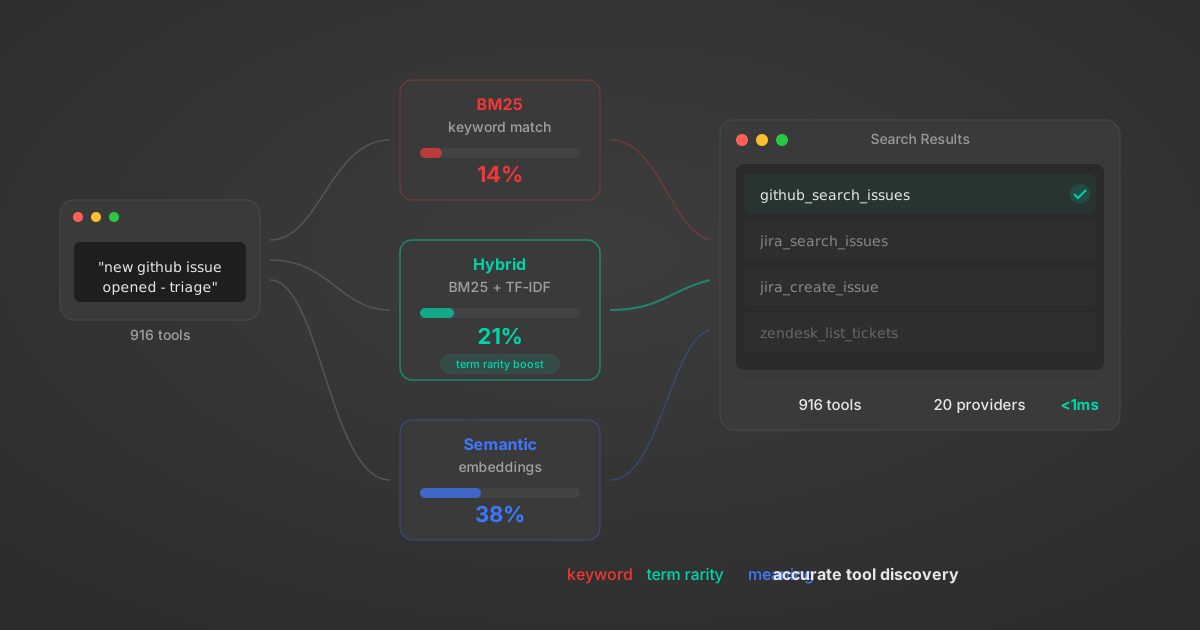
Comparing BM25, TF-IDF, and Hybrid Search for MCP Tool Discovery
Benchmarking BM25, TF-IDF, and hybrid search for MCP tool discovery across 916 tools. The 80/20 TF-IDF/BM25 hybrid hits 21% Top-1 accuracy in under 1ms.
10 min
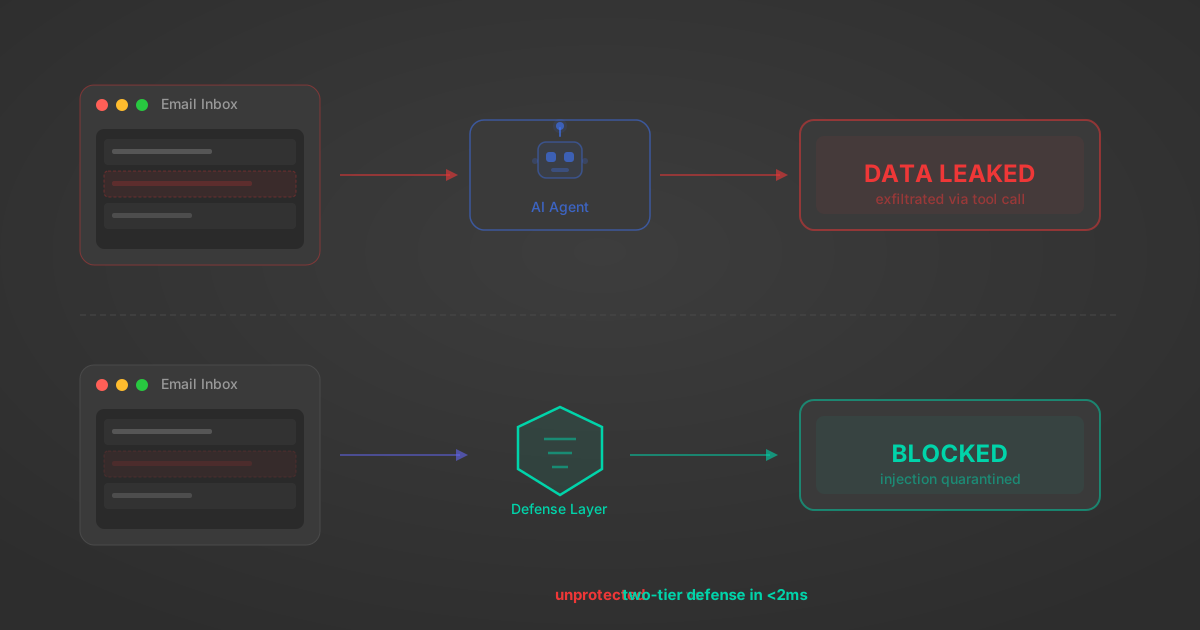
Indirect Prompt Injection Defense for MCP Tools: A Technical Guide
MCP tools that read emails, CRM records, and tickets are indirect prompt injection vectors. Here's how we built a two-tier defense that scans tool results in ~11ms.
12 min
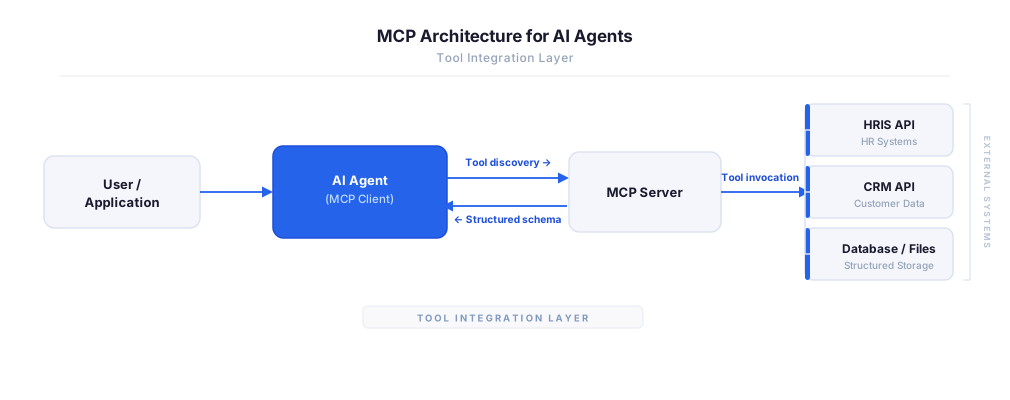
MCP vs A2A: Architecture, Security, and When to Use Each
MCP vs A2A: what each protocol standardizes, how they differ, their shared security risks including indirect prompt injection, and when to use one, both, or a hybrid architecture.
12 min
MCP vs API: What Hundreds of Connector Builds Taught Us
MCP wraps APIs, it doesn't replace them. After building hundreds of connectors that serve both, here's when each approach wins.
14 min read
Pipedrive MCP Server FAQ
Does StackOne have a Pipedrive MCP server?
Pipedrive MCP server vs direct API integration — what's the difference?
How does Pipedrive authentication work for AI agents?
origin_owner_id.Are Pipedrive MCP tools vulnerable to prompt injection?
What is the context bloat of a Pipedrive agent and how do I avoid it?
Can I limit which actions my Pipedrive agent can access?
Can I create custom agent actions for my Pipedrive MCP server?
When should I NOT use a Pipedrive MCP server?
What AI frameworks and AI clients does the StackOne Pipedrive MCP server support?
Put your AI agents to work
All the tools you need to build and scale AI agent integrations, with best-in-class connectivity, execution, and security.